
Participant
May 2, 2024
Answered

No puedo seleccionar ni deseleccionar diferentes capas y/u objetos con el mouse.

  • May 2, 2024
  • 2 replies
  • 926 views

Hola! tengo photoshop 2024 y si selecciono una capa o un objeto no puedo deseleccionarlo hasta que voy a las capas y selecciono otra. En las versiones anteriores seleccionaba la capa que quisera con solo hacer clic sobre ella pero no puedo en esta versión y no sé si me falta algún ajuste.

Necesito ayuda, gracias !!
Correct answer Ged_Traynor

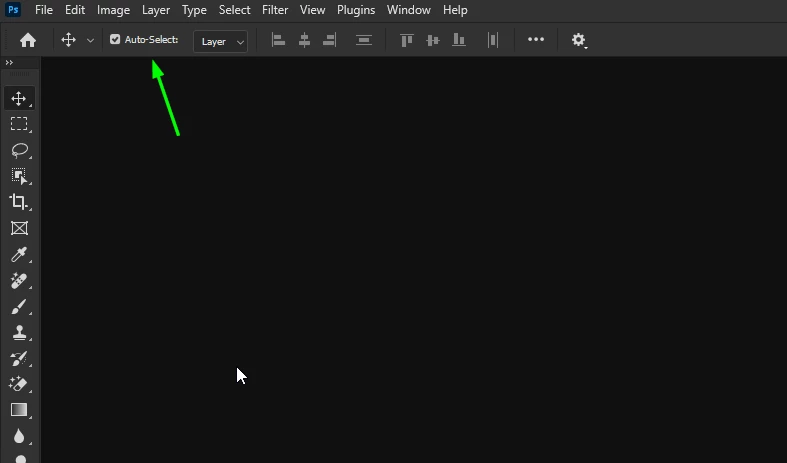
@Andrea371300888dnd try enabling Auto-Select in the options bar

2 replies

Trevor.Dennis
Community Expert
Community Expert
May 2, 2024

@Andrea371300888dnd wrote:

Hello! I have Photoshop 2024 and if I select a layer or an object I can't deselect it until I go to the layers and select another one. In previous versions I selected the layer I wanted just by clicking on it, but I can't in this version and I don't know if I'm missing any adjustments.

I need help, thank you!!


Hi Andrea.  Are you using the release or Beta version of Photoshop?

I ask because the only change I can think of regards layers is the Hover Layer Bounds feature that is only in the beta version.  It places a blue rectangle around the layer beneather the cursor, and also shows the content outside the document window. It can be disabled using the drop down in the Options Bar when the Move tool is selected.

Ged_Traynor
Community Expert
Community Expert
May 2, 2024

@Trevor.Dennis that option is available in the release/non beta version also

Trevor.Dennis
Community Expert
Community Expert
May 2, 2024

Thanks Ged, I didn't know that.

Ged_Traynor
Community Expert
Ged_TraynorCommunity ExpertCorrect answer
Community Expert
May 2, 2024

@Andrea371300888dnd try enabling Auto-Select in the options bar

Participant
February 3, 2025

Thank you so much, it worked for me ❤️