
Participating Frequently
October 30, 2021
Question

Not Enough Ram CC20222

  • October 30, 2021
  • 3 replies
  • 505 views

I know there are other posts in here about RAM but I have tried everything! This has been happening for about 2 weeks - previously PSD worked like a dream. 


I have plenty of RAM, have it set to 96% in preferences. I've made sure there's room on the scratch disks, though I know that's a separate issue, I've checked just to be safe. 


I can have nothing else running but PSD - including in the background - and it won't even open a picture from a smartphone. Not even a professional high resolution image, just an average image. 


I have updated all my drivers. Did a diagnostic on my RAM. Checked for viruses, malware, etc. Windows 10 is up to date. I've uninstalled and reinstalled PSD 2022 three times. I've even removed my tablet.
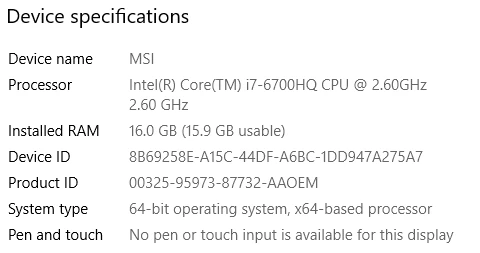
Please  help! I need to use my program it's driving me bonkers!

This topic has been closed for replies.

3 replies

josephlavine
Community Expert
Community Expert
October 30, 2021

Monique-

Keep in mind that all pretty much all systems within your computer require some amount of RAM. I suggest testing running the default 70% to see whether this improves.

warmly/j

Participating Frequently
October 30, 2021

Thank you, I appreciate the suggestion. It is the same as the above suggestion though, and I've tried it at 70% (which is well within the ideal settings suggested in the Preferences panel!) and had the same problem. That was my original setting when the issue started occuing. I have gone back to that setting and it still barely funtions 😞 

D Fosse
Community Expert
Community Expert
October 30, 2021
quote

I have plenty of RAM, have it set to 96% in preferences.


By @Monique.D.Nelson


That's much too high! That's very likely why you have problems. Go down to 70% max.


Other applications and processes need RAM too. Even ACR and other plugins run outside Photoshop's address space, and need their own RAM.


Few applications are as input/output-intensive as Photoshop. It moves huge amounts of data, and needs orders of magnitude more memory than any RAM you may have installed. So it writes temporary working data to disk (the scratch disk). That's Photoshop's "main memory". There's no danger of Photoshop running out of memory, as long as you have enough disk space.


So set RAM allocation to 70%, and make sure you have plenty of disk space, 250 to 500 GB or so. Then you'll be fine.

Participating Frequently
October 30, 2021

I started at 70% - that was my usual setting but when I started having trouble, all the "fixes" said to increase, so I did. I'll try again, but I'll welcome any other suggestions as well!

Participating Frequently
October 30, 2021

I forgot to mention I can use all my other apps with no problem - Premiere Pro, Illustrator, InDesign - all fine!