
Participant
June 3, 2021
Question

NOT WORKING: Tool>Menu option

  • June 3, 2021
  • 2 replies
  • 628 views

Hello everyone!  Can anyone tell me how to fix the menu options on tools?


It doesn't matter if it's the Curves tool, Layers window, Adjustments window, etc.  Everything that exists in the Windows menu, you know, those tools that we dock off to the side, the little hamburger menus aren't clickable on anything anymore and I need to access them.
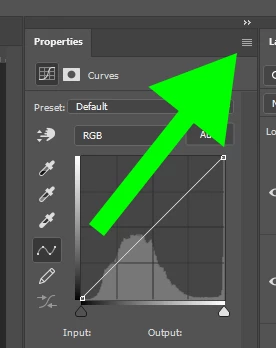
Any thoughts?


Thanks!

This topic has been closed for replies.

2 replies

davescm
Community Expert
Community Expert
June 3, 2021

If you cannot access the drop down menus at the top right of the Photoshop panels, then I would reset Preferences.

Edit > Preferences > General then Reset Preferences on Quit. Click OK then close and restart Photoshop.


Dave

Participant
June 3, 2021

I'll try that, thank you Dave

JJMack
Community Expert
Community Expert
June 3, 2021

You can set shortcuts to toggle the Photoshop menu Windows>Items Palettes.  F key shortcuts  however, can be overridden by Action F key shortcuts. Toggle the pallet and click the hamberger.

JJMack
Participant
June 3, 2021

Hi JJMack, thank you for getting back to me!  I see the shortcuts, but a couple of things I'm noticing: The first thing is that I would have to create a shortcut for every tool I have opened, and the second is that there is no option to open a tool with a shortcut.  It seems I can only close a tool with a shortcut which is odd.  

JJMack
Community Expert
Community Expert
June 3, 2021

Tools do not have palettes with hamburger.There is one Active tools and it's options are available in the tool option bar that does not have  a hamburger and is normally docked under Photoshop Menu. The Bar can be toggled like other palettes using the tab key shortcut.


You activate a tool from the tool Bar or from Action and Scripts.

JJMack