Numbering of individual pixels (think: paint-by-numbers)
I'm pretty certain this is not possible, but I won't find out unless I ask, so here goes...
I'm working on a personal art project that involves pixelating a photo in Photoshop, then using that pixelated image as a guide to create a physical 3D artwork.
To create the guide image, I first specified seven colors in Image > Mode > Indexed Color > Local Selective. Then, I resized the image to be 100 pixels wide and 100 pixels high in Image > Image Size (this resulted in a postage stamp-sized photo, so I resized it again, but specified "1,000 percent" to make it more workable, and at the same time keeping the pixelation). Next, I selected View > Show > Pixel Grid to better help me see the individual pixels (which will be necessary when I begin creating the physical artwork).
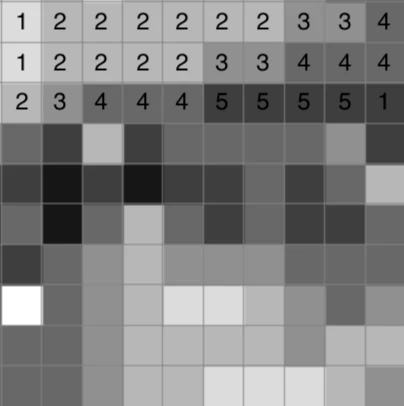
Now to my question: because the image is in grayscale, some pixels are very close in color, potentially making it difficult to differentiate the various shades. Is there a way to assign a number to each color and have that number displayed over the pixel grid, similar to a paint-by-number painting?
Below is a 10x10 section of the photo I am working on. I placed the numbers over each pixel manually for this forum post -- doing this manually to 10,000 pixels would be extremely time-consuming and prone to errors. Is there an easier way?
The final artwork will be 30" x 30".
Bonus points if you can guess the subject of the photo.
Thanks, in advance, for any help you are able to provide.
Chris
 AdChoices