
NVIDIA GeForce Graphics Card Not Consistently Recognized After PS Update
Started experiencing compatability issues with my NVIDIA GeForce graphics card after installing the recent Photoshop update. Will work fine for a few hours, then freeze up & crash entirely. Upon re-launching the program and running the GPU check, gives a compatabililty error because it is detecting the wrong graphics card altogether.
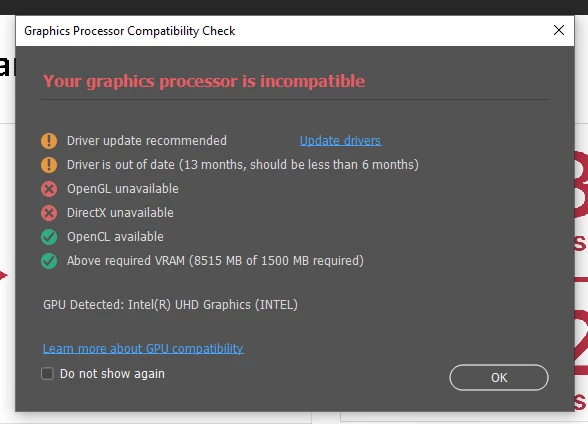
Restarting the computer (temporarily) resolves this and seems to "reset" the program back to recognizing the NVIDIA driver - only for the same issue to occur later. No change in settings or anything, just a simple restart.
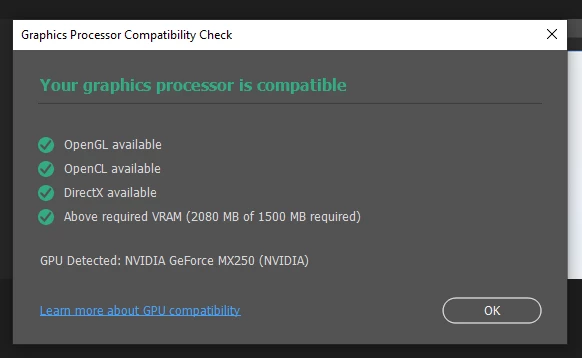
All system updates have been installed, all drivers are updated, and I've un-installed and re-installed the latest version of Photoshop - nothing has provided a long term solution. For what it's worth, I've had similar issues with the desktop version of Google Earth Pro, starting around the same time - stating that its having issues with recognizing the correct GPU.
Not sure what is causing Photoshop to intermittenly not recognize the NVIDIA and default to the INTEL, or why restarting the computer provides a temporary fix, but I am hoping that Adobe can figure this out and puch through an update that resolves this. From other discussions, it seems like this is a pretty prevasive issue since the program updates in May-June.
 AdChoices