

dgatesca
Known Participant
April 14, 2023
Answered

Object Selection Tool

  • April 14, 2023
  • 2 replies
  • 2775 views

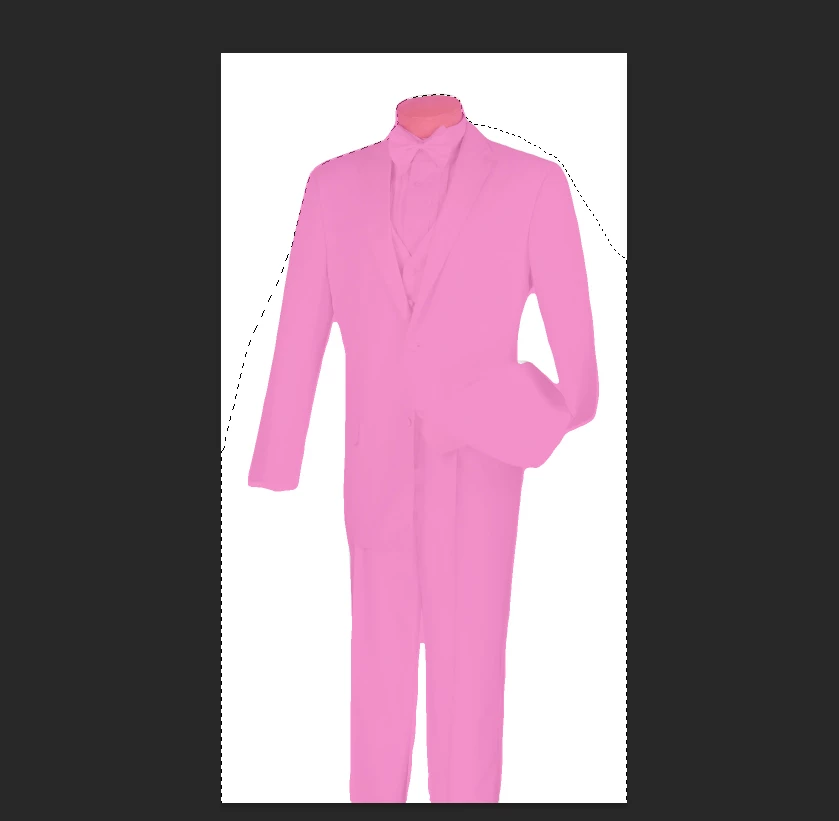
I use the Object Selection Tool, and in most cases, it does a good job of selecting what I want it to. But sometimes the color that shows up (is it pink? I'm colorblind) will cover exactly what I'm wanting, but then the cut line isn't matching that color mask. Is there a way I can have it just select what the color is suggesting?


In the photo, it's a white tuxedo I'm wanting to select, and the color mask has nailed it perfectly, but not the line that is going to be the actual cut.


Thanks for your input.
This topic has been closed for replies.
Correct answer jane-e

Is there a way I can have it just select what the color is suggesting?

By @dgatesca


I just read this again and think that we are looking at a pink mask on a white tuxedo and you are trying to select the pink area. If so:

  • macOS: Cmd+Click the mask thumbnail
  • Win: Ctrl+Click the mask thumbnail


Jane


2 replies

jane-e
Community Expert
jane-eCommunity ExpertCorrect answer
Community Expert
April 15, 2023

Is there a way I can have it just select what the color is suggesting?

By @dgatesca


I just read this again and think that we are looking at a pink mask on a white tuxedo and you are trying to select the pink area. If so:

  • macOS: Cmd+Click the mask thumbnail
  • Win: Ctrl+Click the mask thumbnail


Jane


dgatesca
dgatescaAuthor
Known Participant
April 17, 2023

Thanks!

jane-e
Community Expert
Community Expert
April 17, 2023

You're welcome. @dgatesca 😊


Jane


melissapiccone
Community Expert
Community Expert
April 15, 2023

How are you using it? It should make the selection automatically. Are you starting with or drawing a selection? If you have the tool set with Object Finder in the options bar, it will automatcally select the object. If you use the lasso or rectangle along with it - again, in the options bar - it will try and select something else / part of an object. 

Melissa Piccone | Adobe Trainer | Online Courses Author | Fine Artist
jane-e
Community Expert
Community Expert
April 15, 2023

In addition to what Melissa said, what layer are you on? It would be extremely helpful to have a screenshot that also includes:

  • Layers panel
  • Tools panel with Object Selection tool selected
  • options bar for the Object Selection tool


Jane