Participant
February 4, 2017
Answered

Oil Paint Filter in CC 2017

  • February 4, 2017
  • 3 replies
  • 19840 views

Downloaded latest version of CC and once again the Oil Paint Filter is grayed out.  How to retrieve it?

This topic has been closed for replies.
Correct answer Trevor.Dennis

Check Preferences > Performance > Advanced.

The Oil Paint filter needs Open CL to be checked.
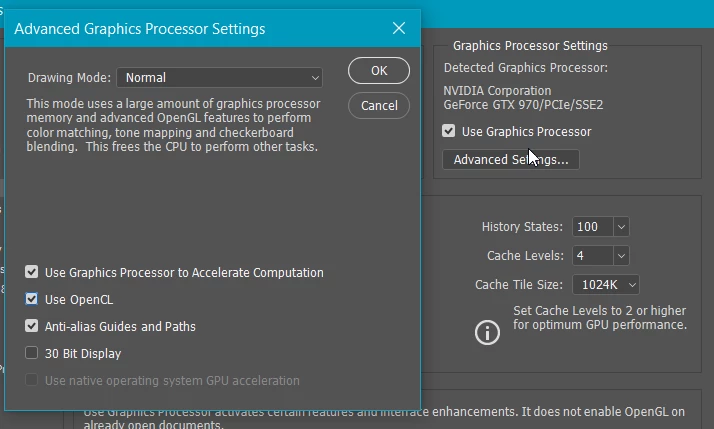
For what it is worth, my OpenCL becomes grey out and available again, with every other Nvidea driver update.  As you can see, it is OK now, but was greyed out before the last GPU driver update.

3 replies

Participant
March 24, 2021

I like it


Jonathan Beth
Known Participant
December 3, 2017

Oil paint filter is not working in PS cc 2017.

Please help.

   thanks

    Jonathan

Trevor.Dennis
Community Expert
Trevor.DennisCommunity ExpertCorrect answer
Community Expert
February 4, 2017

Check Preferences > Performance > Advanced.

The Oil Paint filter needs Open CL to be checked.

For what it is worth, my OpenCL becomes grey out and available again, with every other Nvidea driver update.  As you can see, it is OK now, but was greyed out before the last GPU driver update.

Participant
February 22, 2017

I do the same thing

* Warning message

I disable OpenCL and still the same message

Umaru-chan
Participant
March 4, 2017

Hi.

I've Same Problem.

I updated Graphic Card And Adobe Photoshop to latest version but still I've got same error.

I'm using Windows 8.1 64bit version.

Thanks.