
Participant
December 26, 2016
Respondido

oil paint filter

  • December 26, 2016
  • 2 respostas
  • 996 Visualizações

I have a Mac running OS 10.11.6. When I use the latest version of PhotoShop CC, the oil paint filter is greyed out. Looking at the advice from Adobe (Oil Paint is grayed out in Photoshop) they say say to check the box "Use OpenCL." That is not an option for me- that is greyed out on my computer. I have a graphic card NVIDIA GeForce GT 120 512 MB graphics. Will the oil paint filter not work with this graphic card?
    Este tópico foi fechado para respostas.
    Melhor resposta por Jeff Arola

    What model mac are you using?

    That GT 120 is a pretty old card so it may not meet the photoshop cc specs when tested with the GPU Sniffer.

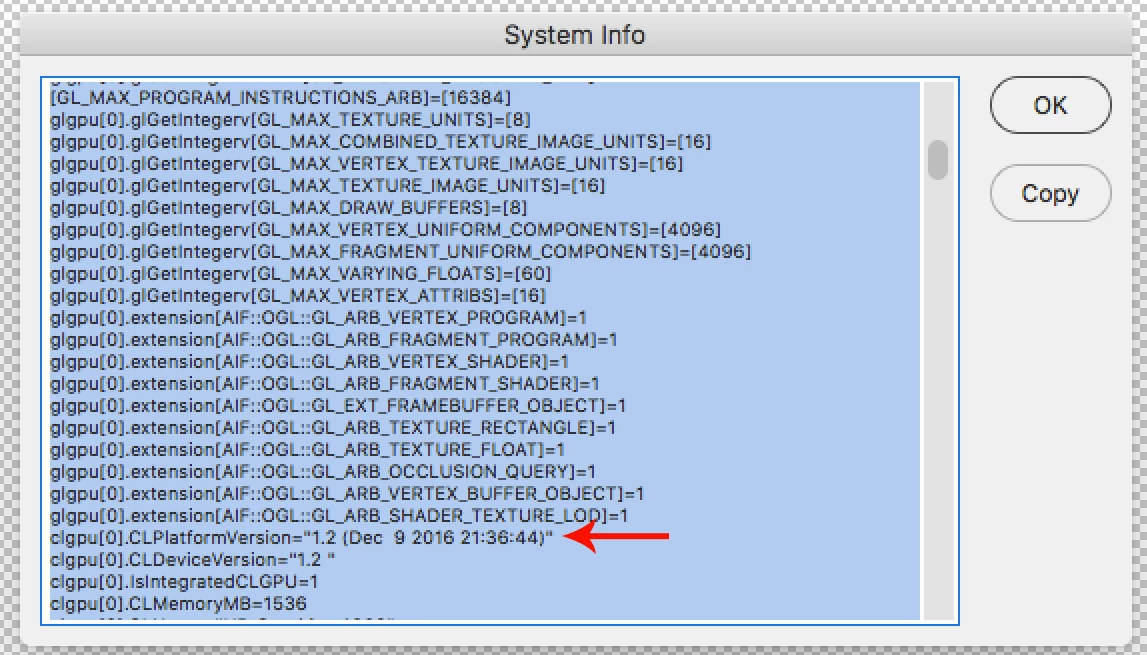
    Anyway, the oil paint filter needs a graphics card that supports OpenCL v1.1 or higher.

    In photoshop look under Help>System Info and look for CLPlatFormVersion

    It might be easier to find if you hit Copy and then in Text Edit paste the contents.

    Here's an apple spec sheet for different mac models and the stock graphics cards.

    If you have a mac pro, then you should be able to upgrade the graphics card.

    https://support.apple.com/en-us/HT202823

    2 Respostas

    Jeff Arola
    Community Expert
    Jeff ArolaCommunity ExpertResposta
    Community Expert
    December 27, 2016

    What model mac are you using?

    That GT 120 is a pretty old card so it may not meet the photoshop cc specs when tested with the GPU Sniffer.

    Anyway, the oil paint filter needs a graphics card that supports OpenCL v1.1 or higher.

    In photoshop look under Help>System Info and look for CLPlatFormVersion

    It might be easier to find if you hit Copy and then in Text Edit paste the contents.

    Here's an apple spec sheet for different mac models and the stock graphics cards.

    If you have a mac pro, then you should be able to upgrade the graphics card.

    https://support.apple.com/en-us/HT202823

    jbm007
    Community Expert
    Community Expert
    December 26, 2016