Impossible to say. This is too broad a question, you need to narrow it down to specifics.
I'd recommend photographing over scanning. A good raw file is much easier to control and correct than an RGB file out of a scanner. And with a good camera and lens you get much better resolution and sharpness - even if the original is a 35mm slide.
First of all, you need one of these. Include this in the shot, or a reference shot done at the same time under identical conditions:
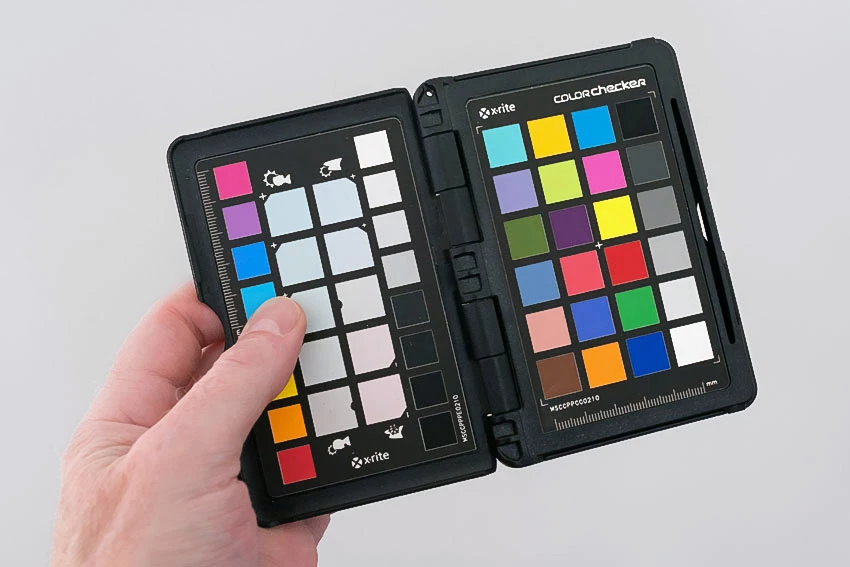
You will never ever get a perfect colorimetric match, meaning a full match in numbers if you took measurements and compared. And even if you did, it wouldn't look right. Any measurement device will "perceive" the original pigments differently than the inks on paper, and different light sources will also influence the perceived color. Look up "metamerism" on Google.
What you use the colorchecker for is to set the basic tone curve. All these patches, including the neutral ones, have standardized Lab values. This way you set the basic brightness and contrast - but note, it only works on flat surfaces in flat light, not for 3D objects.
As for the colors, work visually and aim for equivalent color. It needs to be internally consistent, you can't have "runaway" colors (which is what tends to happen if you go by numbers only). If it looks right, it is right. Use the colorchecker as a visual reference if you're in doubt - not the numbers, just how it looks.
Which brings up the next point: you absolutely must have a good monitor, calibrated to match the output conditions. This means monitor white needs to be a visual match to paper white, and monitor black needs to be a visual match to max ink for that paper. This is essential for a good result that will be accepted as "accurate". The aim is the holy grail for any monitor used in print production: what you see is what you get.
For the final print, you also need to compensate the original contrast curve numbers - the numbers you originally set with the help of the colorchecker - for paper color and max ink. You can do this visually if you have a monitor calibrated as described above.

 AdChoices