
Question
One fix for Photoshop lag, stuttering, on windows found - Text -> Front Preview Size -> None
Found here - https://www.reddit.com/r/photoshop/comments/1am8pdc/comment/n78cbag/?context=3
Just change the setting from the title/screenshot
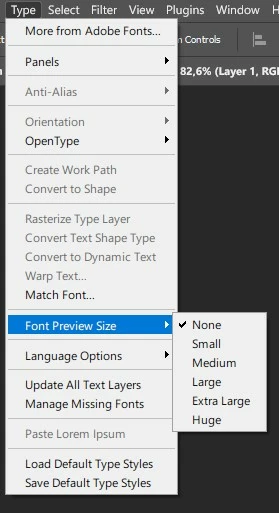
to "None".
For me this makes Photoshop run "like in the olden days" and boot much faster too.
No more freezing, lagging, waiting forever for the "Export" dialog to open etc.
This is after trying out almost everything else - using or not using OpenCL, adding memory to PC, almost buying a whole new PC etc.
I can only guess Photoshop hates having a lot of fonts active on a Windows machine.
 AdChoices