Known Participant
May 31, 2024
Answered

Only show Color Coded layers Script

  • May 31, 2024
  • 4 replies
  • 1275 views

Hi guys Geeks & Creatives, 


I've been seeking this for a while and Script listener didn't help me. 


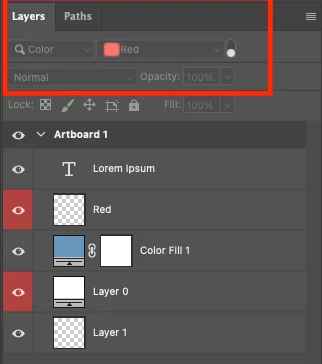
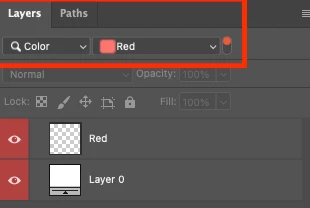
I just want a script that only shows red color coded layers like this 


Image 1: this panel will filter by kind, color and red


I tried with GPT + Visual Studio code and nothing.


Thank you in advance. 


Then only shows red labeled layers


This topic has been closed for replies.
Correct answer Stephen Marsh

@GregCont 


Try this script:


/*
Select All Layers With Red Color Label and Isolate.jsx
v1.0 - 2nd June 2024, Stephen Marsh
https://community.adobe.com/t5/photoshop-ecosystem-discussions/only-show-color-coded-layers-script/m-p/14655753
based on a script by jazz-y
https://community.adobe.com/t5/photoshop-ecosystem-discussions/select-all-layers-except-layer-groups-and-text-layer/m-p/14355053
*/

if (app.documents.length) {
    // Select the layers by color - "none","red","orange","yellowColor","grain","blue","violet","gray" - new in 2024: "magenta", "seafoam", "indigo", "fuchsia"
    selectAllLayersLabelByColor("red");
    // Toggle on the isolate layers menu command
    app.runMenuItem(stringIDToTypeID( "isolateLayers" ));
}


// Functions

function selectAllLayersLabelByColor(theColor) {

    var AM = new ActionManager();
    from = AM.getDocProperty('hasBackgroundLayer') ? 0 : 1,
    to = AM.getDocProperty('numberOfLayers');
    
    if (to) AM.deselectLayers();
    
    for (var i = from; i <= to; i++) {
        if (AM.getLayerProperty('color', i) == theColor)
            AM.selectLayerByIndex(i, true);
    }
}

function ActionManager() {

    this.getDocProperty = function (property) {
        property = s2t(property);
        var ref = new ActionReference();
        ref.putProperty(s2t("property"), property);
        ref.putEnumerated(s2t("document"), s2t("ordinal"), s2t("targetEnum"));
        return getDescValue(executeActionGet(ref), property);
    };

    this.getLayerProperty = function (property, index) {
        property = s2t(property);
        var ref = new ActionReference();
        ref.putProperty(s2t("property"), property);
        ref.putIndex(s2t("layer"), index);
        return getDescValue(executeActionGet(ref), property);
    };

    this.selectLayerByIndex = function (idx, addToSelection) {
        var desc = new ActionDescriptor();
        var ref = new ActionReference();
        ref.putIndex(s2t("layer"), idx);
        desc.putReference(s2t("null"), ref);
        if (addToSelection) desc.putEnumerated(s2t("selectionModifier"), s2t("addToSelectionContinuous"), s2t("addToSelection"));
        executeAction(s2t("select"), desc, DialogModes.NO);
    };

    this.deselectLayers = function () {
        var desc = new ActionDescriptor();
        var ref = new ActionReference();
        ref.putEnumerated(s2t("layer"), s2t("ordinal"), s2t("targetEnum"));
        desc.putReference(s2t("null"), ref);
        executeAction(s2t("selectNoLayers"), desc, DialogModes.NO);
    };

    function getDescValue(desc, property) {

        switch (desc.getType(property)) {
            case DescValueType.OBJECTTYPE:
                return (desc.getObjectValue(property));
                break;
            case DescValueType.LISTTYPE:
                return desc.getList(property);
                break;
            case DescValueType.REFERENCETYPE:
                return desc.getReference(property);
                break;
            case DescValueType.BOOLEANTYPE:
                return desc.getBoolean(property);
                break;
            case DescValueType.STRINGTYPE:
                return desc.getString(property);
                break;
            case DescValueType.INTEGERTYPE:
                return desc.getInteger(property);
                break;
            case DescValueType.LARGEINTEGERTYPE:
                return desc.getLargeInteger(property);
                break;
            case DescValueType.DOUBLETYPE:
                return desc.getDouble(property);
                break;
            case DescValueType.ALIASTYPE:
                return desc.getPath(property);
                break;
            case DescValueType.CLASSTYPE:
                return desc.getClass(property);
                break;
            case DescValueType.UNITDOUBLE:
                return (desc.getUnitDoubleValue(property));
                break;
            case DescValueType.ENUMERATEDTYPE:
                return (t2s(desc.getEnumerationValue(property)));
                break;
            case DescValueType.RAWTYPE:
                var tempStr = desc.getData(property);
                var rawData = new Array();
                for (var tempi = 0; tempi < tempStr.length; tempi++) {
                    rawData[tempi] = tempStr.charCodeAt(tempi);
                }
                return rawData;
                break;
            default:
                break;
        }
    }

    function s2t(s) {
        return stringIDToTypeID(s);
    }

    function t2s(t) {
        return typeIDToStringID(t);
    }
}

 

4 replies

Stephen Marsh
Community Expert
Stephen MarshCommunity ExpertCorrect answer
Community Expert
June 2, 2024

@GregCont 


Try this script:


/*
Select All Layers With Red Color Label and Isolate.jsx
v1.0 - 2nd June 2024, Stephen Marsh
https://community.adobe.com/t5/photoshop-ecosystem-discussions/only-show-color-coded-layers-script/m-p/14655753
based on a script by jazz-y
https://community.adobe.com/t5/photoshop-ecosystem-discussions/select-all-layers-except-layer-groups-and-text-layer/m-p/14355053
*/

if (app.documents.length) {
    // Select the layers by color - "none","red","orange","yellowColor","grain","blue","violet","gray" - new in 2024: "magenta", "seafoam", "indigo", "fuchsia"
    selectAllLayersLabelByColor("red");
    // Toggle on the isolate layers menu command
    app.runMenuItem(stringIDToTypeID( "isolateLayers" ));
}


// Functions

function selectAllLayersLabelByColor(theColor) {

    var AM = new ActionManager();
    from = AM.getDocProperty('hasBackgroundLayer') ? 0 : 1,
    to = AM.getDocProperty('numberOfLayers');
    
    if (to) AM.deselectLayers();
    
    for (var i = from; i <= to; i++) {
        if (AM.getLayerProperty('color', i) == theColor)
            AM.selectLayerByIndex(i, true);
    }
}

function ActionManager() {

    this.getDocProperty = function (property) {
        property = s2t(property);
        var ref = new ActionReference();
        ref.putProperty(s2t("property"), property);
        ref.putEnumerated(s2t("document"), s2t("ordinal"), s2t("targetEnum"));
        return getDescValue(executeActionGet(ref), property);
    };

    this.getLayerProperty = function (property, index) {
        property = s2t(property);
        var ref = new ActionReference();
        ref.putProperty(s2t("property"), property);
        ref.putIndex(s2t("layer"), index);
        return getDescValue(executeActionGet(ref), property);
    };

    this.selectLayerByIndex = function (idx, addToSelection) {
        var desc = new ActionDescriptor();
        var ref = new ActionReference();
        ref.putIndex(s2t("layer"), idx);
        desc.putReference(s2t("null"), ref);
        if (addToSelection) desc.putEnumerated(s2t("selectionModifier"), s2t("addToSelectionContinuous"), s2t("addToSelection"));
        executeAction(s2t("select"), desc, DialogModes.NO);
    };

    this.deselectLayers = function () {
        var desc = new ActionDescriptor();
        var ref = new ActionReference();
        ref.putEnumerated(s2t("layer"), s2t("ordinal"), s2t("targetEnum"));
        desc.putReference(s2t("null"), ref);
        executeAction(s2t("selectNoLayers"), desc, DialogModes.NO);
    };

    function getDescValue(desc, property) {

        switch (desc.getType(property)) {
            case DescValueType.OBJECTTYPE:
                return (desc.getObjectValue(property));
                break;
            case DescValueType.LISTTYPE:
                return desc.getList(property);
                break;
            case DescValueType.REFERENCETYPE:
                return desc.getReference(property);
                break;
            case DescValueType.BOOLEANTYPE:
                return desc.getBoolean(property);
                break;
            case DescValueType.STRINGTYPE:
                return desc.getString(property);
                break;
            case DescValueType.INTEGERTYPE:
                return desc.getInteger(property);
                break;
            case DescValueType.LARGEINTEGERTYPE:
                return desc.getLargeInteger(property);
                break;
            case DescValueType.DOUBLETYPE:
                return desc.getDouble(property);
                break;
            case DescValueType.ALIASTYPE:
                return desc.getPath(property);
                break;
            case DescValueType.CLASSTYPE:
                return desc.getClass(property);
                break;
            case DescValueType.UNITDOUBLE:
                return (desc.getUnitDoubleValue(property));
                break;
            case DescValueType.ENUMERATEDTYPE:
                return (t2s(desc.getEnumerationValue(property)));
                break;
            case DescValueType.RAWTYPE:
                var tempStr = desc.getData(property);
                var rawData = new Array();
                for (var tempi = 0; tempi < tempStr.length; tempi++) {
                    rawData[tempi] = tempStr.charCodeAt(tempi);
                }
                return rawData;
                break;
            default:
                break;
        }
    }

    function s2t(s) {
        return stringIDToTypeID(s);
    }

    function t2s(t) {
        return typeIDToStringID(t);
    }
}
 

Stephen Marsh
Community Expert
Community Expert
June 4, 2024

@GregCont – How did you go with my script?

GregContAuthor
Known Participant
June 4, 2024

Omg Bro! This is insane! Crazy! It worked perfectly!

Legend
May 31, 2024
Select all red layers, then isolate the layers.


Stephen Marsh
Community Expert
Community Expert
May 31, 2024

AFAIK, the filter in the layers panel isn't available to actions or scripting.


The alternatives would be to select all layers labeled in red, and or to toggle the visibility of all layers that are not labeled red.

GregContAuthor
Known Participant
June 1, 2024

Yeah, maybe I'm asking for too much 😐

Stephen Marsh
Community Expert
Community Expert
June 1, 2024
quote

Yeah, maybe I'm asking for too much 😐


By @GregCont


Not in my opinion. I don't know why these controls were not made available to action recording (and therefore Action Manager and batchPlay) from the beginning or afterwards in updates.

c.pfaffenbichler
Community Expert
Community Expert
May 31, 2024
GregContAuthor
Known Participant
May 31, 2024

Hey @c.pfaffenbichler 


Thanks for the forum link, I've been doing researches here but I copy and paste the codes in VS Code and then save as .jsx but my Photoshop 2024 won't run it well. I don't know if I'm doing something wrong.

Wish me luck