Participant
February 6, 2017
Answered

Oops - selected option and can't undo it

  • February 6, 2017
  • 3 replies
  • 319 views

I was going through the preferences and found an option to condence the tools.  However, now I don't have all the options for the tools (like align check box in the spot healing brush, delete after crop with the crop tool, etc.). The issue Is I can't find the darn option in the preferences to undo it.  Silly, but I could use some help with undoing what I shouldn't have done.
    This topic has been closed for replies.
    Correct answer davescm

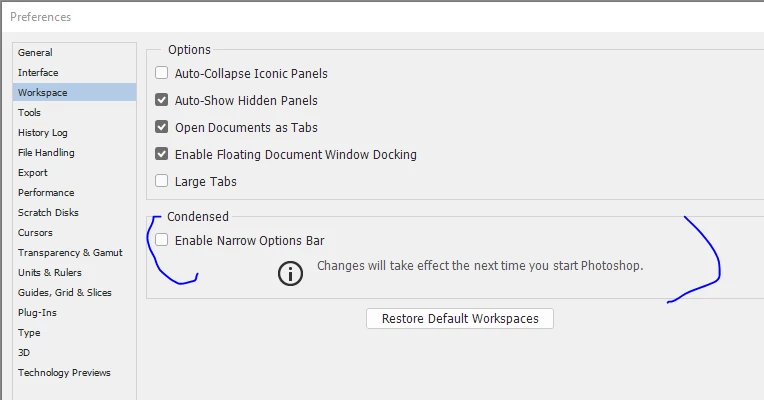
    Do you mean Preferences - Workspace - Enable Narrow Options bar?

    It replaces some options with icons (i.e. the options are still there they are just not written as words)

    Uncheck it in preferences and restart Photoshop.

    Note - The Spot healing brush does not have an align option (narrow bar or not)

    Dave

    3 replies

    davescm
    Community Expert
    davescmCommunity ExpertCorrect answer
    Community Expert
    February 6, 2017

    Do you mean Preferences - Workspace - Enable Narrow Options bar?

    It replaces some options with icons (i.e. the options are still there they are just not written as words)

    Uncheck it in preferences and restart Photoshop.

    Note - The Spot healing brush does not have an align option (narrow bar or not)

    Dave

    Participant
    February 6, 2017

    Exactly! Thank you.

    Larry

    John Waller
    Community Expert
    Community Expert
    February 6, 2017

    Try resetting your preferences

    Preferences in Photoshop

    Chuck Uebele
    Community Expert
    Community Expert
    February 6, 2017

    You should just be able to reset your preferences. Or maybe first try resetting the workspace.
