Exit
  • Global community
    • Language:
      • Deutsch
      • English
      • Español
      • Français
      • Português
  • 日本語コミュニティ
  • 한국 커뮤니티
0

Open new project, Background colour green, HELP!

New Here ,
Feb 20, 2018 Feb 20, 2018

Every time that I open to create a new project/image the background colour is green, there is no way to make it white, its almost as if there is no white... i sound mental I know, can anyone help, or have had this issue?

thanksScreen Shot 2018-02-20 at 17.33.16.png

723
Translate
Report
Community guidelines
Be kind and respectful, give credit to the original source of content, and search for duplicates before posting. Learn more
community guidelines
Adobe
Guest
Feb 20, 2018 Feb 20, 2018

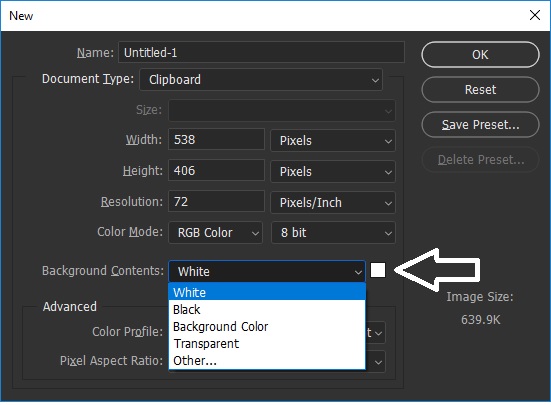
Have you checked this setting when creating a new project

Untitled2.jpg

Translate
Report
Community guidelines
Be kind and respectful, give credit to the original source of content, and search for duplicates before posting. Learn more
community guidelines
Community Expert ,
Feb 20, 2018 Feb 20, 2018

Tap the 'D' key to reset the background / foreground to Black / White... tap the x key to toggle between background / foreground color. Alternatively, click on the green color rectangle to bring up the colors panel and select from there.

Translate
Report
Community guidelines
Be kind and respectful, give credit to the original source of content, and search for duplicates before posting. Learn more
community guidelines
Community Expert ,
Feb 20, 2018 Feb 20, 2018

This is most likely caused by a defective monitor profile, and the green tint in the neutral areas of the Color panel confirms it.

Try setting the monitor profile to sRGB (Adobe RGB if you have a wide gamut monitor).

If this fixes the problem, you should ideally calibrate your monitor with a hardware calibrator.

See http://www.lightroomqueen.com/articles-page/how-do-i-change-my-monitor-profile-to-check-whether-its-...

Translate
Report
Community guidelines
Be kind and respectful, give credit to the original source of content, and search for duplicates before posting. Learn more
community guidelines
Community Expert ,
Feb 20, 2018 Feb 20, 2018

lab value.png

Since the tools display white balance (note: 0,0) isn't it reasonable to assume Ged is on the right track?

Translate
Report
Community guidelines
Be kind and respectful, give credit to the original source of content, and search for duplicates before posting. Learn more
community guidelines
Community Expert ,
Feb 20, 2018 Feb 20, 2018
LATEST

I agree that it seems strange that background color is green in the tools panel, while the rest of the panel is neutral gray, so maybe Ged is on the right track.

But I have seen defective monitor profiles affect different parts of the interface.

And there is something strange with the OP's color panel - apart from the green cast, there is also a predominance of green in the column on the right - which leads me to believe that the monitor profile is the culprit.

This is what my color panel looks like:

PS-color-panel.png

Translate
Report
Community guidelines
Be kind and respectful, give credit to the original source of content, and search for duplicates before posting. Learn more
community guidelines