Participant
September 14, 2023
Question

OpenCl Unavailable

  • September 14, 2023
  • 4 replies
  • 1443 views

This topic has been closed for replies.

4 replies

kevinf3610393
Participant
December 21, 2023

This works very well. Thank you so much! I was having issue with the opencl unavailable even with a 3080 Ti graphic card, and installing this studio version works like a miracle.

Kevin Stohlmeyer
Community Expert
Community Expert
September 14, 2023

Hi @Heavenn make sure you have the Studio NVIDIA drivers installed not the Gaming drivers.

Ged_Traynor
Community Expert
Community Expert
September 14, 2023

@Heavenn do you have dual GPU's in your system, it may help if you post your Photoshop system info, in Photoshop go to Help > System Info, hit the copy button and paste the entire thing into this thread

AxelMatt
Community Expert
Community Expert
September 14, 2023

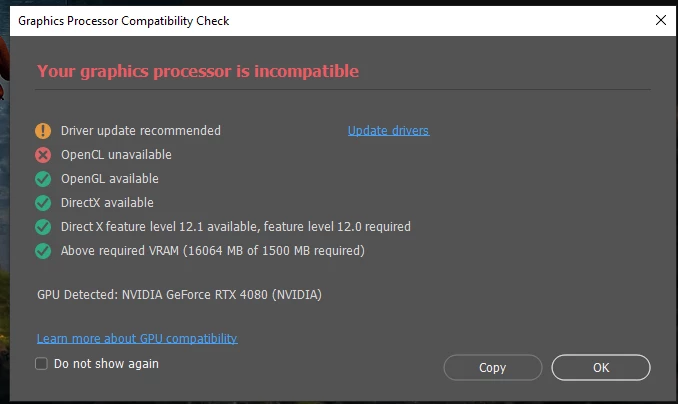
Do you have installed the latest driver for your graphic card?

As you see inthe dialog a driver update is recommended. Please install the "Studio version" of the driver and not the "Game Ready version".

Here you'll find the latest driver: NVIDIA Studio Driver | 536.99 | Windows 10 64-bit, Windows 11 | NVIDIA


My System: Intel i7-8700K - 64GB RAM - NVidia Geforce RTX 3060 - Windows 11 Pro 25H2 -- LR-Classic 15 - Photoshop 27 - Nik Collection 8 - PureRAW 6 - Topaz Photo AI