
OpenGL unavailable after update to Photoshop 2022
I am operating a Surface Book 3 with Windows 10 Pro 64-bit.
I began experiencing issues with Photoshop CC 2021 locking up whenever I tried to open any kind of file, so I updated to Photoshop CC 2022, and after the installation, upon starting up the software I received the following message.
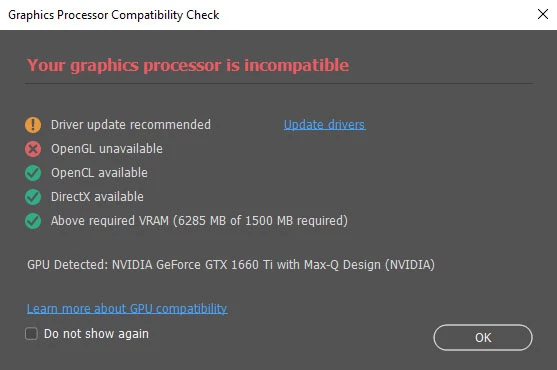
I checked my driver settings and saw that there were new drivers available, I downloaded and installed the new drivers but I still received the same error upon startup. I have tried the newest versions of both the Game Ready and Studio drivers to no avail.
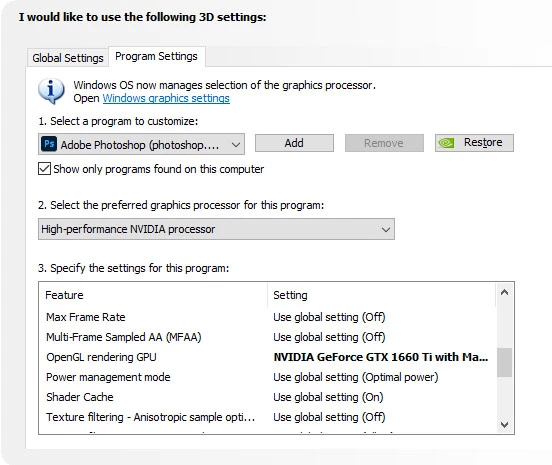
I launched the NVIDIA Control Panel and have changed the preferred graphic processor for both Photoshop and sniffer.exe to "High-performance NVIDIA processor" and I continue to receive the same message.
In Edit > Preferences I have ensured my Cache Levels are set to 4, but the "Use Graphics Processor" check box remains greyed out.

I reinstalled Photoshop 2021 but, the load issue persists. I tried rolling back my video card driver to an older version encase an incompatibility issue between the driver and Photoshop was causing the problem, and I still am experiencing both issues. So I currently have two versions of Photoshop installed on my machine, one that doesn't work at all and one that loads but will not allow me to use all the features because my "...graphics processor is incompatible."
I need some help resolving one of these issues. I appreciate any assistance you can provide. Thanks in advance.
 AdChoices