
a8flygirl
Participant
January 11, 2017
Answered

opening .cr2 raw file on photoshop or lightroom

  • January 11, 2017
  • 3 replies
  • 5053 views

Hello,

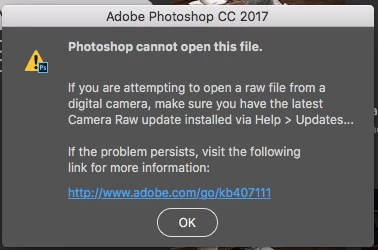
I'm helping one of you can help... I have updated both all of my CC adobe applications to 2017. I am trying to open my .CR2 raw files from my Canon Rebel XSi.  I have installed Camera Raw as well as all of the updates. Clearly I am doing something wrong, but I keep getting this message when I try to open or import images from my camera into Photoshop or Lightroom:
If this helps, this is what my .CR2 images look like in Adobe Bridge.
Thank you so much for your help!

This topic has been closed for replies.
Correct answer a8flygirl

Trevor and John,

Finally figured out what it was.... Photoshop was reading my .cr2 files from my USB as corrupt. When I imported them via the card reader, it worked fine.  Bummed that it took me 3 hours to get to that point, but happy I'm there.

Thank you both for your reply,

Alicia

3 replies

anthonyr34702136
Participant
February 3, 2017

I am having a similar problem viewing CR2 files taken with either my 7D Mk2 or a 5D MK4 I have updated the elements 12 adons to version 9.8 but still get the following error message

Can anyone help as I am pulling my hair out?

Thanks

Tony

Known Participant
November 15, 2017

I'm running CS6.

Camera RAW 9.1.1.461 is installed.

My .CR2 Canon 5D Mark IV files will not open.

Any idea how I might fix this?

Many thanks!

Denis

John Waller
Community Expert
Community Expert
November 15, 2017

Cameras supported by Camera Raw

Simply put: old software cannot read Raw files from new camera without an update. In your case, there's unfortunately no update available.

  • The 5D Mark IV was first supported in Camera Raw 9.7.
  • Camera Raw 9.1.1 is the last ever Camera Raw update for CS6 so you'll never be able to read Raw files from the 5D Mark IV in CS6.

You've got a couple of options:

  1. Join the Cloud and open those Raw files In Photoshop CC, or
  2. Stay with CS6 and go the DNG conversion route which is free:
    a) Download the free Adobe DNG converter from Digital Negative (DNG), Adobe DNG Converter | Adobe Photoshop CC
    b) Batch convert folders of Raw files to DNG format
    c) Edit the DNG files (not the Raw files) in CS6
    Some people feel this extra step is a pain. If that's you, you'll have to join the Cloud - unless you've got Lightroom.
    Others are happy with converting to DNG every time they shoot Raw.
    It's up to you..


John Waller
Community Expert
Community Expert
January 11, 2017

Raw files from the XSi should be able to be opened by Photoshop CC out of the box.

Can you upload one of the CR2 files and post a link so we can download it and open it on our computers?

a8flygirl
a8flygirlAuthorCorrect answer
Participant
January 12, 2017

Trevor and John,

Finally figured out what it was.... Photoshop was reading my .cr2 files from my USB as corrupt. When I imported them via the card reader, it worked fine.  Bummed that it took me 3 hours to get to that point, but happy I'm there.

Thank you both for your reply,

Alicia

Trevor.Dennis
Community Expert
Community Expert
January 11, 2017

Hi Fly Girl

Is the Rebel XSi a newly released model?  I can see an XSi from 2008 (aka EOS450) which should definitely be supported by CC2017.

Out of interest, open Photoshop and go Help > About plugin > Camera RAW which will open a window like this and show what version of ACR you have iunstalled