
Question
Option to change default save location missing in Photoshop for Windows
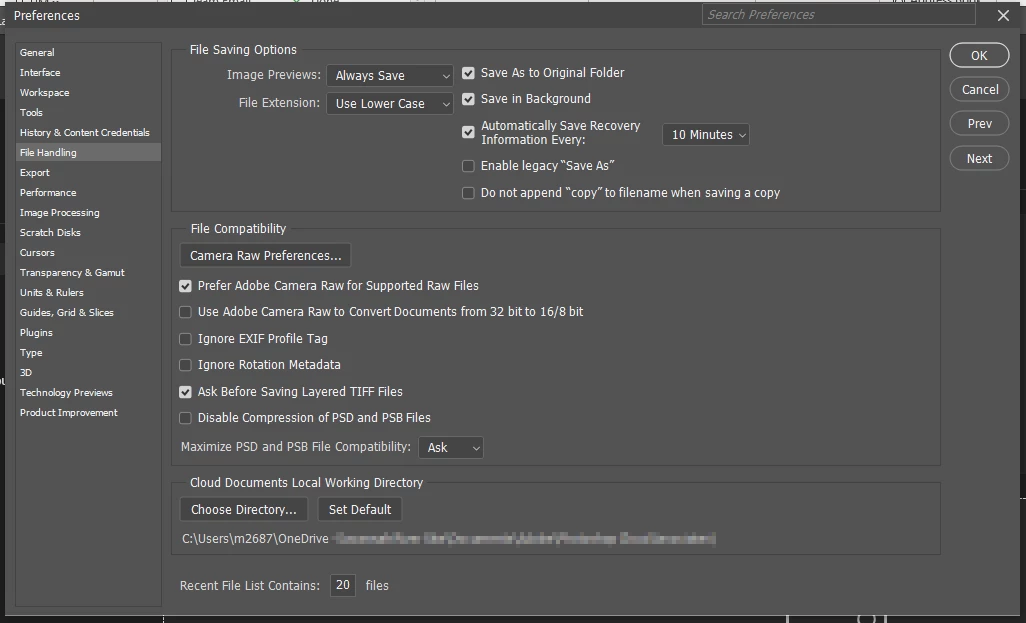
Today, Photoshop suddenly started trying to open documents from the cloud instead of from my computer by default. (Our IT department disabled the cloud. There is no cloud, so this makes me unable to open any files.) Other posts on this forum with this issue say to go to preferences > file handling and change the default file save location. But when I do that, the option is missing.
Threads for the missing default save location bug say to reset preferences and restart Photoshop. I did that, my preferences have reset, but the default file save location option is still missing. How do I make Photoshop stop defaulting to the cloud? At my workplace, the cloud is not allowed, so it's not a valid option.
 AdChoices