
December 21, 2016
Answered

Outer glow not working properly

  • December 21, 2016
  • 2 replies
  • 14470 views

Hi. I'm using Photoshop CS3 and have an issue with outer glow. The outer glow works on a transparent (although the colour is much lighter) and black background, but won't show up on a white background.

Tried various other colours out of interest and you can see there's a glow, but it's not the correct colour, it seems to be a lighter shade of the background colour.

It also refuses to do a gradient outer glow. Whenever I select it and click ok it just changes it back to solid colour.

I tried closing and opening Photoshop and when that didn't work I tried restarting my computer, but I still have the same issue. I tried a new document, but it does the same.

Why will it not work on a white background? Is there any way to resolve this issue?

Thanks.
This topic has been closed for replies.
Correct answer davescm

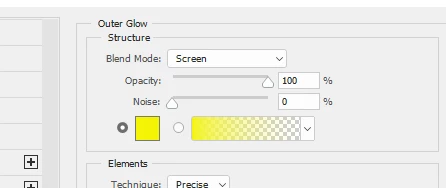
Check the blending mode of your outer glow.

If it is screen for example it can't make it any lighter than white

Dave

2 replies

Participant
November 1, 2020

Sane problem in PS 2021. No preview and no action when applied. Fix here is not the issue.

Dave

jane-e
Community Expert
Community Expert
November 1, 2020

Please show screen shots of:

  • Your outer glow layer style (see Dave's for reference)
  • Your Layers panel with the layer and settings at the top showing

~ Jane

davescm
Community Expert
davescmCommunity ExpertCorrect answer
Community Expert
December 21, 2016

Check the blending mode of your outer glow.

If it is screen for example it can't make it any lighter than white

Dave

December 21, 2016

Thanks. That solved it! I had tried changing the blend mode for the layer, but not blend mode under the glow lol.