
Copy link to clipboard
Copied
Dear sir, with the last update in Photoshop, the Discover panel is not working. When i press Ctrl+F or click in the magnifier, a windows shows up with a message telling thar Discover panel doesn't work and need to be reloaded. But if i clik in reload button, it does nothing and the Discover panel continues without working.
I have tried all solutions i ever found in internet as reset preferences, Update graphic card drivers and reinstall photoshop. I am sure thar teh pluggins are not the problem because i haven't installed or updated any plugging in the months, and other photoshop versions worked without any problem.
Could you help me to solve this issue, please?
Thanks
Copy link to clipboard
Copied
Have somebody got a solution for this problem? It seems it's a big issue that nobody can solve.
Copy link to clipboard
Copied
Lo has dicho ya: revisaste todo lo revisable y no hay solucción. Me sumo, como a otras iguales a esta petición a este ruego educado. Y pienso que deberíamos ser más exigentes en nuestro planteamiento. No es comprensible lo que está sucediendo. Hablamas ya de muchas semanas con el problema y parece extraño que , dados los recursos de Adobe, siga el problema pendiente. Empieza ya a parecer más un problema de mentalidad que de cómo resolver este problema que se manifiesta como técnico.
Copy link to clipboard
Copied
Hi all,
Apologies for the trouble you’ve been experiencing. We’ve just released an update for Photoshop 27.1, which includes several stability fixes and improvements. Please update to the latest version and let us know if the issue still persists.
For more details on this release, you can check the official release notes.
Regards,
Srishti
Copy link to clipboard
Copied
Copy link to clipboard
Copied
Sigue fallando en la 27.1
Copy link to clipboard
Copied
Hi all,
Thank you for sharing these details and for trying the new build. I’d request you to follow the steps below and let us know if it helps:
Windows: C:\Users\<username>\AppData\Roaming\Adobe\UXP\PluginsStorage\PHSP\undefined
Mac: /Users/<username>/Library/Application Support/Adobe/UXP/PluginsStorage/PHSP/
Please let us know how it goes.
Regards,
Srishti
Copy link to clipboard
Copied
I've followed all these steps on my Mac (M4) and it does not work.
Copy link to clipboard
Copied
Copy link to clipboard
Copied
No encuentro la ruta indicada. Por no encontrar no encuentro ni appdata.
Copy link to clipboard
Copied
He activado ver elementos ocultos y aparece la ruta
¿Y ahora, qué? ¿Qué demonios hay qué hacer, paso a paso?
Copy link to clipboard
Copied
Hey, josantgomez. You can empty the contents of the folders in the PHSP directory under the folders 26 (for PS 2025), 27 (for PS 2026), or 25 if you're using Photoshop 2024 v25.
Thanks!
Sameer K
(Type '@' and type my name to mention me when you reply)
Copy link to clipboard
Copied
@Sameer K Mi versión es la última, la 27. 1 . ¿ Mantengo la carpeta "27" y elimino sus subcarpetas: "Internal" y "Shared", o mantengo ambas pero vacías? ¿Significaría que PS dependería de la carpeta "26"? Gracias
Copy link to clipboard
Copied
Hi @josantgomez, thanks for checking in!
You can safely delete the subfolders inside the 27 folder. They only store cached data that Photoshop can easily regenerate, so removing them won’t affect your actual project files. In fact, clearing them can free up space and sometimes improve performance.
When you open Photoshop again, it’ll automatically create a new folder and rebuild what it needs.
If you’d like to play it extra safe, you can move those folders to a backup location first. If Photoshop behaves oddly afterward, you can simply move them back.
Hope that helps!
Alek
Copy link to clipboard
Copied
Realizada la eliminación: primero de la 27. Sin resultado positivo. Segundo: hago simultáneamente la eliminación de las subcarpetas de la 26 y de la 27. Sin resultado positivo.
Copy link to clipboard
Copied
Hi @josantgomez
Thanks for trying the steps shared. In this scenario, we must try some basic troubleshooting steps:
Let us know how it goes.
Regards,
Srishti
Copy link to clipboard
Copied
Copy link to clipboard
Copied
Buenos días:
@Aleke @Srishti Bali Tengo el mismo problema que @josantgomez ( adjunto la captura de pantalla )
¿ Alguna solución ?
Hi, I have the same problem (screenshot attached). Any solutions?
Copy link to clipboard
Copied
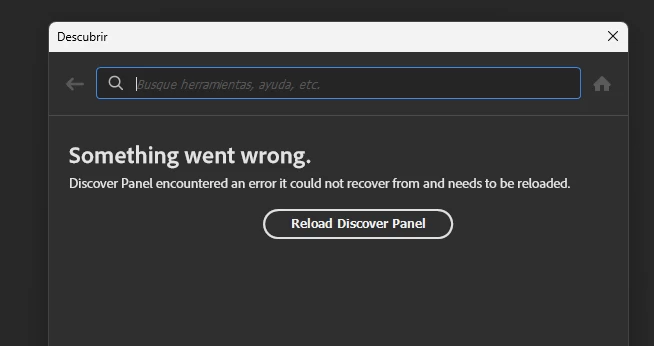
Error: Panel Descubrir no funciona en Photoshop v27.0. aparece el error "Something went wrong. Discover Panel encountered an error..." y ya has intentado borrar la configuración UXP sin éxito.
Copy link to clipboard
Copied
Hey, @Juan Enrique24261143z1ww. Welcome to the Photoshop Community. I'll need more info to help you figure this out. Please share screenshots & the system info from Photoshop Help > System info > Copy & paste into a text document > upload & attach here.
Head to the content here and scroll to the Open in Photoshop button at the bottom: https://adobe.ly/3JIxPp4
Please check if the issue exists if you launch Photoshop via the Creative Cloud desktop app. I've moved your post to discussions for now.
Thanks!
Sameer K
(Type '@' and type my name to mention me when you reply)
Copy link to clipboard
Copied
Aquí tienes el pantallazo del error, tambien te he adjuntado la información del sistema.
Respecto a lo de abrirlo econ Creative Cloud , no ha funcionado, seguia dando el mismo error.
Con la pruebas del botón : Open in Photoshop" del enlace: https://adobe.ly/3JIxPp4 tampoco ha funcionado.
Copy link to clipboard
Copied
Copy link to clipboard
Copied
Thanks for sharing the details and the updates. Please check if the issue exists when you use Photoshop (Beta) from the Creative Cloud desktop app Apps tab > Beta apps section.
Thanks!
Sameer K
(Type '@' and type my name to mention me when you reply)
Copy link to clipboard
Copied
Copy link to clipboard
Copied
Es cierto que esto no responde a la pregunta concreta en este lugar. Pero está relacinado con otras publicaciones que he hecho en relación a este problema.
Por tanto es oportuno reflejarlo. Y si lo enlacen en lo que yo publique´pues sería de agradecer. Pero ahora notengo tiempo de estar buscando dónde demonios está el hilo mencionado. Pero Adobe, sí.
Copy link to clipboard
Copied
Hola a todas y todos:
Tengo exactamente el problema y he probado todas las alternativas. Desinstalé e instalé Photoshop, eliminé el contenido de las carpetas 27, 26 y 25. Cerré sesión, y un largo etcétera. Y aún no logro que se corrija ni he podido leer sobre muchas experiencias de éxito en este chat. Por favor, solicito ayuda. Es importante que un servicio que es pago tenga sus funcionalidades acorde y llevo a lo menos un mes con esta situación.
Hi everyone,
I’m having this exact problem and I’ve tried every option. I uninstalled and reinstalled Photoshop, deleted the contents of folders 27, 26 and 25, signed out, and so on. And I still haven’t managed to fix it, nor have I been able to read about many success stories in this thread. Please, I’m asking for help. It’s important that a paid service have its features working properly, and I’ve been dealing with this situation for at least a month now.
Thanks!
Get ready! An upgraded Adobe Community experience is coming in January.
Learn more