
Participant
November 5, 2025
Question

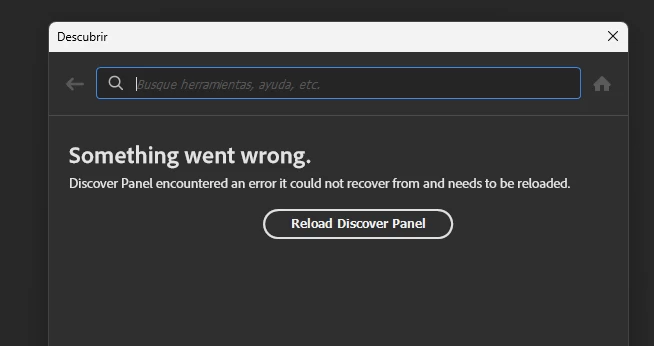
Error: Panel Descubrir no funciona en Photoshop v27.0

  • November 5, 2025
  • 2 replies
  • 197 views

Error: Panel Descubrir no funciona en Photoshop v27.0.  aparece el error "Something went wrong. Discover Panel encountered an error..."  y ya has intentado borrar la configuración UXP sin éxito.
 

2 replies

josantgomez
Legend
November 14, 2025

Es cierto que esto no responde a la pregunta concreta en este lugar. Pero está relacinado con otras publicaciones que he hecho en relación a este problema. 

Por tanto es oportuno reflejarlo. Y si lo enlacen en lo que yo publique´pues sería de agradecer. Pero ahora notengo tiempo de estar buscando dónde demonios está el hilo mencionado. Pero Adobe, sí.


Sameer K
Community Manager
Community Manager
November 5, 2025

Hey, @Juan Enrique24261143z1ww. Welcome to the Photoshop Community. I'll need more info to help you figure this out. Please share screenshots & the system info from Photoshop Help > System info > Copy & paste into a text document > upload & attach here.


Head to the content here and scroll to the Open in Photoshop button at the bottom: https://adobe.ly/3JIxPp4


Please check if the issue exists if you launch Photoshop via the Creative Cloud desktop app. I've moved your post to discussions for now. 


Thanks!
Sameer K

(Type '@' and type my name to mention me when you reply)

Participant
November 10, 2025

I have the same issue. The discovery panel is not working, even if I uninstalled and installed again.

Sameer K
Community Manager
Community Manager
November 11, 2025

Thanks for sharing the details and the updates. Please check if the issue exists when you use Photoshop (Beta) from the Creative Cloud desktop app Apps tab > Beta apps section.


Thanks!
Sameer K
(Type '@' and type my name to mention me when you reply)