


- Home
- Photoshop ecosystem
- Discussions
- Re: P: Photoshop 22.3.1 freezes when using the Cro...
- Re: P: Photoshop 22.3.1 freezes when using the Cro...

Copy link to clipboard
Copied
Can not crop an image in PS 2021. Whole program freezes.
{Moderator note: Edited the thread title, PS-64819}


 1 Correct answer

Hi,
We're happy to announce the release of Photoshop 22.4 which should include the fix for this issue. To update Photoshop to the latest version, you can check: https://helpx.adobe.com/creative-cloud/help/creative-cloud-updates.html
For information on other issues fixed with this update, please check: https://helpx.adobe.com/photoshop/kb/fixed-issues.html
Regards,
Nikunj


Explore related tutorials & articles
 179
Replies
179
179
Replies
179


Copy link to clipboard
Copied
Adobe that there is even a problem, much less work on a solution. The wide
range of graphic cards that are supposedly the issue point to a software
problem rather than an issue with a few old cards. I could accept such
behavior from a free software not a expensive subscription software. Time
to looks elsewhere.

Copy link to clipboard
Copied
I am experiencing the same problem. I have updated the driver for my NVIDIA GeForce GT 720 graphics card, tried all the trouble shooting options and nothing. The graphics processor settings are grayed out with the message "Photoshop detected and error......update graphics processor......". Previous version of Photoshop works fine. Rediculous, especially since I pay a monthly fee for the software.

Copy link to clipboard
Copied
The crazy part is that they don't seem to care about fixing it. This thread was started over a month and a half ago.

Copy link to clipboard
Copied
Hi. Have a look at mine solution about sniffer file. Not sure what does it do but it worked for me. Just relocate to different file and it should work.
Copy link to clipboard
Copied
I'll have to try it tomorrow and report back.
Copy link to clipboard
Copied
It seems to solve the crop tool probelm with a catch (see below) and for the benefit of others, here is what I did.
1. I went to where the Photoshop program files are located: C:\Program Files\Adobe\Adobe Photoshop 2021
2. I found the sniifer.exe file and moved it to my desktop.
3. I rebooted the machine and the crop tool now works and does not hang BUT it does not appear that Photoshop reconizes my graphics processor. When I want to check the settings it is grayed out and says unknown.

At least the crop tool works and the program is usable again.
Copy link to clipboard
Copied
Opps, I can't spell.
The file is sniffer.exe

Copy link to clipboard
Copied
Sent from Mail for Windows 10

Copy link to clipboard
Copied
I'm relieved to see I'm not the only one who has been having this issue, but I'm absolutely floored by Adobe's lack of a reasonable response to this problem we're all having. I've had photoshop since 2014 and this is the worst it's ever performed. What other editing programs are you all using so I can switch over to them and get back to work?

Copy link to clipboard
Copied
Affinity Photo at personal level but we are ransomed and under their mercy at office level.

Copy link to clipboard
Copied
This issue is driving me nuts! I'm trying the solution of reverting to an older version.

Copy link to clipboard
Copied
I have the same issue with 22.3.1 but 22.3 is ok

Copy link to clipboard
Copied
Way to go Adobe! I can't crop photos after an upgrade. Please issue a fix ASAP, you should know better! WOW what a mess!!!

Copy link to clipboard
Copied
Exact same problem for me (Windows 10, Nvidia Geforce GTX 750). Have been using 22.3.1 all week with no problems, suddenly this morning freezes as soon as I try to use the crop tool. "Use graphics processor" box is greyed out with a warning my drivers need updating (noticed that yesterday but ignored it whilst working). I tried all the stuff already mentioned (updated graphics driver, deleted preference files etc) nothing worked UNTIL I went back to previous version 22.3. Everything fine again now, PS automatically using the graphics processor again.Clearly a fix is needed with the next update.
Copy link to clipboard
Copied
Hi,
We're happy to announce the release of Photoshop 22.4 which should include the fix for this issue. To update Photoshop to the latest version, you can check: https://helpx.adobe.com/creative-cloud/help/creative-cloud-updates.html
For information on other issues fixed with this update, please check: https://helpx.adobe.com/photoshop/kb/fixed-issues.html
Regards,
Nikunj
Copy link to clipboard
Copied
that a fix was being worked on. Lets just hope this fix works and they
have learned some transparency is essential dealing with users. --
Sent from My stupid phone,

Copy link to clipboard
Copied
Ok! 22.4 supposed to fix this!!! Who wants to try it?!?!
Copy link to clipboard
Copied
Update 22.4 seems to have fixed the problem!!! Yay!!!

Copy link to clipboard
Copied
Hi.
I am having trouble with Photoshop freezing when I try to use the texttool. There is no problem starting the program or using anything else but when I choose the text too and tru and use it the program freezes and I have to force windows to close it.
Any suggestions?


Copy link to clipboard
Copied
Hi
Have you tried resetting the Tools

If that doesn't help try a preference reset
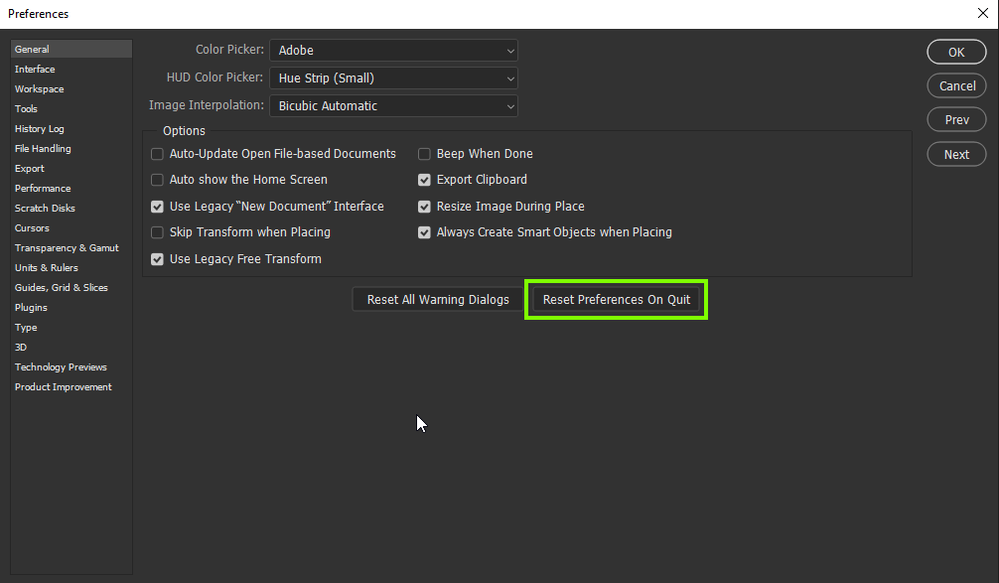
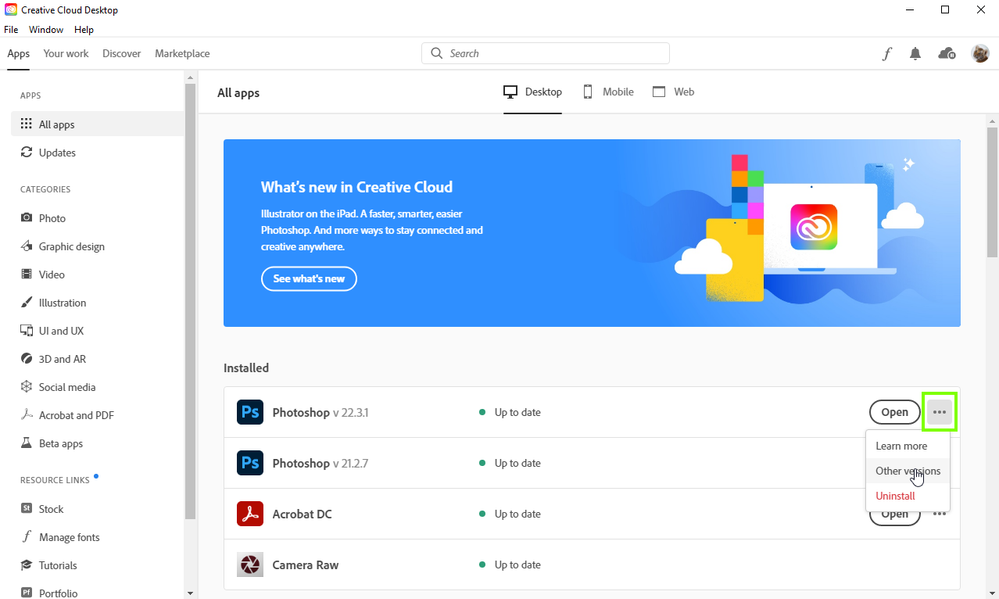
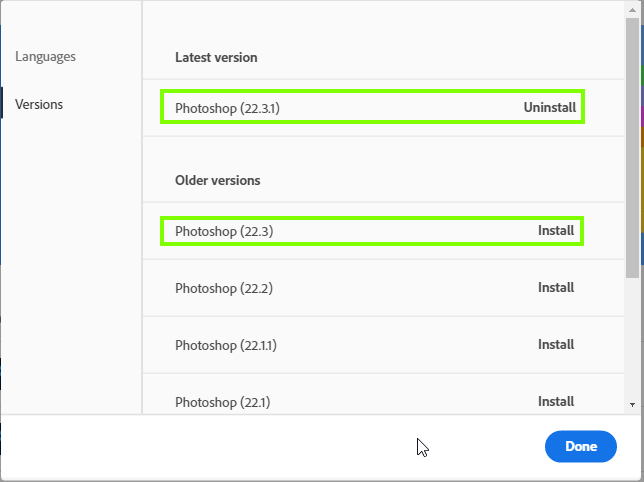
If neither of the above help try reverting back to version 22.3 from the Creative Cloud app
Copy link to clipboard
Copied
Thanks Ged!
The preference reset did the magic and now it's working again.
Cheers!
Copy link to clipboard
Copied
You're welcome 🙂

Copy link to clipboard
Copied
Text was freezing my PS too. I tried the resetting the tools and resetting to prference that did not work. I had to reinstall the older version. It worked. Thank you for the advice. I did not know I could go back to an older version.

Copy link to clipboard
Copied
Photoshop 22.3.0 freezes when I use crop tool. I select it then boom. Won't work. I just tried to use text tool too. Freezes entire program.
Yes, I chose to uninstall past versions, didn't think that would be an issue. I saw another post where OP was attacked for uninstalling past apps. Well not everyone has piles of storage for doubling up on Adobe apps so why would that make a difference?
Someone will probably call me out for not giving the right info but......we are paying a ridiculous amount for this garbage software. I never had this happen before this update.
Info idk I don't post on tech forums so.
Operating System
Windows 10 Pro 64-bit
CPU
Intel Core i7 7200U @ 2.50GHz 52 °C
Kaby Lake-U/Y 14nm Technology
RAM
16.0GB Dual-Channel DDR3 (14-17-17-40)
Motherboard
Microsoft Corporation Surface Pro (U3E1)
Graphics
Surface Display (2736x1824@59Hz)
Intel Iris Plus Graphics 640 (Microsoft)
Storage
476GB SAMSUNG KUS040202M-B000 (Unknown (SSD))
Optical Drives
No optical disk drives detected
Audio
Realtek High Definition Audio(SST)

Copy link to clipboard
Copied
»I saw another post where OP was attacked for uninstalling past apps.«
Please post a link to that thread, I am curious to see what you consider »attacking«.
»Well not everyone has piles of storage for doubling up on Adobe apps so why would that make a difference?«
The difference would not be that the new version performs differently depending on whether the old version has been uninstalled but that, if the new version should turn out to contain a bug that makes it unusable to you, you can easily go back to using the old version. (That it contains bugs seems undebatable but only you can really figure out whether they matter to your individual workflow.)
What have you done for all-purpose trouble-shooting so far?
Restoring Preferences after making sure all customized presets like Actions, Patterns, Brushes etc. have been saved might be a good starting point:
https://helpx.adobe.com/photoshop/kb/troubleshoot-fonts-photoshop.html
https://helpx.adobe.com/photoshop/using/preferences.html
If you should find it necessary to toll back Photoshop make sure to back-up all your customized presets first.


 AdChoices
