Participant
May 13, 2021
Answered

P: Photoshop 22.4 - Missing Save as formats from the menu

  • May 13, 2021
  • 107 replies
  • 450249 views

I just updated to the mentioned version and the formats dropdown list only shows 3 formats: Photoshop (*.PSD;*.PDD;*.PSDT), *.PSB and TIFF (*.TIF;*.TIFF).
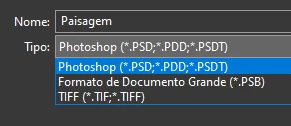

This topic has been closed for replies.
Correct answer Noelle Shamroukh

Hi All,


We appreciate your feedback on the recent “Save a Copy” change. To address your concerns, we have created two new options in Photoshop 22.4.2 that will enable both revert to the legacy “Save As” workflow and/or omit the addended “copy” when saving as a copy. These options can be found in the File Saving Options section under Preferences > File Handling.


To quickly summarize, you will now have the option to revert to the legacy “Save As” workflow (from before recent changes) on both macOS and Windows. Enabling this preference will make both the “Save As” and “Save a Copy” commands operate within the same “Save As” dialog box with all its previous options, including the “as a copy” checkbox. The only difference between the two commands will be whether the checkbox is automatically selected (when using “Save a Copy”). Additionally, you will now have the option to not append copy when saving a copy. On macOS, if you enable the legacy workflow, the option to not append copy will be forced ‘on’ due to the changes made in macOS 10.15 and later. On Windows, the two preferences will operate independently.


We hope these preference options will help ease some of the frustration you encountered using the new “Save a Copy” command.


Please note, reverting to the legacy “Save As” workflow may increase the risk of overwriting file names and lost work. A new dialog will pop-up warning customers of this risk when selecting either one of these preferences on macOS. On Windows, the legacy “Save As” operates in a manner that is safe, so a warning dialog will only pop-up when selecting the option to not append copy to the file name.


For more details on each preference and how they differ by platform, please see our updated new feature summary page.


Thanks, 

Noelle

107 replies

moqui
Participant
May 16, 2021

I just downloaded Photoshop 22.4 and now I cannot save my files to jpeg!

jane-e
Community Expert
Community Expert
May 16, 2021

Hi @moqui 


Use the new command in 22.4: File > Save a Copy. You will also see a Save a Copy command button in the Save As dialog.


~ Jane

moqui
Participant
May 16, 2021
Jane, thank you. So what do you save a photo as - PSD, PSB, or TIF? Can a photo with any of these extensions be converted to jpeg to email it?

Sent from MQD
Inspiring
May 16, 2021

With the update 22.4.0, many of my save options are missing.


Example 1: When I save a finished .psd, I normally save a TIFF without layers. The box to uncheck "layers" is missing. Now I can only save as a layered TIFF; which in turn, doesn't save the most current changes made to the file.


Example 2: The save as a JPEG is totally gone; including, everything except PSD, PSB, and TIFF.


I looked in Preferences, but cannot find anything that could effect the save dialog window.

I normally save with this shortcut: (Ctrl + Shift + S) which brings up the Save Window with all its options. I've been doing it this way for at least 8 years.


Please advise!


Thank you,

Julius Titak

JJMack
Community Expert
Community Expert
May 16, 2021

Yes Adobe Photoshop has a new "Save a Copy" . Adobe should have kept  "Save  As" as it was and added a "Save Your Work" instead of  a "Save a Copy" that was "Save As" function  now "Save As"  is a "Save Your Work".  You have to edit your actions that use "Save As" if the "Save As" step was not recorded to save your layered. That Step will turn into an Interactive "Save As" PSD for your convenience A do be added a "Save a Copy..." Button to the "Save As" dialog so you can use it to switch to "Save a Copy"  then the Action can save the Jpeg your Action was recorded to do.  "Save As" can only save a Jpeg if you flatten your document first. So you  can add flatten in the actions before the "Save As" step  then after the "Save As" step back up in history to recover your layer.  That action will work in all versions of Photoshop not just 22.4

JJMack
Participating Frequently
May 16, 2021

Hey Everyone,


All of a sudden my Save As function has changed. I can only save as a tiff, psd or psb. I have to click Save as a Copy to get my regular options and it will add "copy" to the file name this way... It's infuriating. 

Been using Photoshop for years, never had this problem. Anyone got a solution? 


What I've tried:
Reinstalled 2 times (last time without keeping prefs)
My file is not too big (1000p x 1000p

Color mode is regular RGB

8 bit channel


If this is a new update... O.o

Participating Frequently
May 16, 2021

FIXED IT.

I went to one version prior to this one. 


PLEASE ADOBE FIX THIS IN YOUR UPDATE. IT'S DUMB. 

I don't want to have to make 2 extra clicks and removing the word "copy" if I wanted to save a simple JPEG. 

D Fosse
Community Expert
Community Expert
May 16, 2021

Apple broke this, so direct your anger at them. The change in Photoshop is the only possible workaround to the change in MacOS. The Windows version also had to be changed to maintain platform parity.

Known Participant
May 16, 2021

I've only been using Photoshop since 1997, this isn't a quizzical remapping of keystrokes or anything. Punching in "save as" hasnt been a simple quick key workflow I've done ten billion times, so it's not like there's any muscle memory or whatever...


So glad we could have this little chat.

davescm
Community Expert
Community Expert
May 16, 2021

You could of course write to Apple whose operating system changes were the driver for this change.

Dave

Known Participant
May 16, 2021

How am I supposed to know who changed the code, and why should it matter? I'm the end user. Adobe's balls should be broken for creating an impediment in my 25-year-old workflow, especially considering how much money we all pay a month to use this software.

Inspiring
May 16, 2021

Trying to figure out how to work with this update.  VERY frustrating.  I am trying to adjust to Save a Copy (though I really dislike the "copy" that it adds to the end of the file name).  However, when I launch Photoshop from Lightroom, finish my editing,  use Save a Copy, and then return to Lightroom, LR has forgotten where I was.  If I am working on file #100, I better remember that if I want to get back to the same place.  It "used to" return me back to the image I launched into Photoshop from LR.


I use the ratings to have 3 stars for a pic I most likely want to delete, 4 for one I want to process, and 5 for one that I have processed.  It "used to" keep my .NEF extension when I did a Save As to a jpg, but using Save a Copy, it changes my file name to a .jpg (along with the annoying copy), and again, "looses" my place in LR.


Maybe it is my workflow that is the problem and not Adobe, but for now, it is taking me twice as long to edit images as it did before I installed 22.4.


Whew......frustrating!!!  Hope I explained the dilemna well enough.


Participating Frequently
May 17, 2021

I noticed this too. It adds "copy", annoying, and if you find the folder you want to save into before hitting "Save a Copy", you have to go searching for the folder all over again. I mean, it's all little workflow issues, not a deal breaker. But I feel like workflow is sort of the heart of a program like Photoshop. I'm genuinely confused at this rollout.

jerryt21340754
Known Participant
May 16, 2021

Before the 5/14/2021 update, I could open a file in Photoshop from ACR as a 16-bit image and then select jpg under Save As and it would convert it to 8-bit and save as a jpg. Now jpg doesn't show as an option under Save As and I either have to go to Mode and manually change to 8-bit or use Save As Copy to select jpg and it will do the conversion, but with Copy in the file name. Why does it work in Save As Copy the way it's done for years in Save As and not work in Save As? How can I get back to the old, preferred setup?. (I did try reverting to the prior build, but now it is the same issue as the new build.)

JJMack
Community Expert
Community Expert
May 16, 2021

Adobe state they are protecting you from yourself.   There is name a new file menu item "Savs a Copy". You will need to edit all your actions that use Save As file Type  they will be interactive now and will switch to as  PSD..  It sound like  you think Adobe made more work for you  force you to alert you work flow and impacted your productivity.  You are not alone in that boat.


You can always use  "Savs a Copy"  instead of Save As it can save your work as well as "Save As",  "Save As" is not required.  Just change your Shift+Ctrl+S shortcut to "Save a Copy"  Basically its the old Save As

JJMack
Known Participant
May 16, 2021

Do you know if there is some option to just dont get the "copy" text appended to the filename when saving a jpeg. Having to delete the "copy" string every time I save the file is going to drive me nuts. 

JJMack
Community Expert
Community Expert
May 15, 2021

Adobe made an incompatible change to "Save As'" in Photoshop in 22.4. That brakes batch actions that use save as to save flat file from layer documents. The change also changes you editing work flow you have the adapt your work for to the change.  Adobe removed the feature they added to save as  years ago that enable Save As to save flat image file types from layer documents.


It  is back to the old days for those old action they need to flatten before save as can save can save flat image formats in Photoshop 22.4. The actions can back up in history to recover the layers they were forced to flatten.  If you are a fool and only use Photoshop 22.4  you can change the actions from Save As to Save a Copy... which is new in Photoshop 22.4  and can do what Save As could do in Prior Photoshop version save a flat image file format from a layered document.  You an not force to flatten then recover you layers. The action will not work in old Photoshop versions they do not have a Save a Copy the can use Save As in old Photoshop versions and don't have to flatten.


In my eyes its a bug unfotunitly Adobe eyes do not see well the see its NEW

JJMack
e2online
Participant
May 16, 2021

 I thought I was trippin'. This is an inconvenient update for sure. Is there a workaround. I thought I did some funky keystroke or something lol. I uninstalled and reinstalled, reset preferences and still just the large format save options unless I choose save as a copy. Is that the only way to save as .psd? 

djuncheg117156386
Inspiring
May 15, 2021

Adobe's logic: If you run too fast, you can trip and hurt yourself. Adobe cares about safety. That's why Adobe shoots itself in the foot - so you can't run too fast and you won't trip!

davescm
Community Expert
Community Expert
May 15, 2021

Actually Adobe were kind of forced into this one by Apple making changes in the Mac OS. The change to overcome the issues on Macs  is applied across the board i.e. Macs and Windows

If your file contains items that are not supported in your required format (e.g. layers or 16 bits/channel) then the file format is moved to the Save a Copy menu.


https://helpx.adobe.com/photoshop/using/whats-new.html


Dave

ProDesignTools
Community Expert
Community Expert
May 15, 2021

In other words, if Adobe had made the needed change only on macOS but not on Windows, then we'd have a different problem with UI/UX differences between the PC & Mac versions of Photoshop going forward, plus Action & plug-in incompatibilities depending on platform.


Which of course wouldn't make people happy either. It's kind of a no-win situation.


gugapixel
Participant
May 15, 2021

This is the most inconvenient adobe update ever did. Unbelievable!

Participant
May 14, 2021

I've aproached a strange problem in Photoshop. Since yestarday the application can not save the file in jpg. or other formats. The only formats which are possible to save, are psd, psb and tiff. The only way to save file as jpg is to chose the command Export as or Save for Internet. Anybody knows what happend? 


Participant
May 14, 2021

I have the same problem. I don’t know how to solve

Participant
May 14, 2021

There is a change in v 22.4 which moved formatsxthat do not support layers to Save As Copy