Participant
May 13, 2021
Answered

P: Photoshop 22.4 - Missing Save as formats from the menu

  • May 13, 2021
  • 107 replies
  • 449524 views

I just updated to the mentioned version and the formats dropdown list only shows 3 formats: Photoshop (*.PSD;*.PDD;*.PSDT), *.PSB and TIFF (*.TIF;*.TIFF).
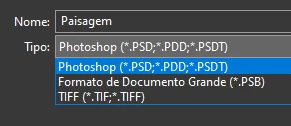

This topic has been closed for replies.
Correct answer Noelle Shamroukh

Hi All,


We appreciate your feedback on the recent “Save a Copy” change. To address your concerns, we have created two new options in Photoshop 22.4.2 that will enable both revert to the legacy “Save As” workflow and/or omit the addended “copy” when saving as a copy. These options can be found in the File Saving Options section under Preferences > File Handling.


To quickly summarize, you will now have the option to revert to the legacy “Save As” workflow (from before recent changes) on both macOS and Windows. Enabling this preference will make both the “Save As” and “Save a Copy” commands operate within the same “Save As” dialog box with all its previous options, including the “as a copy” checkbox. The only difference between the two commands will be whether the checkbox is automatically selected (when using “Save a Copy”). Additionally, you will now have the option to not append copy when saving a copy. On macOS, if you enable the legacy workflow, the option to not append copy will be forced ‘on’ due to the changes made in macOS 10.15 and later. On Windows, the two preferences will operate independently.


We hope these preference options will help ease some of the frustration you encountered using the new “Save a Copy” command.


Please note, reverting to the legacy “Save As” workflow may increase the risk of overwriting file names and lost work. A new dialog will pop-up warning customers of this risk when selecting either one of these preferences on macOS. On Windows, the legacy “Save As” operates in a manner that is safe, so a warning dialog will only pop-up when selecting the option to not append copy to the file name.


For more details on each preference and how they differ by platform, please see our updated new feature summary page.


Thanks, 

Noelle

107 replies

Participating Frequently
May 13, 2021

Wow, 


Another bemusing, obnoxious decision stuffed down the gullet. This had me scratching my head for the last 45 minutes when suddenly I could no longer quickly edit and resave files out in whatever format I feel necessary. 
Why in God's name is there an additional step to save images out now? What could possibly be the reasoning behind this nonsense? What. Are. You. Bozos. Thinking? This is quite frankly, a stupid decision. I don't want this. Nobody wants this. Cut it out.

JJMack
Community Expert
Community Expert
May 14, 2021

Adobe programming development management is doing a poor job. While upper management is occupied enjoying their life styles. Junk get designed in and many bugs are delivered to Adobe customers. Users here are not Bozos we are in your boat are you a Bozo

JJMack
Participating Frequently
May 13, 2021

Opening a PSD that was made prior to update only gives me the option to save as a PSD, Large Format or Tiff when in RGB.

Ged_Traynor
Community Expert
Community Expert
May 13, 2021

Hi

Take a look at this thread, Adobe has changed how the save as function works in version 22.4

https://community.adobe.com/t5/photoshop/version-22-4-0-quot-save-as-quot-formats-have-disappeared/td-p/12034909

J2kLarsonite
Inspiring
May 18, 2021

LOL, how pathetic!  To bad Adobe doesn't have the brains Apple has...  Such a disapointment to be forced to change this process.

JJMack
Community Expert
Community Expert
May 13, 2021

The problem seems to be related to the new feature save a copy changed the old save as feature. Adobe must want users to use new feature. So old Save as has been changed so you must use save a copy what wrong with adding in an extra step here. You use save as to get to save a copy.

JJMack
raindog308
Participating Frequently
May 17, 2021

UGH!  Amazing Adobe is still fumbling this.

When I go to "Save a copy..." it apparently never occurred to the Adobians that I might want to save File.PSD as File.PNG or File.JPG.

So now every time I "Save a copy..." I have to mouse up to the file name and manually remove the word " copy" in the file name.

Who the heck wants THAT?

Just brain dead design.


chanaart
Community Expert
Community Expert
May 13, 2021

On windows you need to make sure you have see all document format on. 

Try it and let us know!!!


JJMack
Community Expert
Community Expert
May 13, 2021

"On windows you need to make sure you have see all document format on. "

Where is that setting is that  some new setting in 22.4?

JJMack
Mike_Gondek10189183
Community Expert
Community Expert
May 13, 2021

If you had Image >> mode >>32 bits/channel you get  a similar reduction in option.

Try seeing if you need to switch to 8 bit.


JJMack
Community Expert
Community Expert
May 13, 2021

If you flatten you may see more options. Photoshop 22.4 has a big problem updating its floating image even though photoshop has updated the document correctly on my widows workstation.  For minimizing the window and reopening the window will show the operation Photoshop correctly. The windows content will correctly updated.  Photoshop 22.4 is less usable then 22.3.1 what is going on at Adobe with program development?

JJMack
Conrad_C
Community Expert
Community Expert
May 13, 2021

This is probably not a bug. According to the release notes for this version (22.4), Save As now only provides formats that “preserve your work” (which I think means formats supporting full Photoshop layers and features). Formats not preserving Photoshop layers have been moved to Save a Copy.


For convenience, a Save a Copy button was added to Save As, as shown below. If you click the (i) button shown, you get a message explaining what happened, and a More Info button leading to the Adobe help article that explains the same thing as my screen shot below.


Why did they do this? There had been some long-standing Save As bugs, I can think of one involving macOS 10.15 Catalina and later, and what I understand is that the only practical (safe) way to fix those bugs was by re-coding Save As in this way.

ProDesignTools
Community Expert
Community Expert
May 13, 2021

I can confirm – the Type dropdown on my "Save a Copy..." command (including for plugins like the WebP format) now looks like it used to on "Save As...", whose list now appears much smaller.

jane-e
Community Expert
Community Expert
May 13, 2021

Hi @Samuel5DFB 

The formats that are available to you all support layers, so without seeing more of your screen, I suspect it has to do with that.

  • Does your image have layers?
  • When you did a save as, is layers checked or unchecked?


If you you don't see this, then show two screen shots:

  • Layers panel
  • Entire Save As dialog


Hope this helps,

~Jane

Ged_Traynor
Community Expert
Community Expert
May 13, 2021

Hi Jane

I can confirm this bug, along with another in version 22.4, what is Adobe doing 😮

P: 3D feature issue in Photoshop 22.4

Version 22.4

Version 21.2.8


Participating Frequently
May 19, 2021

I didn't realize this was as big as an issue as it was.  


A big problem when you have to work seriously with this tool. Nobody pays me for the lost time due to this immature copy-save dialog! Again: It's not about the function as such, but about the amateurish implementation!