Participant
May 13, 2021
Answered

P: Photoshop 22.4 - Missing Save as formats from the menu

  • May 13, 2021
  • 107 replies
  • 449779 views

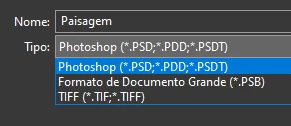
I just updated to the mentioned version and the formats dropdown list only shows 3 formats: Photoshop (*.PSD;*.PDD;*.PSDT), *.PSB and TIFF (*.TIF;*.TIFF).

This topic has been closed for replies.
Correct answer Noelle Shamroukh

Hi All,


We appreciate your feedback on the recent “Save a Copy” change. To address your concerns, we have created two new options in Photoshop 22.4.2 that will enable both revert to the legacy “Save As” workflow and/or omit the addended “copy” when saving as a copy. These options can be found in the File Saving Options section under Preferences > File Handling.


To quickly summarize, you will now have the option to revert to the legacy “Save As” workflow (from before recent changes) on both macOS and Windows. Enabling this preference will make both the “Save As” and “Save a Copy” commands operate within the same “Save As” dialog box with all its previous options, including the “as a copy” checkbox. The only difference between the two commands will be whether the checkbox is automatically selected (when using “Save a Copy”). Additionally, you will now have the option to not append copy when saving a copy. On macOS, if you enable the legacy workflow, the option to not append copy will be forced ‘on’ due to the changes made in macOS 10.15 and later. On Windows, the two preferences will operate independently.


We hope these preference options will help ease some of the frustration you encountered using the new “Save a Copy” command.


Please note, reverting to the legacy “Save As” workflow may increase the risk of overwriting file names and lost work. A new dialog will pop-up warning customers of this risk when selecting either one of these preferences on macOS. On Windows, the legacy “Save As” operates in a manner that is safe, so a warning dialog will only pop-up when selecting the option to not append copy to the file name.


For more details on each preference and how they differ by platform, please see our updated new feature summary page.


Thanks, 

Noelle

107 replies

Participant
May 21, 2021

Hello, 

I have the newest version of photoshop and I can't save edited images as jpg, there is only large format and tiff options. 

I chatted with someone from adobe and they told me it was because my file sizes are too large. If I flatten the image, it works. 

But I'm really confused why this is happening. I use a program called Ortery to capture images. I save them from ortery as jpegs and then open them in photoshop and I have been doing this for the last year with no problems. I used photoshop a few days ago and everything worked fine. I haven't updated Ortery or anything else on my computer aside from updating photoshop a couple hours ago. The image sizes have always been large when I'm editing, but they were still allowing me to save as jpg. So I'm extremely confused why this is just now an issue, does anyone have any insight? It's not a huge deal for me to just flatten the image, I'm, again, just so dang confused. 


Thanks!

nikunj.m
Community Manager
Community Manager
May 21, 2021

Hi,


We're sorry about the trouble with Photoshop. Please try saving the document using the option to Save a Copy from the File menu & you should be able to save the file as a Jpeg. For more info, please check: https://helpx.adobe.com/photoshop/using/whats-new/2021-4.html


Regards,

Nikunj

pixalien
Participant
May 21, 2021

Why Adobe is constantly doing things like this to mess with the core work flow is beyond me. this may be the most ridiculous and pointless update theyve done to date. So irritating

pixalien
Participant
May 21, 2021

At the VERY LEAST, remove the automatic prompt saying - copy that literally no one ever uses for anything ever, and if they do, they can type it themselves

davescm
Community Expert
Community Expert
May 21, 2021

No that is inaccurate .Yesterdays update to 22.4.1 did not change Save As/Save a copy.


What you are probably seeing is what was also the case in 22.4. If your document contents can be preserved in a jpeg file i.e it has a background layer, no other layers or adjustment layers, no additional channels, no hidden pixels, no transparency  then jpeg will appear in Save As.

If it is 16 bit, jpeg 2000 appears in the list but that is not the standard jpeg format

Add a layer and jpeg 2000 and PNG also disappear from Save As  and are available only in Save a Copy


Dave

JJMack
Community Expert
Community Expert
May 20, 2021

Adobe has made a annoying Photoshop UI change the give many a Photoshop users an issue they have to deal with.  The change is not compatible with previous version Adobe Photoshop UI. operations. Some Action have also been infected by the UI changes.  Script that I have I has tested the use that use Adobe's document Save As method seem to be un effected they still function correctly..

JJMack
Participant
May 20, 2021

My file size is 11x17 inches, 84 pixels, 1425 x 921 px and 5M.    The layers have been flattened. Save as pdf is not available as an option.  Is this file too large?

nikunj.m
Community Manager
Community Manager
May 20, 2021

Hi,


We're sorry about the trouble with Photoshop. Have you updated Photoshop to the latest version (22.4.1)? If yes, then please try using the option to Save a Copy instead of Save As to save the document as PDF.


For more info, please check: https://helpx.adobe.com/photoshop/using/whats-new/2021-4.html


Regards,

Nikunj

D Fosse
Community Expert
Community Expert
May 20, 2021

"Save As" now lists only the formats that support all the current properties of the file, thus preserving all your work. All other formats, with limited support, are now moved to "Save A Copy".

This was changed because the Save As jpeg function had already been broken for over a year on the Mac side, since Catalina. Saving over a jpeg resulted in a separate file with "-copy" appended. The programming function to strip "-copy" from the filename had been removed by Apple, and there was no way for Adobe to work around it. The Save As jpeg function was  rendered useless by this and had to be totally rewritten.

To be clear, saving a layered/16 bit file as jpeg saved out a copy the whole time. That is important to understand! The jpeg format does not allow 16 bit or layers. That fact was just hidden by Photoshop, by removing "-copy", but with Catalina it was no longer possible and "-copy" would always appear regardless.

Everybody should keep in mind that the direct save to jpeg, from 16 bit/layered files, was introduced in Photoshop CS5 in 2010. Prior to that, it was not possible at all to save directly to jpeg. First you had to remove every property in the file that wasn't supported in the jpeg specification. Only then could you save it. So this is nothing new - but this time you can use Save A Copy.

Platform parity has always been a sacred principle in Photoshop, so it had to be changed in the Windows version as well, even though it never was a problem on Windows.

TheDigitalDog
Inspiring
May 20, 2021

Yes, he's telling you why the software had to be changed and how it now behaves. 

Author “Color Management for Photographers" & "Photoshop CC Color Management/pluralsight"
Participating Frequently
May 20, 2021

Hi, for some reason as of last week. My computer or photoshop is not letting me save in any other file format other than: Photoshop (.PSD), Large Document Format (.PSB) and TIFF (.TIFF).


Whether im saving a photoshop file as a JPEG or PNG file, i have to Flatten all layers before i can save as any other file type. regardless if saving a RGB or CMYK file to anything, as long as i have layers i cannot save as anything else.


before, if i wanted to just save a JPEG, it would flatten the image for me then...


Can Anyone Help?


c.pfaffenbichler
Community Expert
Community Expert
May 20, 2021

File > Save a Copy 

Participating Frequently
May 20, 2021

Again: this is where you should say that:

https://www.apple.com/feedback/macos.html 


As for who cares about mac - about 50% of the Photoshop users. Breaking platform equality in Photoshop has much more far reaching implications than you realize. It wasn't on the table.


It's only 'slightly' annoying and frustrating that now this argument of equality is used when it appears to be convenient, while between the Adobe apps breaking equality is celebrated like there's no tomorrow. So many shortcuts, workflows, menu's, preferences, etc are very different between PS, AI, ID, AE.. which makes the whole suite rather counter intuitive. What is the reason for that, one might ask..


I wish Adobe would step into the 21st century already.

Inspiring
May 19, 2021

Recently when I perform a "Save As" or  "Save A Copy" in Photoshop, it adds a -Edit to my filename.  This is new and has never happened with previous versions. I have not changed my workflow.  Prior to the recent update, I could export from LR classic into PS by selecting "Edit in Adobe Photoshop." I would then make my my edits in PS, flatten the image and then use the "Save As" command to save the file to the directory location I desired (not the same directory as the original raw file).  When I do this with the latest version of photoshop, -Edit is automatically added to the end of my file name.  I am performing the same steps that I have always performed: export from LR, edit in photoshop, and then select Save As.  Previously, there was no -Edit.  How to I get rid of this "-Edit" extension without having to manually delete it?  I tried to change my export settings in PS to uncheck the "Save As to Original Folder" thinking it had something to do with LR classics catalog pointing to the directory of the raw file.  However, that feature doesn't do anything different regardless if the box is checked or not.  In fact, it pulls up the last directory accessed regardless if the box is checked or not (completely separate issue than I described above).  Thank you for your help.

Kevin Stohlmeyer
Community Expert
Community Expert
May 21, 2021

The save and save as functions have changed with the new Photoshop update.

This was due to Apple OS API changes they made it consistent on both Mac and Win going forward.

https://helpx.adobe.com/photoshop/using/whats-new/2021-4.html#save-a-copy 

Inspiring
May 31, 2021

Thanks!  I have been using the save a copy feature and that works for me; however, I do not like that it adds the "-Edit" onto the back of my file name? Do you know of a way to not let it do that?

Inspiring
May 19, 2021

Hello,


since two days, if I use "save as..." I can only save as "Photoshop, Large Document Formar, TIFF". If I click on the button "Save a Copy...", I can use all formats (also jpeg) but my file name contins "copy".

Does anybody know this proble?

(iMac - macOS Big Sur - 11.3.1 / Photoshop 2021 - 22.4.1 20210518.r.211 7b18b4f x64)


Sven

TheDigitalDog
Inspiring
May 19, 2021
Author “Color Management for Photographers" & "Photoshop CC Color Management/pluralsight"
Inspiring
May 20, 2021

Thanks, but this is only for the "save a copy" function. But I won't save a copy. I want to "save as" as JPEG.

ianbutty
Known Participant
May 19, 2021

Yet another crazy change to Photoshop.  First we have the whole pixel-based line problem (still not solved if you want to use arrowheads).  Now we can't "save as" into a different format!


It took me ages to discover that I could "save as" by selecting "save a copy" but now I'm forced to edit the file name to remove the word "copy" from the end of it.   Adobe is making their software less and less user friendly with every release.  And for this privilege, I am paying nearly £50 per month.


I am so close to ditching Adobe altogether.  


Adobe PLEASE restore the original save as functionality.

jane-e
Community Expert
Community Expert
May 19, 2021


@ianbutty wrote:

Adobe PLEASE restore the original save as functionality.


This is a user-to-user forum. Most of us are volunteers who do not work for Adobe. When you read though this entire thread, you will see this was caused by Apple, not Adobe. You can give feedback to Apple here:

https://www.apple.com/feedback/macos.html


~ Jane


ianbutty
Known Participant
May 19, 2021

I'm confused - I'm on PC so changes to Apple OS shouldn't affect those of us who are Windows users.