didiermazier
Community Expert
Community Expert
May 13, 2021
Answered

P: Unable to update Photoshop to 22.4 Error 403

  • May 13, 2021
  • 27 replies
  • 24719 views

Tried every trick… Reset and so on

same fail
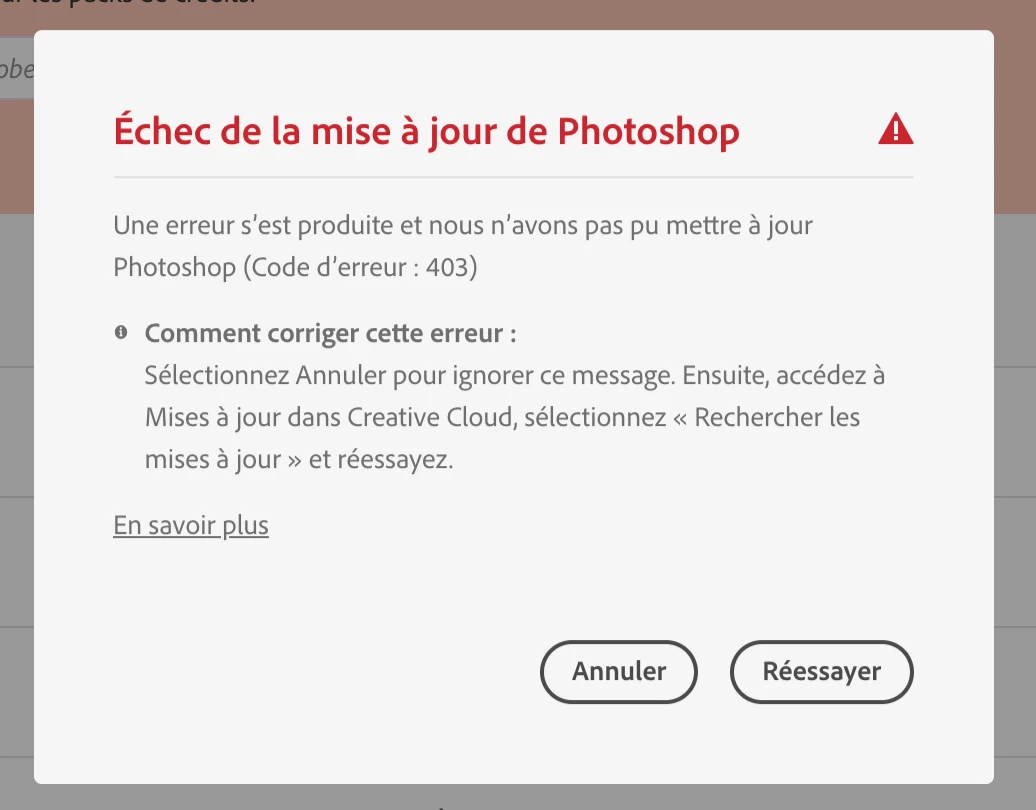
{Moderator note: Edited the thread title, PS-66191}

This topic has been closed for replies.
Correct answer Mohit Goyal

Hi there,


Could you please open the Creative Cloud Desktop app and click on the "Check for Updates" option on the top right corner. You should see the Photoshop 22.4 update, go ahead install it. 


Let us know if see any error message.


Thanks,

Mohit

27 replies

John Bronces
Inspiring
May 14, 2021

Same problem !


Participant
May 14, 2021

Tricks in Creative Desktop App did not work for me !


• Error 403 on 22.4 update or 22.4 install from scratch, after 22.3.1 uninstall

• Re-install Photoshop 22.3.1 work perfectly and 403 error on update re appear


22.4 Install or update still impossible.


macos 11.2.3

Known Participant
May 14, 2021

same issue here

update fail on MacBook Pro M1 for photoshop form 22.3.1 to 22.4


Known Participant
May 14, 2021

Same issue for me. Please Adobe, fix this asap !!!

Participant
May 13, 2021

Yes, doesn't update for me too.

So I am still on 22.2 because of GPU issue of 22.3. It's quite frustrating... 

Matt Peter Waltt
Participating Frequently
May 13, 2021

Exactly ! Dosen't work for me too, French update won't ever work ! 

Ged_Traynor
Community Expert
Community Expert
May 13, 2021
didiermazier
Community Expert
Community Expert
May 13, 2021

And funny thing : If I switch to Canadian French (tabernacle) it works…

What are ingeneers doing ?

didiermazier
Community Expert
Community Expert
May 13, 2021

And now after deleting Photoshop impossible to install again. Same 403 error., which means… nothing