Audiobulb
Participant
May 2, 2019
Resuelto

Paint Bucket - No Tool Presets Defined for Current Tool

  • May 2, 2019
  • 4 respuestas
  • 4010 visualizaciones

Hi - paint bucket is not in use as there are no presets for it to work.

How do I load presets for this tool.

I would have assumed Adobe cloud would have preloaded it like all the other tools.
    Este tema ha sido cerrado para respuestas.
    Mejor respuesta de

    Hi

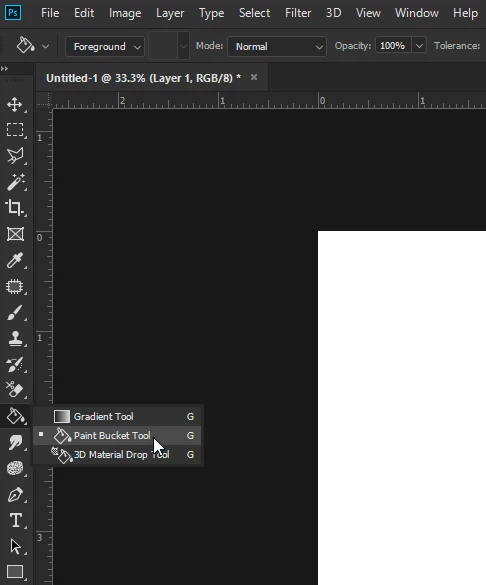
    You have the wrong tool selected

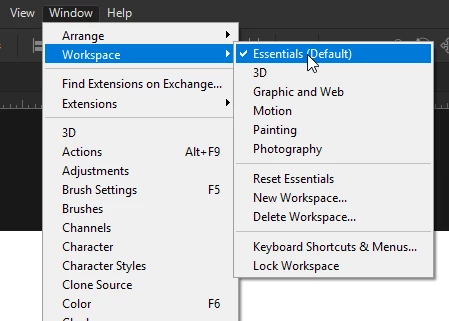
    Also make sure you're in the Essentials workspace, looks like you may have the 3D workspace enabled

    4 respuestas

    Audiobulb
    Participant
    May 3, 2019

    Thank you

    jane-e
    Community Expert
    Community Expert
    May 2, 2019

    Audiobulb  wrote

    Hi - paint bucket is not in use as there are no presets for it to work. How do I load presets for this tool.

    Once you get on the Paint Bucket tool, you will find one preset for the Bubble Pattern, which you might find useless. To change the pattern, click the dropdown for the pattern. To create a new tool preset, set the options bar to the way you like it and click the dropdown for the Paint Bucket tool.

    As others have said, you don't need a preset, but you are currently on the Material Drop tool, which is only found in the 3D workspace.

    Bojan Živković11378569
    Community Expert
    Community Expert
    May 2, 2019

    Do you want to report that Paint Bucket can not be used for some reason or simply that you do not have presets saved for that particular tool? You can use Paint Bucket tool without any preset activated, one preset is already created in Options bar automatically, use it as it is or modify and save as new tool preset if you are using it often.

    c.pfaffenbichler
    Community Expert
    Community Expert
    May 2, 2019

    Please post screenshots including all pertinent Panels.

    Audiobulb
    Participant
    May 2, 2019

    The bucket tool cursor has a "circle with line through it - stop sign' and does not engage with the picture - thanks

    Respuesta
    May 2, 2019

    Hi

    You have the wrong tool selected

    Also make sure you're in the Essentials workspace, looks like you may have the 3D workspace enabled