Participant
March 24, 2020
Answered

Paint bucket only paints in grey

  • March 24, 2020
  • 2 replies
  • 5599 views

When I use the paint bucket tool it paints everything grey. No matter what color I pick, it always come out grey. 

This topic has been closed for replies.
Correct answer jane-e


Hi

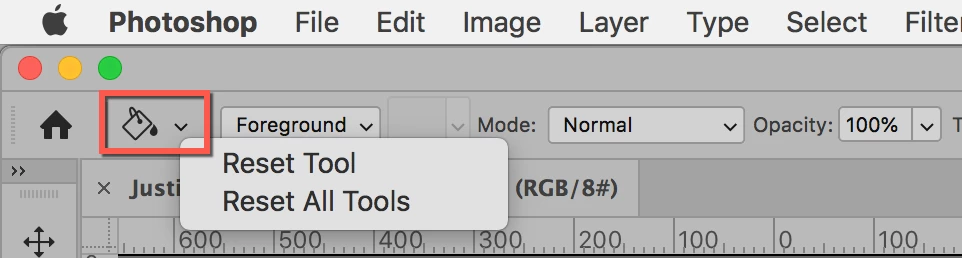
Look in the options bar with the Paintbucket selected. Does it say Foreground, and have you set a Foreground color? If that's not it, right-click the Paintbucket in the options bar (not Tools panel) and choose Reset Tool. Does that fix it?

~ Jane
 

2 replies

Semaphoric
Community Expert
Community Expert
March 24, 2020

Are you possibly painting on a Mask?

xangpowAuthor
Participant
March 24, 2020

I dont think so. I have tried paint bucket on other files and I get the same thing. 

jane-e
Community Expert
jane-eCommunity ExpertCorrect answer
Community Expert
March 25, 2020


Hi

Look in the options bar with the Paintbucket selected. Does it say Foreground, and have you set a Foreground color? If that's not it, right-click the Paintbucket in the options bar (not Tools panel) and choose Reset Tool. Does that fix it?

~ Jane


jane-e
Community Expert
Community Expert
March 24, 2020

The first thing to check is to see what color mode you are in. If it is Grayscale, change to RGB, for example. If that's not it, post again.

xangpowAuthor
Participant
March 24, 2020

It is in RGB. I have thought about changing to CMYK would do anything but I dont think that would change anything, its still using colors.