Inspiring
January 10, 2023
Answered

Paste content in alpha channel into layers (ScreenPrint)

  • January 10, 2023
  • 4 replies
  • 3427 views

Hello community, hope eveybody is doing great!


Can anybody help me with my code? I am trying to copy all the info in my alpha channels (spot colors maybe?) to create layer with it's name, I found this one:


https://community.adobe.com/t5/photoshop-ecosystem-discussions/convert-all-alpha-channels-into-layers/m-p/13478911/page/2#M696904


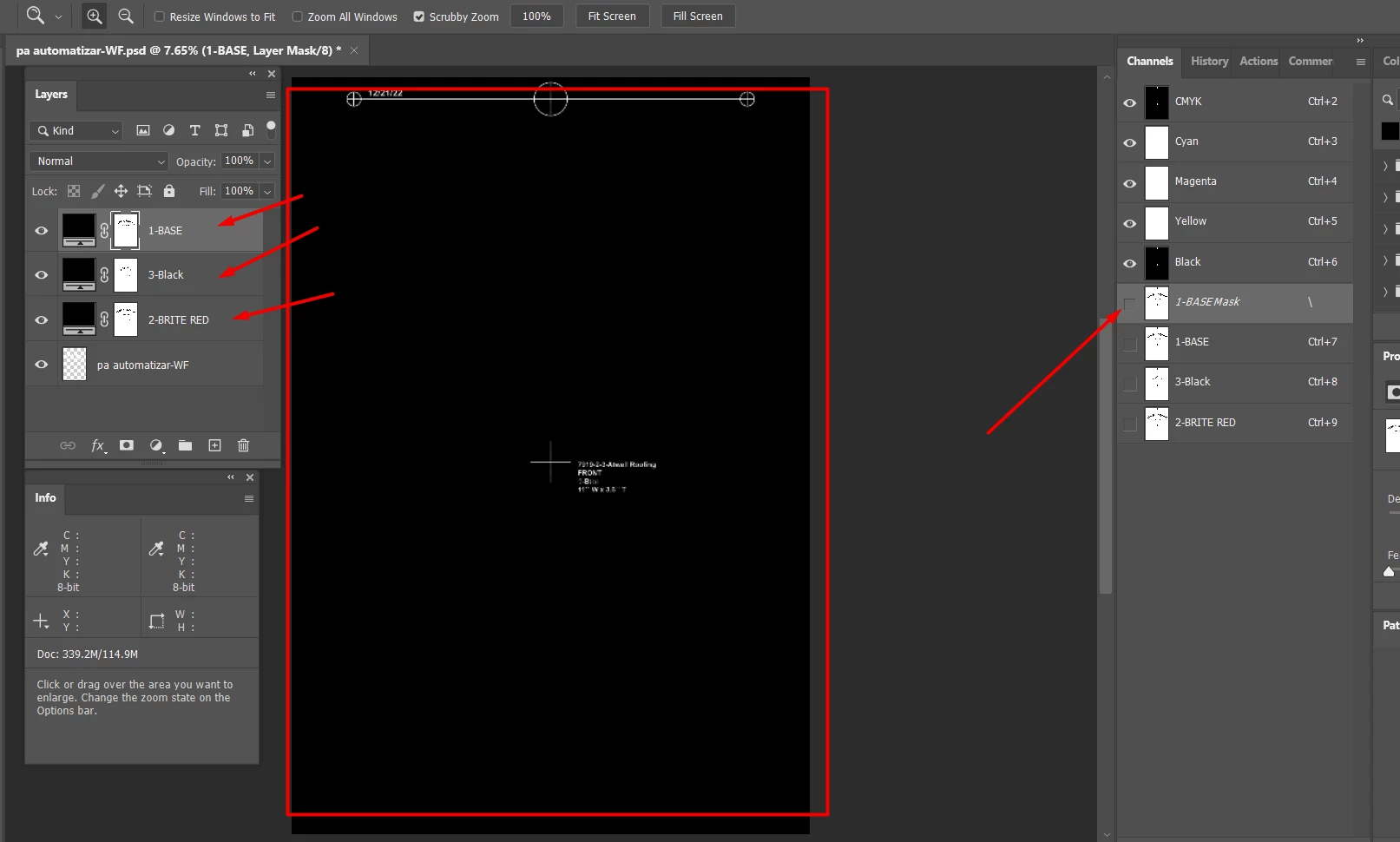
and works good! but it creates things that... I don't know what are they like the ones I point in this screen shot:


The image is in "negative" if I explain myself good, the layers seems to be masked and I need it like a normal layer, I don't know what is that channel I am point which gets the name of the layer I choose, idk.... Here is a code I've been working but I honestly surrender, sorry about the spanish:


var doc = app.activeDocument;
var channelList = [];
if (activeDocument.mode == DocumentMode.RGB) {
alert("the doc is RGB");
for (var i = 2; i < doc.channels.length; i++) {
alert("valor de i es " + i + " conteo en la lista es " + channelList.length);
alert(doc.channels[i].name);
channelList.push(doc.channels[i].name);
alert("conteo en la lista es " + channelList.length);
alert("ahora se va a seleciconar el canal " + channelList[i-2]);
doc.activeChannels = [doc.channels.getByName(channelList[i-2])];
var lyr = app.activeDocument.artLayers.add();
lyr.name = doc.channels[i].name;
app.activeDocument.selection.selectAll();
app.activeDocument.selection.copy();
app.activeDocument.selection.deselect();
app.activeDocument.paste();

}
}
if (activeDocument.mode == DocumentMode.CMYK) {
alert("the doc is  CMYK");
for (var i = 3; i < doc.channels.length; i++) {
alert(doc.channels[i].name);
}
}


I just need to copy all the info in the channels I separated from a picture, whether is CMYK or RGB to layers, please help, thanks.

This topic has been closed for replies.
Correct answer Stephen Marsh

@AntonioPacheco – OK, I think that you need to change this line:


for (var m = theChannels.length-1; m >= 0; m--) {


to this: 


for (var m = 0; m < theChannels.length; m++) {


Full code with very limited testing:


//code by c.pfaffenbichler
if (app.documents.length > 0) {
    if (activeDocument.mode == DocumentMode.RGB || activeDocument.mode == DocumentMode.CMYK) {
        var theChannels = collectChannels();
        activeDocument.selection.deselect();
        // create layers;
        //for (var m = theChannels.length-1; m >= 0; m--) {
        for (var m = 0; m < theChannels.length; m++) {
            loadAndLayer(theChannels[m][1], theChannels[m][0], [0, 0, 0]);
            app.doAction("action1","actionset")
        }
        app.doAction("action2","actionset")
    }
}
////// collect layers //////
function collectChannels() {
    // get number of layers;
    var ref = new ActionReference();
    //ref.putProperty(stringIDToTypeID('property'), stringIDToTypeID('numberOfChannels'));
    ref.putEnumerated(charIDToTypeID("Dcmn"), charIDToTypeID("Ordn"), charIDToTypeID("Trgt"));
    var applicationDesc = executeActionGet(ref);
    var theNumber = applicationDesc.getInteger(stringIDToTypeID("numberOfChannels"));
    // pixel dimensions;
    var theWidth = applicationDesc.getUnitDoubleValue(stringIDToTypeID("width"));
    var theHeight = applicationDesc.getUnitDoubleValue(stringIDToTypeID("height"));
    var theRes = applicationDesc.getUnitDoubleValue(stringIDToTypeID("resolution"));
    var thePixels = (theWidth * theRes / 72) * (theHeight * theRes / 72);
    // process the channels;
    var theChannels = new Array;
    for (var m = 0; m <= theNumber; m++) {
        try {
            var ref = new ActionReference();
            ref.putIndex(stringIDToTypeID("channel"), m);
            var channelDesc = executeActionGet(ref);
            // collect values;
            var theName = channelDesc.getString(stringIDToTypeID('channelName'));
            var theIndex = channelDesc.getInteger(stringIDToTypeID('itemIndex'));
            var theID = channelDesc.getInteger(stringIDToTypeID('ID'));
            if (channelDesc.hasKey(stringIDToTypeID('alphaChannelOptions')) === true) {
                var theHistogram = channelDesc.getList(stringIDToTypeID('histogram'));
                var value0 = theHistogram.getInteger(0);
                // if not completely black;
                if (value0 != thePixels) {
                    theChannels.push([theName, theIndex, theID]);
                } else {}
            }
        } catch (e) {}
    }
    return theChannels;
}
//////
function loadAndLayer(theIndex, theName, theColor) {
    var idnull = stringIDToTypeID("null");
    var idcontentLayer = stringIDToTypeID("contentLayer");
    var idchannel = stringIDToTypeID("channel");
    var idmake = stringIDToTypeID("make");
    // =======================================================
    var desc11 = new ActionDescriptor();
    var ref4 = new ActionReference();
    ref4.putClass(idcontentLayer);
    desc11.putReference(idnull, ref4);
    var desc12 = new ActionDescriptor();
    var desc13 = new ActionDescriptor();
    var desc14 = new ActionDescriptor();
    desc14.putDouble(stringIDToTypeID("red"), theColor[0]);
    desc14.putDouble(stringIDToTypeID("grain"), theColor[1]);
    desc14.putDouble(stringIDToTypeID("blue"), theColor[2]);
    var idRGBColor = stringIDToTypeID("RGBColor");
    desc13.putObject(stringIDToTypeID("color"), idRGBColor, desc14);
    desc12.putString(stringIDToTypeID("name"), theName);
    desc12.putObject(stringIDToTypeID("type"), stringIDToTypeID("solidColorLayer"), desc13);
    desc11.putObject(stringIDToTypeID("using"), idcontentLayer, desc12);
    executeAction(idmake, desc11, DialogModes.NO);
    // remove layer mask;
    try {
        // =======================================================
        var desc10 = new ActionDescriptor();
        var ref2 = new ActionReference();
        var idchannel = stringIDToTypeID("channel");
        ref2.putEnumerated(idchannel, idchannel, stringIDToTypeID("mask"));
        desc10.putReference(stringIDToTypeID("null"), ref2);
        executeAction(stringIDToTypeID("delete"), desc10, DialogModes.NO);
    } catch (e) {}
    // =======================================================
    var desc2 = new ActionDescriptor();
    desc2.putClass(stringIDToTypeID("new"), idchannel);
    var ref1 = new ActionReference();
    ref1.putEnumerated(idchannel, idchannel, idmask = stringIDToTypeID("mask"));
    desc2.putReference(stringIDToTypeID("at"), ref1);
    desc2.putEnumerated(stringIDToTypeID("using"), stringIDToTypeID("userMaskEnabled"), stringIDToTypeID("hideAll"));
    executeAction(idmake, desc2, DialogModes.NO);
    // =======================================================
    var desc3 = new ActionDescriptor();
    var desc4 = new ActionDescriptor();
    var ref2 = new ActionReference();
    ref2.putIndex(idchannel, theIndex);
    desc4.putReference(stringIDToTypeID("to"), ref2);
    var idpreserveTransparency = stringIDToTypeID("preserveTransparency");
    desc4.putBoolean(stringIDToTypeID("invert"), true);
    desc4.putBoolean(idpreserveTransparency, true);
    desc3.putObject(stringIDToTypeID("with"), stringIDToTypeID("calculation"), desc4);
    executeAction(idapplyImageEvent = stringIDToTypeID("applyImageEvent"), desc3, DialogModes.NO);
}

 

4 replies

Inspiring
January 26, 2023

Hello community.  I would like to open this thread again.


Is it possible to add to this code the feature to also "set" the channel color to the copied layer? I mean you know taht we can select a color for the channel, right now the code only copies the information on each channel to a layer but it does not copy/set the color, I have to do it manually one by one when layers are generated, is there the posibility to also copy the color from the channel to the layer? Thank you so much.

Stephen Marsh
Community Expert
Community Expert
January 26, 2023

@c.pfaffenbichler as this is your code, I thought that it was best to bring this topic to your attention...

Inspiring
January 26, 2023

sorry for bothering to both of you

Participant
January 23, 2023

You may try this spot-color plugin for Photoshop, it handles spot channels as if they were layers:

https://www.retouchxpress.eu/plugins/spot


Inspiring
January 23, 2023

thank you so much!

Inspiring
January 10, 2023

I found a solution, i used the code in the following thread:


https://community.adobe.com/t5/photoshop-ecosystem-discussions/convert-all-alpha-channels-into-layers/m-p/13478902/page/2#M696903


But adding some lines and actions in PS in order to make what I needed, BUT.... I will really appreaciate if somebody can tell me how to make it work from the top of the channels to the bottom of the channels, right now it creates layers from the bottom to the top. here it is:


//code by c.pfaffenbichler

if (app.documents.length > 0) {
if (activeDocument.mode == DocumentMode.RGB || activeDocument.mode == DocumentMode.CMYK) {
var theChannels = collectChannels ();
activeDocument.selection.deselect();
// create layers;
for (var m = theChannels.length-1; m >= 0; m--) {
loadAndLayer (theChannels[m][1], theChannels[m][0], [0,0,0]);
app.doAction("action1","actionset")
};
app.doAction("action2","actionset")
};
};
////// collect layers //////
function collectChannels () {
// get number of layers;
var ref = new ActionReference();
//ref.putProperty(stringIDToTypeID('property'), stringIDToTypeID('numberOfChannels'));
ref.putEnumerated( charIDToTypeID("Dcmn"), charIDToTypeID("Ordn"), charIDToTypeID("Trgt") );
var applicationDesc = executeActionGet(ref);
var theNumber = applicationDesc.getInteger(stringIDToTypeID("numberOfChannels"));
// pixel dimensions;
var theWidth = applicationDesc.getUnitDoubleValue(stringIDToTypeID("width"));
var theHeight = applicationDesc.getUnitDoubleValue(stringIDToTypeID("height"));
var theRes = applicationDesc.getUnitDoubleValue(stringIDToTypeID("resolution"));
var thePixels = (theWidth*theRes/72)*(theHeight*theRes/72);
// process the channels;
var theChannels = new Array;
for (var m = 0; m <= theNumber; m++) {
try {
var ref = new ActionReference();
ref.putIndex(stringIDToTypeID( "channel" ), m);
var channelDesc = executeActionGet(ref);
// collect values;
var theName = channelDesc.getString(stringIDToTypeID('channelName'));
var theIndex = channelDesc.getInteger(stringIDToTypeID('itemIndex'));
var theID = channelDesc.getInteger(stringIDToTypeID('ID'));
if (channelDesc.hasKey(stringIDToTypeID('alphaChannelOptions')) == true) {
var theHistogram = channelDesc.getList(stringIDToTypeID('histogram'));
var value0 = theHistogram.getInteger(0);
// if not completely black;
if (value0 != thePixels) {
theChannels.push([theName, theIndex, theID])
} else {}
};
} catch (e) {};
};
return theChannels
};
//////
function loadAndLayer (theIndex, theName, theColor) {
var idnull = stringIDToTypeID( "null" );
var idcontentLayer = stringIDToTypeID( "contentLayer" );
var idchannel = stringIDToTypeID( "channel" );
var idmake = stringIDToTypeID( "make" );
// =======================================================
var desc11 = new ActionDescriptor();
var ref4 = new ActionReference();
ref4.putClass( idcontentLayer );
desc11.putReference( idnull, ref4 );
var desc12 = new ActionDescriptor();
var desc13 = new ActionDescriptor();
var desc14 = new ActionDescriptor();
desc14.putDouble( stringIDToTypeID( "red" ), theColor[0] );
desc14.putDouble( stringIDToTypeID( "grain" ), theColor[1] );
desc14.putDouble( stringIDToTypeID( "blue" ), theColor[2] );
var idRGBColor = stringIDToTypeID( "RGBColor" );
desc13.putObject( stringIDToTypeID( "color" ), idRGBColor, desc14 );
desc12.putString( stringIDToTypeID( "name" ), theName );
desc12.putObject( stringIDToTypeID( "type" ), stringIDToTypeID( "solidColorLayer" ), desc13 );
desc11.putObject( stringIDToTypeID( "using" ), idcontentLayer, desc12 );
executeAction( idmake, desc11, DialogModes.NO );
// remove layer mask;
try {
// =======================================================
var desc10 = new ActionDescriptor();
var ref2 = new ActionReference();
var idchannel = stringIDToTypeID( "channel" );
ref2.putEnumerated( idchannel, idchannel, stringIDToTypeID( "mask" ) );
desc10.putReference( stringIDToTypeID( "null" ), ref2 );
executeAction( stringIDToTypeID( "delete" ), desc10, DialogModes.NO );
} catch (e) {};
// =======================================================
var desc2 = new ActionDescriptor();
desc2.putClass( stringIDToTypeID( "new" ), idchannel );
var ref1 = new ActionReference();
ref1.putEnumerated( idchannel, idchannel, idmask = stringIDToTypeID( "mask" ) );
desc2.putReference( stringIDToTypeID( "at" ), ref1 );
desc2.putEnumerated( stringIDToTypeID( "using" ), stringIDToTypeID( "userMaskEnabled" ), stringIDToTypeID( "hideAll" ) );
executeAction( idmake, desc2, DialogModes.NO );
// =======================================================
var desc3 = new ActionDescriptor();
var desc4 = new ActionDescriptor();
var ref2 = new ActionReference();
ref2.putIndex( idchannel, theIndex );
desc4.putReference( stringIDToTypeID( "to" ), ref2 );
var idpreserveTransparency = stringIDToTypeID( "preserveTransparency" );
desc4.putBoolean( stringIDToTypeID( "invert" ), true );
desc4.putBoolean( idpreserveTransparency, true );
desc3.putObject( stringIDToTypeID( "with" ), stringIDToTypeID( "calculation" ), desc4 );
executeAction( idapplyImageEvent = stringIDToTypeID( "applyImageEvent" ), desc3, DialogModes.NO );
};

Stephen Marsh
Community Expert
Community Expert
January 11, 2023

@AntonioPacheco wrote:

I will really appreaciate if somebody can tell me how to make it work from the top of the channels to the bottom of the channels, right now it creates layers from the bottom to the top. here it is:


I'm guessing the answer will be to reverse the for loop over the channels/layers. I'm not in front of a computer so I can't give you the code now... But knowing this, you can search the forum or web for info on JS for loops  - forwards and backwards. Look for the more common ++ increment loop examples as this appears to use -- decrement.


EDIT: You could also select the layers after they are created, then use Layer > Arrange > Reverse


Stephen Marsh
Community Expert
Stephen MarshCommunity ExpertCorrect answer
Community Expert
January 11, 2023

@AntonioPacheco – OK, I think that you need to change this line:


for (var m = theChannels.length-1; m >= 0; m--) {


to this: 


for (var m = 0; m < theChannels.length; m++) {


Full code with very limited testing:


//code by c.pfaffenbichler
if (app.documents.length > 0) {
    if (activeDocument.mode == DocumentMode.RGB || activeDocument.mode == DocumentMode.CMYK) {
        var theChannels = collectChannels();
        activeDocument.selection.deselect();
        // create layers;
        //for (var m = theChannels.length-1; m >= 0; m--) {
        for (var m = 0; m < theChannels.length; m++) {
            loadAndLayer(theChannels[m][1], theChannels[m][0], [0, 0, 0]);
            app.doAction("action1","actionset")
        }
        app.doAction("action2","actionset")
    }
}
////// collect layers //////
function collectChannels() {
    // get number of layers;
    var ref = new ActionReference();
    //ref.putProperty(stringIDToTypeID('property'), stringIDToTypeID('numberOfChannels'));
    ref.putEnumerated(charIDToTypeID("Dcmn"), charIDToTypeID("Ordn"), charIDToTypeID("Trgt"));
    var applicationDesc = executeActionGet(ref);
    var theNumber = applicationDesc.getInteger(stringIDToTypeID("numberOfChannels"));
    // pixel dimensions;
    var theWidth = applicationDesc.getUnitDoubleValue(stringIDToTypeID("width"));
    var theHeight = applicationDesc.getUnitDoubleValue(stringIDToTypeID("height"));
    var theRes = applicationDesc.getUnitDoubleValue(stringIDToTypeID("resolution"));
    var thePixels = (theWidth * theRes / 72) * (theHeight * theRes / 72);
    // process the channels;
    var theChannels = new Array;
    for (var m = 0; m <= theNumber; m++) {
        try {
            var ref = new ActionReference();
            ref.putIndex(stringIDToTypeID("channel"), m);
            var channelDesc = executeActionGet(ref);
            // collect values;
            var theName = channelDesc.getString(stringIDToTypeID('channelName'));
            var theIndex = channelDesc.getInteger(stringIDToTypeID('itemIndex'));
            var theID = channelDesc.getInteger(stringIDToTypeID('ID'));
            if (channelDesc.hasKey(stringIDToTypeID('alphaChannelOptions')) === true) {
                var theHistogram = channelDesc.getList(stringIDToTypeID('histogram'));
                var value0 = theHistogram.getInteger(0);
                // if not completely black;
                if (value0 != thePixels) {
                    theChannels.push([theName, theIndex, theID]);
                } else {}
            }
        } catch (e) {}
    }
    return theChannels;
}
//////
function loadAndLayer(theIndex, theName, theColor) {
    var idnull = stringIDToTypeID("null");
    var idcontentLayer = stringIDToTypeID("contentLayer");
    var idchannel = stringIDToTypeID("channel");
    var idmake = stringIDToTypeID("make");
    // =======================================================
    var desc11 = new ActionDescriptor();
    var ref4 = new ActionReference();
    ref4.putClass(idcontentLayer);
    desc11.putReference(idnull, ref4);
    var desc12 = new ActionDescriptor();
    var desc13 = new ActionDescriptor();
    var desc14 = new ActionDescriptor();
    desc14.putDouble(stringIDToTypeID("red"), theColor[0]);
    desc14.putDouble(stringIDToTypeID("grain"), theColor[1]);
    desc14.putDouble(stringIDToTypeID("blue"), theColor[2]);
    var idRGBColor = stringIDToTypeID("RGBColor");
    desc13.putObject(stringIDToTypeID("color"), idRGBColor, desc14);
    desc12.putString(stringIDToTypeID("name"), theName);
    desc12.putObject(stringIDToTypeID("type"), stringIDToTypeID("solidColorLayer"), desc13);
    desc11.putObject(stringIDToTypeID("using"), idcontentLayer, desc12);
    executeAction(idmake, desc11, DialogModes.NO);
    // remove layer mask;
    try {
        // =======================================================
        var desc10 = new ActionDescriptor();
        var ref2 = new ActionReference();
        var idchannel = stringIDToTypeID("channel");
        ref2.putEnumerated(idchannel, idchannel, stringIDToTypeID("mask"));
        desc10.putReference(stringIDToTypeID("null"), ref2);
        executeAction(stringIDToTypeID("delete"), desc10, DialogModes.NO);
    } catch (e) {}
    // =======================================================
    var desc2 = new ActionDescriptor();
    desc2.putClass(stringIDToTypeID("new"), idchannel);
    var ref1 = new ActionReference();
    ref1.putEnumerated(idchannel, idchannel, idmask = stringIDToTypeID("mask"));
    desc2.putReference(stringIDToTypeID("at"), ref1);
    desc2.putEnumerated(stringIDToTypeID("using"), stringIDToTypeID("userMaskEnabled"), stringIDToTypeID("hideAll"));
    executeAction(idmake, desc2, DialogModes.NO);
    // =======================================================
    var desc3 = new ActionDescriptor();
    var desc4 = new ActionDescriptor();
    var ref2 = new ActionReference();
    ref2.putIndex(idchannel, theIndex);
    desc4.putReference(stringIDToTypeID("to"), ref2);
    var idpreserveTransparency = stringIDToTypeID("preserveTransparency");
    desc4.putBoolean(stringIDToTypeID("invert"), true);
    desc4.putBoolean(idpreserveTransparency, true);
    desc3.putObject(stringIDToTypeID("with"), stringIDToTypeID("calculation"), desc4);
    executeAction(idapplyImageEvent = stringIDToTypeID("applyImageEvent"), desc3, DialogModes.NO);
}


Inspiring
January 10, 2023

I need teh info from the selected areas turn into layers, thanks!