BarryWhitelaw
Known Participant
August 31, 2021
Answered

Paste Profile Mismatch

  • August 31, 2021
  • 1 reply
  • 6053 views

Hoping someone can explain, in simple terms 🙂 what the enclosed error message means.


Most of what I do is compositing, and with artwork from various places, usually combined into one image.  Up until the current version of Photoshop i've not had this message before.


I'm not quite clued up with all the various options when it comes to RBG spaces and colour profiles.  I'm just a hobbyist and not doing anything professionally.
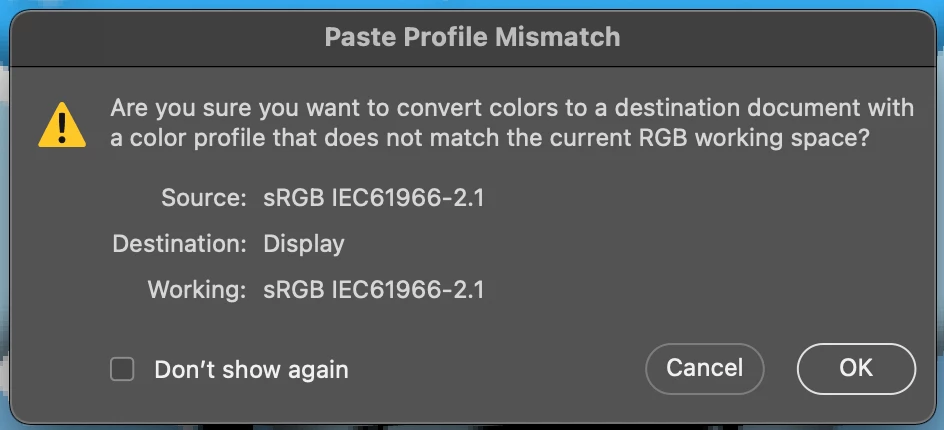


I get this when I'm copying from one workspace to another.


Many thanks
Correct answer c.pfaffenbichler

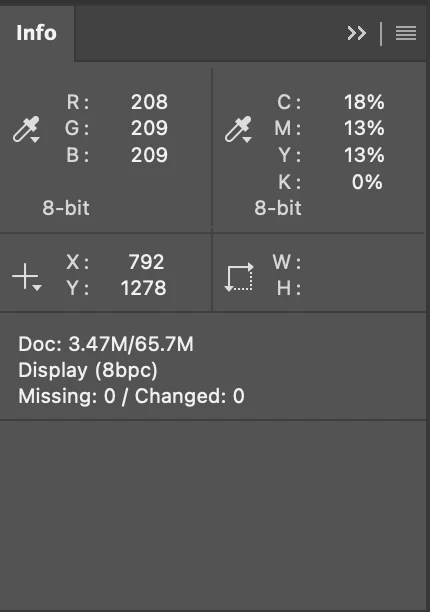
And these 2 screens also.


One image is sRGB, the other apparently a screenshot. 

So content from the one would have to be converted to appear the same in the other. 

1 reply

c.pfaffenbichler
Community Expert
August 31, 2021

A pixel’s RGB values are certainly not meaningless, but they do NOT define an actual appearance. 

They just define that it is lighter, redder, … than another pixel in the same image. 

What the pixel is actually intended to look like is dependent on the image’s Color Space (usually expressed as an ICC profile). 

Kind of like the scale of map … 


When two images have different Color Spaces and you paste content from Space A to Space B there are two options; 

• convert the content so it looks (roughly) the same 

• maintain the pixels’ RGB values (or CMYK or …) but risk that it looks different 


What are Photoshop’s Edit > Color Settings? 

BarryWhitelaw
Known Participant
August 31, 2021

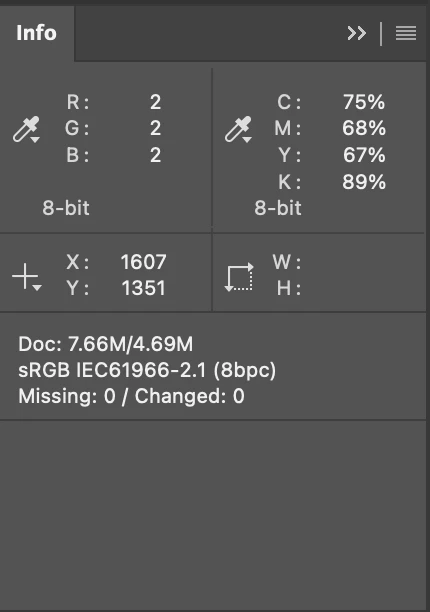
This is where I get lost, however, Screenshot 1 is my main document, and Screenshot 2 was the temp document I created to paste 3 or 4 different images into...to work on a bit before coying them onto the main doc.


These are the same aren't they?

c.pfaffenbichler
Community Expert
August 31, 2021

Those are the program’s Color Settings, not the images’. 

Please set the Status Bar to »Document Profile« and post screenshots.