kevind82335850
Inspiring
July 18, 2017
Answered

Path duplicates while editing a point with direct select tool

  • July 18, 2017
  • 2 replies
  • 480 views

Something I have done 1000 times before.  I am not sure what I am doing wrong today.

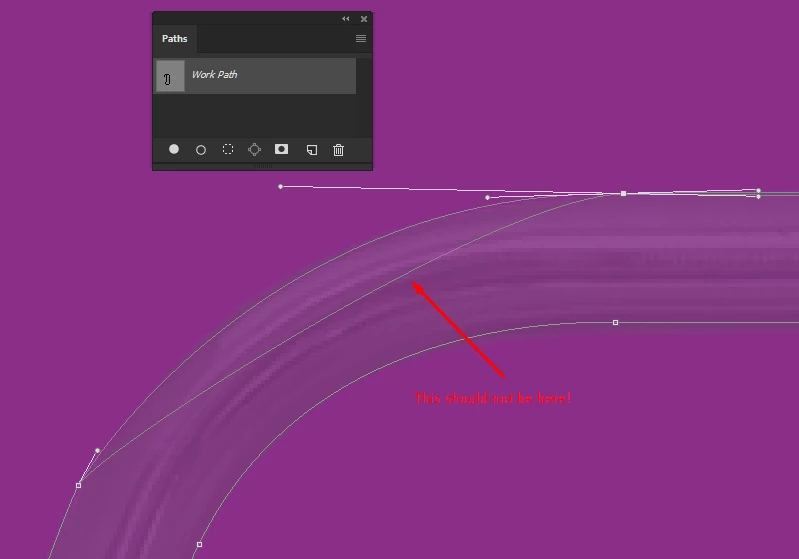
I made a path to cut out (mask) an item.  I went back to edit some of the points and every time I edit, it duplicates the path.

I have made sure no keys are stuck.  It happens whether I am holding alt or not.  I'm sure its something simple...I just can't figure it out.

Photoshop CC 2017.1.1    Windows 10

    This topic has been closed for replies.
    Correct answer kevind82335850

    I guess at least half of the points were duplicated somehow....not sure how.  I ended up re-tracing the object and all is honky-dory now. Thanks @JJMack

    2 replies

    davescm
    Community Expert
    Community Expert
    July 18, 2017

    Did you by any chance press the Alt key whilst using the direct selection (white arrow tool) to move a point

    Move white arrow over point:

    Click and drag moves point:

    Hold down Alt and white arrow gains a + sign

    Click whilst holding Alt duplicates the path.

    Now click & drag after releasing Alt moves the path on the duplicate path or  drag whilst still holding ALT moves the whole duplicate path

    Note references to Alt are because I use windows. For Mac use Opt

    Dave

    JJMack
    Community Expert
    Community Expert
    July 18, 2017

    Are you sure it is there when you move the handles does its shape change or stay the same or go away. Refresh the display some how.

    JJMack
    kevind82335850
    kevind82335850AuthorCorrect answer
    Inspiring
    July 18, 2017

    I guess at least half of the points were duplicated somehow....not sure how.  I ended up re-tracing the object and all is honky-dory now. Thanks @JJMack