Participant
March 17, 2019
Answered

PDFs from Photoshop open in Illustrator

  • March 17, 2019
  • 4 replies
  • 2010 views

My Photoshop files that are saved as PDF's keep opening as Illustrator PDFs! How do I get it to open in Preview on a Mac?

[Title edited for brevity by moderator. Was a repeat of the body.]

This topic has been closed for replies.
Correct answer jane-e

nb14119081  wrote

My photoshop files that are saved as PDF's keep opening as illustrator pdf's! How do I get it to open in preview on a Mac?

Hi NB,

This is a question about your operating system, not Photoshop. Your Mac sees a PDF, and the PDF extension has been associated with Illustrator on your computer.
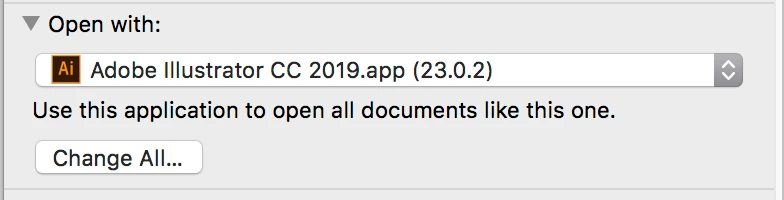
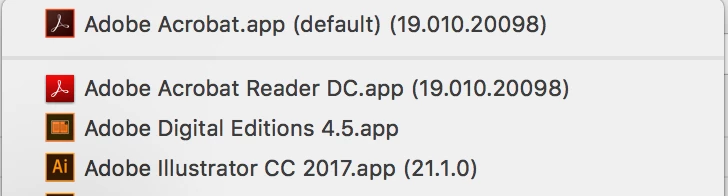
  • To change that, open the Finder and select a PDF.
  • With a PDF selected, choose File > Get Info
  • In the Get Info panel, find where it says Open with: Illustrator
  • In the Pop-up, choose the Application you want to open your PDFs. They are in alphabetical order.
  • Important: Choose Change All.. to change All PDFs to open with your preferred program and not just the one you have selected.

Note: I love all things Mac with one exception. Preview is a horrible PDF reader. Use Adobe Acrobat or Adobe Reader if at all possible. The Reader is free. It will say (default) when you have finished. My PDFs open in Acrobat — whether I create them in Photoshop, Illustrator, InDesign, Word, or Excel.

~ Jane

4 replies

Eugenio.NYC
Participating Frequently
March 18, 2019

Also if you use Adobe Bridge you can set up the File Type Association

jane-e
Community Expert
jane-eCommunity ExpertCorrect answer
Community Expert
March 18, 2019

nb14119081  wrote

My photoshop files that are saved as PDF's keep opening as illustrator pdf's! How do I get it to open in preview on a Mac?

Hi NB,

This is a question about your operating system, not Photoshop. Your Mac sees a PDF, and the PDF extension has been associated with Illustrator on your computer.
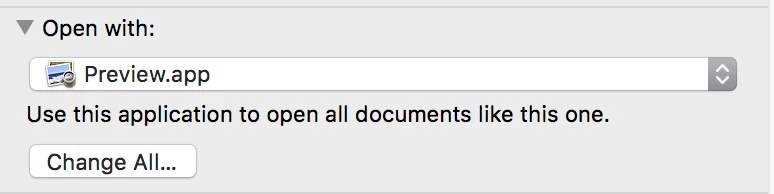
  • To change that, open the Finder and select a PDF.
  • With a PDF selected, choose File > Get Info
  • In the Get Info panel, find where it says Open with: Illustrator
  • In the Pop-up, choose the Application you want to open your PDFs. They are in alphabetical order.
  • Important: Choose Change All.. to change All PDFs to open with your preferred program and not just the one you have selected.

Note: I love all things Mac with one exception. Preview is a horrible PDF reader. Use Adobe Acrobat or Adobe Reader if at all possible. The Reader is free. It will say (default) when you have finished. My PDFs open in Acrobat — whether I create them in Photoshop, Illustrator, InDesign, Word, or Excel.

~ Jane

Derek Cross
Community Expert
Community Expert
March 17, 2019

Mac Previewer is not a good PDF viewer, use Acrobat Reader.

Associate your PDF document with Acrobat Reader (or Previewer) by using Open With and tick Always Open With.

Legend
March 17, 2019

Open it in the app, or drag it to the app, is two ways.