
Participant
September 2, 2020
Answered

Pen tool problem: no color

  • September 2, 2020
  • 1 reply
  • 1939 views

Hello,

I have the latest version of Photoshop cc (21.2.2). Since the installation when I try to create a path, the line is black by default. I tried to change the colour the settings but it doesn't take it into account. The problem has happened since the last update.

Graphic card : ATI Radeon HD 5770

Operating system : macOS High Sierra


I’ve attached some screenshots to explain correctly the issue. 

Thank you in advance for you help!
This topic has been closed for replies.
Correct answer

Hi

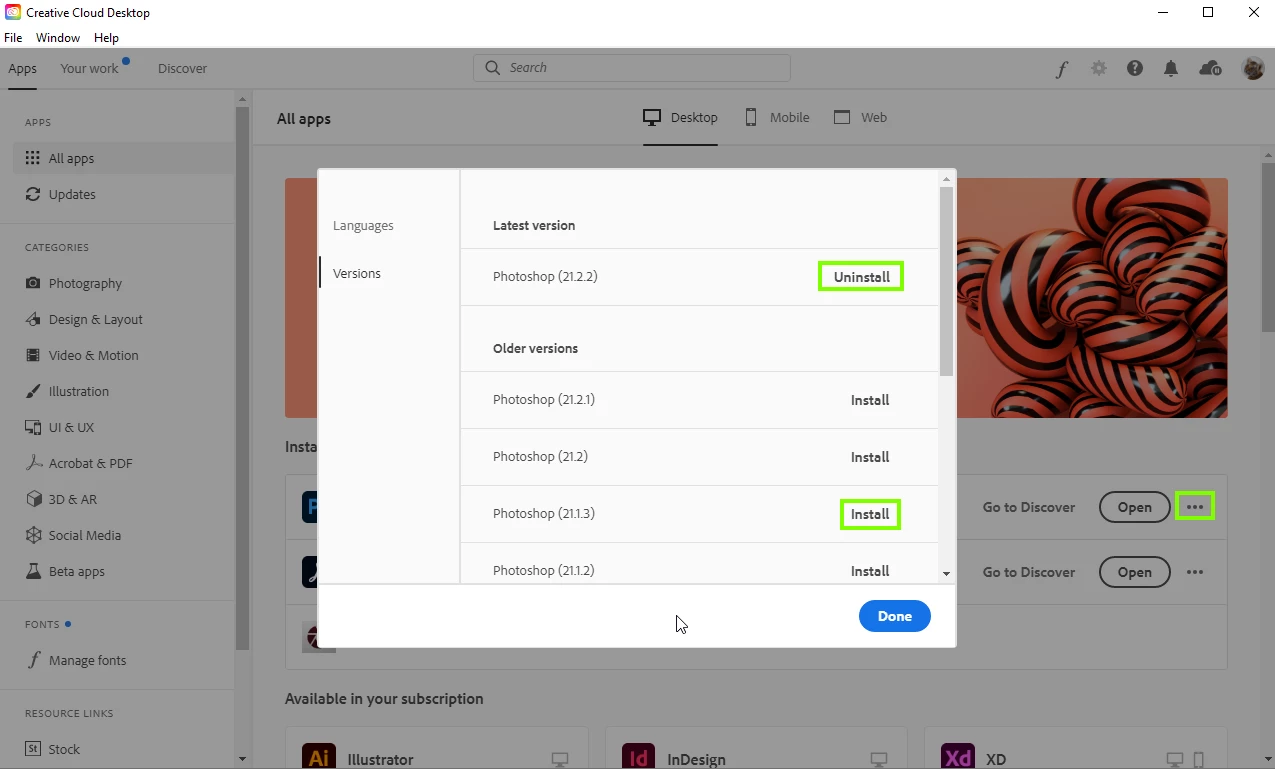
Photoshop is not detecting your GPU and more than likely it's because you have a old card, Photoshop version 21.2.2 has major issues detecting old and some not so old GPU's, the only option you have at the moment is to revert back to version 21.1.3

1 reply

Correct answer
September 2, 2020

Hi

Photoshop is not detecting your GPU and more than likely it's because you have a old card, Photoshop version 21.2.2 has major issues detecting old and some not so old GPU's, the only option you have at the moment is to revert back to version 21.1.3

Participant
September 2, 2020

Thank you for the quick answer!

This is the solution I thought about as well. I will follow your advice and go back to the old version. Do you think it's something that will be fixed in the next updates ?

September 2, 2020

I would hope so, the issue arouse with version 21.2 and then Adobe released version 21.2.1, at that time that update fixed the issue for me on my work PC with an 2018 Nvidia quadro p620 GPU.

Alas it didn't fix the issue for a lot of other people, you'll just have to wait and see I'm afraid.