Pikamon101
Known Participant
March 3, 2021
Answered

Percentage and Text Point Size don't match

  • March 3, 2021
  • 3 replies
  • 1494 views

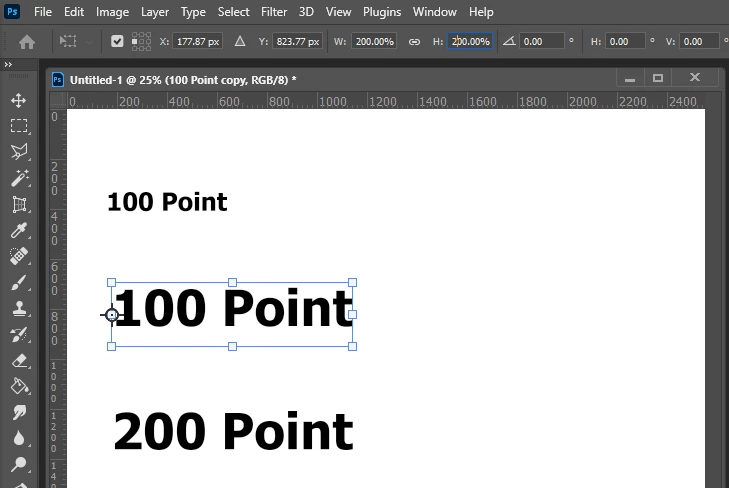
Hello! So I was watching this YouTube video about scaling Text in Photoshop (https://youtu.be/9P01qAn52Y8) and at 3:25 in the video he demostrates changing the Text Point Size to 200 Points using the Text Tool and then changing the duplicate Text to 200% using the Transform Tool and they match up. However when I do it, it doesn't match up at all.

My Image is 1080 x 1080 300 PPI and my Rulers are set to Percent any my Type is set to Points. I don't know if my settings are wrong or whats the matter but I don't know why it doesn't match up.

I've tried Googling the problem but nothing.

I hope everything I explained makes sense and I would sincerely appreciate the help! 🙂
This topic has been closed for replies.
Correct answer JJMack

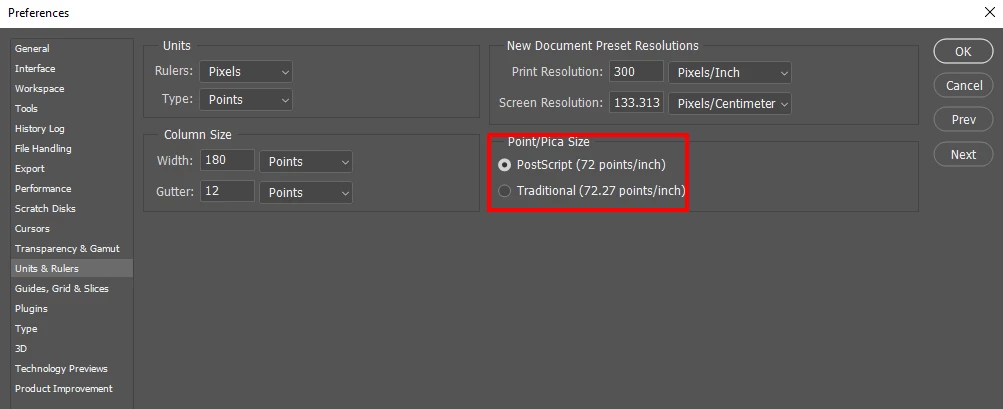
I think text point is something like 72 points per innch.  See if it works if the change your document Print resolution to 72 ppi so print pixels are point size.  Then try the 200% resize. 

3 replies

jane-e
Community Expert
Community Expert
March 3, 2021

@Pikamon101 wrote:

My Image is 1080 x 1080 300 PPI and my Rulers are set to Percent any my Type is set to Points.


Try the same settings that Jesús used: 2600 px x 1800 px (72 ppi). (His rulers are set to pixels)


If it still doesn't work, notice that he reverted at 07m55s and started with a clean slate. Make sure you are not carrying over anything Jesús demoed in the first eight minutes.

~ Jane

Pikamon101
Known Participant
March 3, 2021

Thank you for the help!! 🙂

jane-e
Community Expert
Community Expert
March 3, 2021

You're welcome 😊


@Pikamon101 wrote:

Also in your opinion, which is better? 72 PPI or 300 PPI? Or whats the difference between them? Sorry if its a dumb question. I mostly just use 1080 x 1080 300 PPI


You only need to worry about PPI when you are printing. Otherwise, you are just working with pixels. The difference is how large the pixels are when you print (how many fit in an inch).


~ Jane


~ Jane

JJMack
Community Expert
JJMackCommunity ExpertCorrect answer
Community Expert
March 3, 2021

I think text point is something like 72 points per innch.  See if it works if the change your document Print resolution to 72 ppi so print pixels are point size.  Then try the 200% resize. 

JJMack
Pikamon101
Known Participant
March 3, 2021

YES!!! That fixed it! I knew it was something simple like that but I couldn't figure it out. Thank you so much for your help! 


Also in your opinion, which is better? 72 PPI or 300 PPI? Or whats the difference between them? Sorry if its a dumb question. I mostly just use 1080 x 1080 300 PPI

JJMack
Community Expert
Community Expert
March 3, 2021

Photoshop is a Pixels editor what is important is the number of pixels you have not the size you print pixels.  With more pixels  you can store more details.    If you have 100 pixels to store a eye's details you can describe the eye but not in great detail.   If you have 10,000 pixels to store  an eye's details the eye's description can be much better. However, you need quality pixels if your lens is out of  focus or the  shooting at 64,000ISO you will just have 10,0000 low quality pixels.

JJMack
Bojan Živković11378569
Community Expert
Community Expert
March 3, 2021

I start watching at 3:25 and Jesus start explaining advantage of Paragraphh styles. what is your problem exactly? Because you can not follow what is doing instructor (pleaase provide new tip for timing) or  something else?