
Participant
April 18, 2020
Answered

Perspective crop grid problem

  • April 18, 2020
  • 3 replies
  • 1740 views

I use this tool a lot, and a squared grid used to come up as a guide. However, recently this turned into tiny squares with running lines (different sides of the squares), which make it very hard to align anything. I have searched and searched to try to find a way of removing this but to no avail. Please can anyone help?
This topic has been closed for replies.
Correct answer davescm

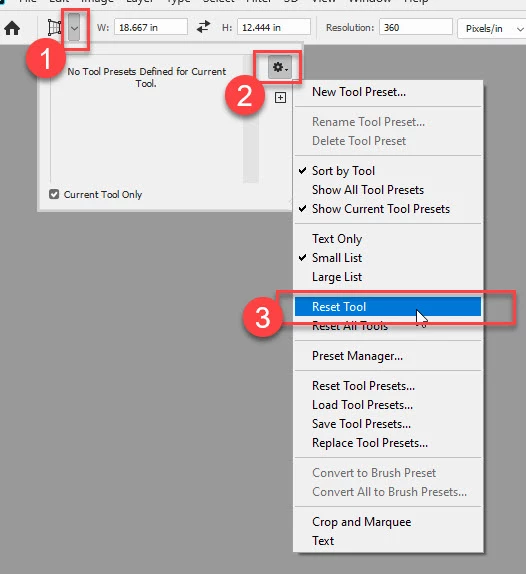
To reset the tool go to the top left of the options bar:

If that has no effect, then try resetting Preferences. Preferences > General >Reset Preferences on Quit, then close and restart Photoshop.

Dave

3 replies

davescm
Community Expert
davescmCommunity ExpertCorrect answer
Community Expert
April 19, 2020

To reset the tool go to the top left of the options bar:

If that has no effect, then try resetting Preferences. Preferences > General >Reset Preferences on Quit, then close and restart Photoshop.

Dave

Participant
April 20, 2020

Resetting the tool didn't work, but Resetting Preferences on Quit did - thank you so much Davescm - that did the trick! It is great to have the normal grid back.

davescm
Community Expert
Community Expert
April 20, 2020

You're welcome

Dave

davescm
Community Expert
Community Expert
April 18, 2020

Hi

Can you confirm what version you are using and on what OS.
I am using PS v 21.1.2 here and perspective crop looks the same as always

Have you tried resetting the tool?

Dave

Participant
April 19, 2020

I am using Photoshop 21.1.2 in Windows 10. This is the grid I get. I used to get what you have, but may have inadvertently changed a setting that now gives me this grid (the lines move all the time, so you can't even use them to line something up easily). How do you reset the tool?

PECourtejoie
Community Expert
Community Expert
April 19, 2020

Hello, do you have any kind of scaling enabled in Windows?

Bojan Živković11378569
Community Expert
Community Expert
April 18, 2020

As far as I know there isn't any hidden option to revert to previous bahavior or "look". The only thing you can do is to ask developers on Photoshop family site to add option in preferences or in the Options bar or to revert their implementation https://feedback.photoshop.com/photoshop_family