
Participant
April 25, 2019
Answered

Perspective Warp grayed out using Nvidia Geforce GTX 1060 6GB

  • April 25, 2019
  • 3 replies
  • 1285 views

I need to use Perspective Warp on a Windows 10 Pro desktop. It has an Nvidia Geforce GTX 1060 6GB graphics card. The Perspective Warp is grayed out. When I go to Edit> Preferences> Performance the Graphics Processor and Advanced Settings are also grayed out. Thanks in advance for your advice.
This topic has been closed for replies.
Correct answer

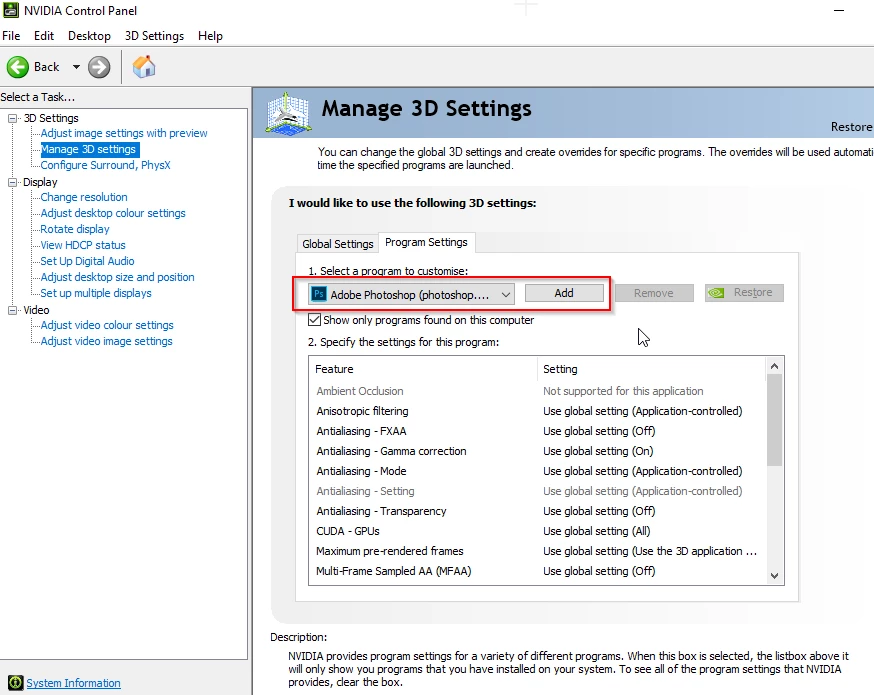
Have you checked out the link I posted above, make sure that Photoshop.exe is added here

3 replies

macpawel
Participating Frequently
April 25, 2019

Maybe you are using CMYK or different mode or depth image?

Is your image RGB?

old manAuthor
Participant
April 25, 2019

Yes I have tried Gray scale and RGB.

April 26, 2019

Thanks Ged!! That is exactly what I needed to fix the issue. Works perfectly.

Hope you have a great evening.

Regards,

Doug


Ah great glad you got it working

davescm
Community Expert
Community Expert
April 25, 2019

Hi

Can you go to Photoshop >Help >System info press the Copy button and paste the info here. It will help us to see the way Photoshop is set up on your machine.

Dave

April 25, 2019

Is there an echo in the room

davescm
Community Expert
Community Expert
April 25, 2019

Oops - sorry Ged - I obviously hadn't fully read your post

Dave

April 25, 2019

Hi

What exact version of Photoshop are you using, have you tried updating your GPU driver from the Nvidia website, performing a clean install of the driver is usually the best option, you'll find that option under custom installation

Also take a look here

Troubleshoot Photoshop graphics processor (GPU) and graphics driver issues

Perhaps you could post your Photoshop system info, in Photoshop go to Help > System Info and copy and paste that into this thread