LuluGypsy
Participating Frequently
February 9, 2018
Answered

Perspective warp not available photoshop CC2018

  • February 9, 2018
  • 2 replies
  • 1174 views

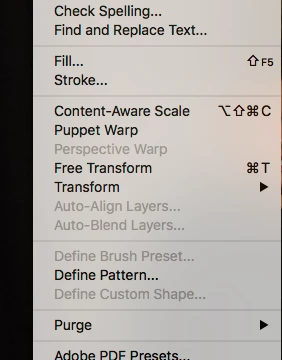
Hi any advice how to get Perspective warp CC2018 back.its not worked for a few months.

Thanks

    This topic has been closed for replies.
    Correct answer Trevor.Dennis

    What are your Preference > Performance settings?

    What is your system spec?  Open Photoshop and go Help > System Info > Copy ​and paste to this thread.

    [EDIT]  JJ you old Night Owl.  You are not trying to tell us that you don't need your beauty sleep?

    2 replies

    Trevor.Dennis
    Community Expert
    Trevor.DennisCommunity ExpertCorrect answer
    Community Expert
    February 9, 2018

    What are your Preference > Performance settings?

    What is your system spec?  Open Photoshop and go Help > System Info > Copy ​and paste to this thread.

    [EDIT]  JJ you old Night Owl.  You are not trying to tell us that you don't need your beauty sleep?

    LuluGypsy
    LuluGypsyAuthor
    Participating Frequently
    March 21, 2018

    Thank you so much I was struggling with this for months Yaaaaaaaa

    JJMack
    Community Expert
    Community Expert
    February 9, 2018

    Can not tell why it is grayed out. You do not show your layers palette can not see if any Photoshop layer is targeted.  If there are more than one layer targeted or if the targeted layer is a layer perspective warp can be used on.  If perspective warp is not available for what is targeted you could try converting the target to a smart object layer and use perspective warp on the smart object layer.  Something is targeted for some transforms and define brush and puppet warp is avaialbe.

    JJMack