
Inspiring
April 21, 2019
Answered

Perspective Warp tool does not work.

  • April 21, 2019
  • 4 replies
  • 20891 views

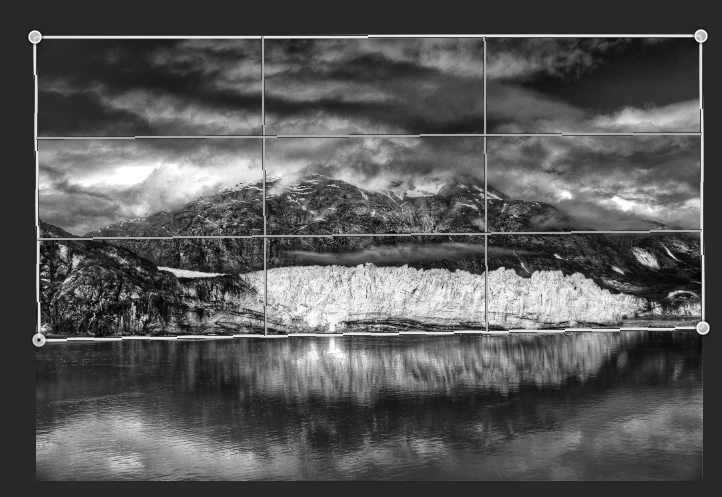
I am trying to adjust the horizontal plane in the middle of a photograph so that it is truly horizontal. I want the sky line to stay the way it is. I want to adjust the shore-line in the middle of the photo so that it is truly horizontal. So, I am using the Perspective Warp tool. However, once I insert the Perspective Warp lines and hit the Enter button, nothing changes. The Warp lines disappear, and the photo does not change at all. How do I get the Warp lines to make the changes? I can't get the Perspective Warp tool to actually make any changes to the image.

    Correct answer davescm

    Hi

    Place your grid in Layout mode then , in the options bar switch to Warp mode and move the grid. Then hit enter or press the tick button.

    Dave

    4 replies

    curt.gallery
    Known Participant
    October 23, 2024

    The very non intuitive silly thing is you can actually move the handles in layout mode and the results are worthless when you switch to warp. It does nothing. You have to switch to warp before moving the handles. The UX does not make sense. 

    Participant
    February 27, 2024

    I have the same problem. And the suggested solution makes no sense.


    With the layer I want to change selected, I go to Edit>Perspective Warp.

    The cursor changes to the perspective warp tool, and the object I previously selected (the layer I want to warp), becomes UNselected. The options menu opens at the top. The options menu is set to "layout." The undo, cancel, and check are "available" but the other tools (the various lines, home...) are greyed out. 

    I place the cursor where I want the object to go and manipulate the corners until the box is the shape I want the finished layer to be. Then I hit "warp" and move the image. But it cuts off the image, like there's an invisible mask.

    Participant
    June 10, 2024

    Did you find the fix? Same issue here, It used to work flawlessly and now it's broken since the updates

    Participant
    July 9, 2024

    Since I updated to Version 25.9.1, Perspective Warp, Warp does not function, and the sub categories of Warp, like Split Warp Horizontally , are all ghosted. What a mistake.

    Participant
    December 23, 2019

    Hello!  I am having trouble with Perspective Warp. When I choose Edit > Perspective Warp,  I do not see layout or warp modes in my options bar, so how does it work in Photoshop Version 20.08 on a mac?

    davescm
    Community Expert
    Community Expert
    December 23, 2019

    It works the same way, but it looks like you have the narrow options bar enabled in preferences, so you have symbols for those functions instead of words.


    Dave

    Participant
    June 8, 2022


    Hello do you know why my perspective warp dosent work

    thank you

    davescm
    Community Expert
    davescmCommunity ExpertCorrect answer
    Community Expert
    April 21, 2019

    Hi

    Place your grid in Layout mode then , in the options bar switch to Warp mode and move the grid. Then hit enter or press the tick button.

    Dave

    Inspiring
    April 22, 2019

    Thanks. That worked.