Participant
March 3, 2021
Answered

Phonographic copyright symbol (P in circle)

  • March 3, 2021
  • 6 replies
  • 10551 views

Hi, can anyone help with getting the phonographic copyright symbol in photoshop? Anything I try results in a box with an X in it?

Correct answer Kevin Stohlmeyer

Hi Kevin, yes!  Thank you for that suggestion, I did come across everyone's suggestions here and on the internet, but none of them worked for me.   I am using Photoshop 2024 on a macintosh, not windows.   Maybe that's the problem?   The Glyph Panel and the other grid that you're referring to do not contain a P in a circle.    They contain a C in a circle and an R in a circle, but again,  P in a circle is a different symbol., unfortunately.   I can see the pic you've attached, and clearly you can access a P in a circle, but I've been dealing with this issue for years and it is really dumb, to be honest,  lol.  There's got to be something I don't know, perhaps?     But i appreciate your answers of course, thank you!! 


@A.j.22520063hgv8 the catch is its not widely available so only certain fonts show it. On the Mac in the PS Glyphs panel, use Arial and switch to symbols.
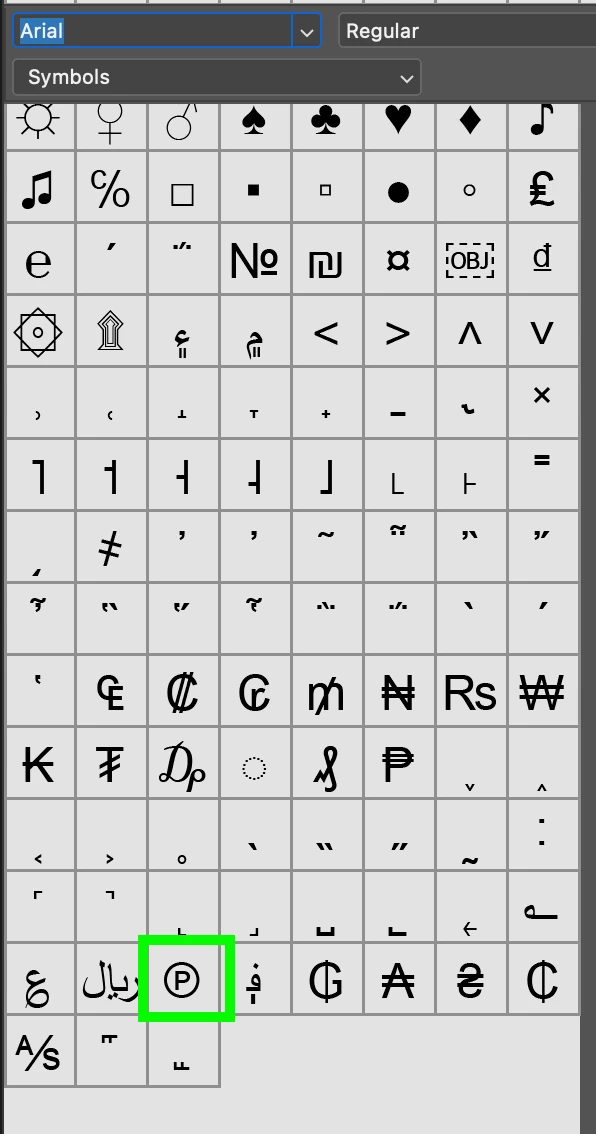


6 replies

Participant
June 26, 2025

use the arial regular font to make the circled p appear instead of the x box.   not all fonts in photoshop has that symbol.   😉

November 27, 2024

To get it into a transparent png or gif use the symbol for R in a circle.
Maks the layer with the letter and chop off the bottom right extremity of the R.
Save as (P)

Participating Frequently
August 13, 2024

I have never been able to create a P inside of a circle using Photoshop.   P, not C.    Years later, I still need a P inside of a circle,  and this time it will appear onscreen, so i can only use text, I cannot utilize a jpg of this symbol.    


I am not asking about a C inside of a circle.  There is a difference, and people everywhere give me an answer for how to create a C inside of a circle.  P and C are different letters.  They are completely different symbols.  


P in a circle is not available via text inside photoshop, i don't think?  But that is my question.  Is it??  Last time i checked,  P in a circle does not appear in the gigantic grid of symbols that photoshop offers automatically.  


To reiterate: 


What I am asking for is instructions on how to create a P in a circle symbol  to appear onscreen as a transparent PNG, therefore, i must create it in photoshop using TEXT ONLY.   I have to save it as a transparent png so that you will see thru the picture onscreeen thru the P in a circle symbol.   C in a circle instructions will not help, it is a different symbol, therefore,  please do not suggest any links or any resources that are not explicitly for creating a P in a circle.   Thank you very much!  

Kevin Stohlmeyer
Community Expert
Community Expert
August 13, 2024

@A.j.22520063hgv8 Did you attempt to use the solution I offered above before dual posting?

I've confirmed on my PC it is there - Unicode Subrange>Letterlike Symbols


Kevin Stohlmeyer
Community Expert
Community Expert
August 13, 2024

And it works in Photoshop:


Chris 486
Community Expert
Community Expert
March 1, 2022

Hi MIA5C49!


There is a full character map in windows you can use to select and then paste it as text into other programs. You can search for it in windows.


Participating Frequently
August 13, 2024

Thank you for this reply, but the last time I checked, the full character map that you are suggesting to us,  it does not contain a P in a circle.   The question:  How do you get a P in a circle,  not a C in a circle.    Please note that P and C are different letters, hence,  there is a difference!!   Good grief, and lol.    It is really frustrating when we ask a question correctly but receive incorret answers!  I didnt' even think that was possible.  🙂

Kevin Stohlmeyer
Community Expert
Community Expert
August 13, 2024

@A.j.22520063hgv8 per the UK copyright office select "web dings" dropdown in the character map:

https://copyrightservice.co.uk/copyright/copyright_symbol


Bojan Živković11378569
Community Expert
Community Expert
March 1, 2022

Can you provide more details on what are steps and methods you use? Have ou read this article https://fsymbols.com/keyboard/windows/layouts/

JJMack
Community Expert
Community Expert
March 3, 2021

try holding down the Alt key and on the numeric key pad type 0169 like this ©

or

JJMack
Inspiring
March 1, 2022

Phonographic copyright is not a c but a p. I have that same question, getting the regular copyright C is easy, but getting the p is a nightmare in illustrator, as we always get the box. This is what we need ---->>>> Ⓟ

Leslie Moak Murray
Community Expert
Community Expert
March 1, 2022

One way is the Ellipse tool. Make a circle in black:


Duplicate the layer and make it white:


Make the white one smaller. Now, both are vectorized and scalable. Add the P of your choice, and the type layer is also scalable.