A new version, combining the separate metric and imperial scripts into one script with a GUI, adding a scale factor field.
P.S. Just in case I broke something, I welcome testing and feedback, thanks.
EDIT: v1.4 Update, 27th April 2026
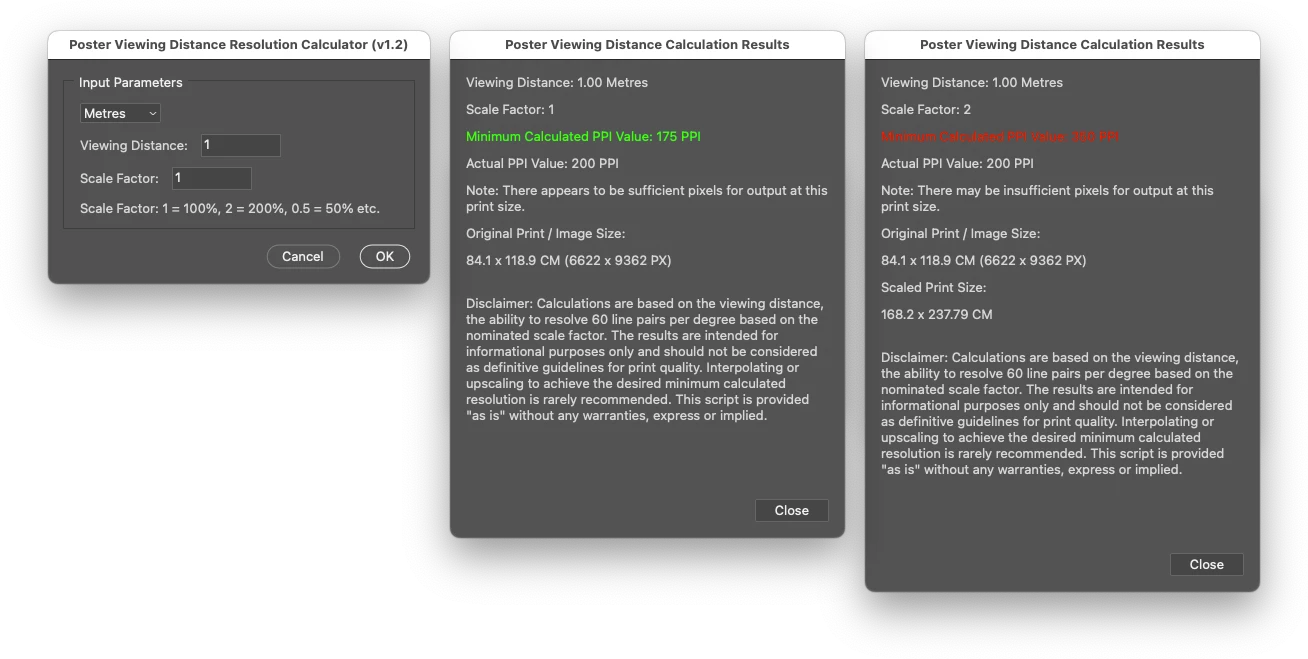
/*

Poster Viewing Distance Resolution Calculator v1-4.jsx
Stephen Marsh
v1.0 - 13th February 2024: Initial release
v1.1 - 14th February 2024: Added canvas size to the alert
v1.2 - 6th May 2025: Combined the separate metric and imperial scripts into a single script with a GUI, including a scale factor
v1.3 - 21st August 2025: Scale factor and minimum calculated PPI formula corrected
v1.4 - 27th April 2026: Minor GUI update and scaled PX dimensions report corrected


https://community.adobe.com/t5/photoshop-ecosystem-discussions/photo-blow-up-question/td-p/14416674
https://community.adobe.com/t5/photoshop-ecosystem-discussions/quick-question-how-to-you-tackle-image-size-regarding-printing-projects-distance-dpi/m-p/13273751

Related resources:
https://www.omnicalculator.com/other/pixels-to-print-size
https://www.insights4print.ceo/2025/04/stop-asking-for-300-ppi-or-dpi-images/
https://www.linkedin.com/pulse/300-ppp-le-culte-des-pixels-inutiles-branislav-mili%25C4%2587-1qx6f/?trackingId=OGo70EImQ5cm9d3Sqe4q5w%3D%3D

*/

#target photoshop

    (function () {
        // Check if a document is open
        if (!app.documents.length) {
            alert("A document must be open to use this script!");
            return;
        }

        // Create the input dialog window
        var dialog = new Window("dialog", "Poster Viewing Distance Resolution Calculator (v1.4)");
        dialog.preferredSize.width = 380;

        // Create the panel for dropdown and input field
        var inputPanel = dialog.add("panel", undefined, "Input Parameters");
        inputPanel.alignChildren = "left";
        inputPanel.orientation = "column";
        inputPanel.margins = 15;
        inputPanel.preferredSize.width = 350;

        // Dropdown for unit selection
        var unitGroup = inputPanel.add("group");
        unitGroup.orientation = "row";
        unitGroup.add("statictext", undefined, "Units:");
        var unitDropdown = unitGroup.add("dropdownlist", undefined, ["Metres", "Feet"]);
        unitDropdown.selection = 0; // Default selection: Metres

        // Input field for viewing distance
        var distanceGroup = inputPanel.add("group");
        distanceGroup.orientation = "row";
        distanceGroup.add("statictext", undefined, "Viewing Distance:");
        var distanceInput = distanceGroup.add("editnumber", undefined, "1");
        distanceInput.characters = 8;

        // Input field for scale factor
        var scaleGroup = inputPanel.add("group");
        scaleGroup.orientation = "row";
        scaleGroup.add("statictext", undefined, "Scale Factor:");
        var scaleInput = scaleGroup.add("editnumber", undefined, "1");
        scaleInput.characters = 8;

        // Add help text for scale factor
        var helpText = inputPanel.add("statictext", undefined, "Scale Factor: 1 = 100%, 2 = 200%, 0.5 = 50% etc.");
        helpText.preferredSize.width = 320;

        // Event listener to change the editnumber field based on dropdown selection
        unitDropdown.onChange = function () {
            if (unitDropdown.selection.text === "Feet") {
                distanceInput.text = "3"; // Set to 3 for Feet
            } else if (unitDropdown.selection.text === "Metres") {
                distanceInput.text = "1"; // Set to 1 for Metres
            }
        };

        // Cancel and OK buttons
        var buttonGroup = dialog.add("group");
        buttonGroup.alignment = "right";
        var cancelButton = buttonGroup.add("button", undefined, "Cancel");
        var okButton = buttonGroup.add("button", undefined, "OK");

        // Define OK button action
        okButton.onClick = function () {
            var unit = unitDropdown.selection.text; // Get selected unit
            var viewingDistance = parseFloat(distanceInput.text); // Get entered distance
            var scaleFactor = parseFloat(scaleInput.text); // Get scale factor

            if (isNaN(viewingDistance)) {
                alert("Please enter a valid number for the viewing distance.");
                return;
            }

            if (isNaN(scaleFactor) || scaleFactor <= 0) {
                alert("Please enter a valid positive number for the scale factor.");
                return;
            }

            // Validate minimum viewing distance based on the selected unit
            if (unit === "Metres" && viewingDistance < 1) {
                alert("For Metres, the minimum viewing distance is 1.");
                return;
            } else if (unit === "Feet" && viewingDistance < 3) {
                alert("For Feet, the minimum viewing distance is 3.");
                return;
            }

            // Convert to feet if necessary
            if (unit === "Metres") {
                viewingDistance = viewingDistance * 3.281; // Metres → Feet
            }
            var inches = viewingDistance * 12;

            ////////////////////////////////////////////////////////////////////
            // A "minimal" constant of 3438 PPI (or x2 of 6878 PPI for "optimal
            // smoothness") is derived from the relationship between human visual
            // acuity and the resolution needed for a print.
            ////////////////////////////////////////////////////////////////////

            var minPPI = Number(3438);
            var optPPI = Number(6878);

            // Required PPI depends ONLY on viewing distance
            var requiredPPI = Math.ceil(optPPI / inches);

            // Document properties
            var doc = app.activeDocument;
            var docRes = Math.round(doc.resolution);

            // Original dimensions (px)
            var origWidthPx = Math.round(doc.width.as('px'));
            var origHeightPx = Math.round(doc.height.as('px'));

            // Scaled dimensions (px)
            var scaledWidthPx = origWidthPx;
            var scaledHeightPx = origHeightPx;

            // Original print dimensions (inches or cm)
            var origWidth = unit === "Metres" ?
                (Math.round(doc.width.as('cm') * 100) / 100) :
                (Math.round(doc.width.as('in') * 100) / 100).toFixed(2);
            var origHeight = unit === "Metres" ?
                (Math.round(doc.height.as('cm') * 100) / 100) :
                (Math.round(doc.height.as('in') * 100) / 100).toFixed(2);

            // Scaled print dimensions
            var scaledWidth = unit === "Metres" ?
                (Math.round((doc.width.as('cm') * scaleFactor) * 100) / 100) :
                (Math.round((doc.width.as('in') * scaleFactor) * 100) / 100).toFixed(2);
            var scaledHeight = unit === "Metres" ?
                (Math.round((doc.height.as('cm') * scaleFactor) * 100) / 100) :
                (Math.round((doc.height.as('in') * scaleFactor) * 100) / 100).toFixed(2);

            // Effective resolution after scaling
            var actualPPI = docRes / scaleFactor;

            // Format display strings
            var origSizeUnit = unit === "Metres" ? " CM" : " Inches";
            var origCanvasSize = origWidth + " x " + origHeight + origSizeUnit;
            var scaledCanvasSize = scaledWidth + " x " + scaledHeight + origSizeUnit;
            var origCanvasSizePx = origWidthPx + " x " + origHeightPx + " PX";
            var scaledCanvasSizePx = scaledWidthPx + " x " + scaledHeightPx + " PX";

            // Show the result in a new window
            var resultWindow = new Window("dialog", "Poster Viewing Distance Calculation Results");
            resultWindow.preferredSize.width = 400;
            resultWindow.orientation = "column";
            resultWindow.alignChildren = "left";
            resultWindow.spacing = 10;

            var resultGroup = resultWindow.add("group");
            resultGroup.orientation = "column";
            resultGroup.alignChildren = "left";
            resultGroup.spacing = 10;

            resultGroup.add("statictext", undefined, "Viewing Distance: " +
                (unit === "Metres" ? (viewingDistance / 3.281).toFixed(2) + " Metres" : viewingDistance + " Feet"));
            resultGroup.add("statictext", undefined, "Scale Factor: " + scaleFactor);
            var requiredText = resultGroup.add("statictext", undefined, "Required Minimum PPI: " + requiredPPI + " PPI");
            var actualText = resultGroup.add("statictext", undefined, "Actual Effective PPI: " + actualPPI.toFixed(0) + " PPI");
            var infoText = resultGroup.add("statictext", undefined,
                actualPPI >= requiredPPI ?
                    "Note: There appears to be sufficient pixels for output at this print size." :
                    "Note: There may be insufficient pixels for output at this print size.",
                { multiline: true });
            infoText.preferredSize.width = 365;

            // Original size
            resultGroup.add("statictext", undefined, "Original Print / Image Size:", { multiline: true });
            resultGroup.add("statictext", undefined, origCanvasSize + " (" + origCanvasSizePx + ") ");

            // Scaled size - only show if scale factor is not 1
            if (scaleFactor !== 1) {
                resultGroup.add("statictext", undefined, "Scaled Print Size:", { multiline: true });
                resultGroup.add("statictext", undefined, scaledCanvasSize + " (" + scaledCanvasSizePx + ")", { multiline: true });
            }

            // Disclaimer text
            var explanationText = resultGroup.add("statictext", undefined,
                '\nDisclaimer: Calculations are based on the viewing distance and visual acuity assumptions. The results are intended for informational purposes only and should not be considered as definitive guidelines for print quality. Upscaling to achieve higher PPI is rarely recommended. This script is provided "as is".',
                { multiline: true });
            explanationText.preferredSize.width = 365;

            // Color code pass/fail based on comparison
            if (actualPPI >= requiredPPI) {
                requiredText.graphics.foregroundColor = actualText.graphics.newPen(actualText.graphics.PenType.SOLID_COLOR, [0, 1, 0, 1], 1);
            } else {
                requiredText.graphics.foregroundColor = actualText.graphics.newPen(actualText.graphics.PenType.SOLID_COLOR, [1, 0, 0, 1], 1);
            }

            // Add Close button
            var buttonGroup = resultWindow.add("group");
            buttonGroup.alignment = "right";
            var closeButton = buttonGroup.add("button", undefined, "Close");
            closeButton.onClick = function () { resultWindow.close(); };

            resultWindow.layout.layout(true);
            resultWindow.layout.resize();
            resultWindow.center();
            resultWindow.show();

            dialog.close();
        };


        // Define Cancel button action
        cancelButton.onClick = function () {
            dialog.close();
        };

        // Show the input dialog
        dialog.center();
        dialog.show();
    })();
- Copy the code text to the clipboard
- Open a new blank file in a plain-text editor (not in a word processor)
- Paste the code in
- Save as a plain text format file – .txt
- Rename the saved file extension from .txt to .jsx
- Install or browse to the .jsx file to run (see below)
https://prepression.blogspot.com/2017/11/downloading-and-installing-adobe-scripts.html



 AdChoices