April 18, 2019
Question

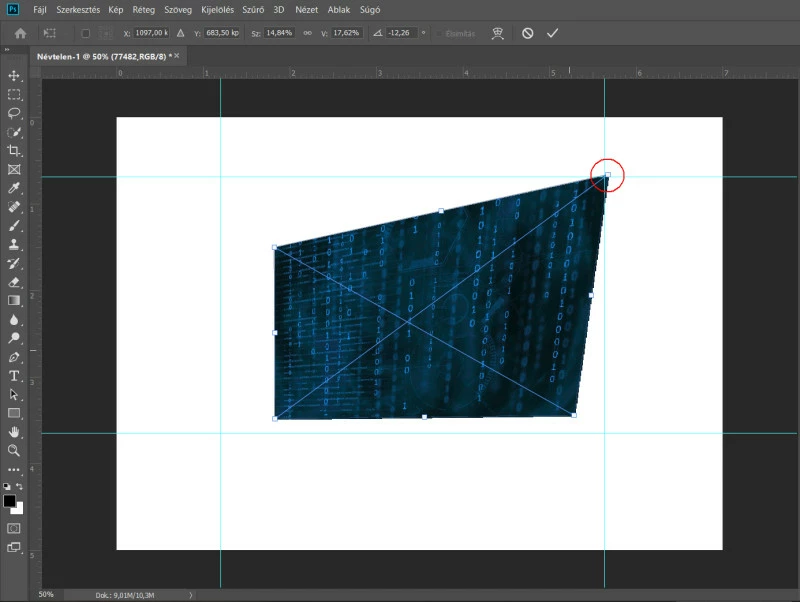
Photoshop 20.0.4 snap to guidelines not woking with transformed images
  • April 18, 2019
  • 2 replies
  • 2322 views

In CS6 this function works fine.

This topic has been closed for replies.

2 replies

JJMack
Community Expert
Community Expert
April 18, 2019

How are you Photoshop View Snap to setting currently set?  It look like you using the Ctrl key to distort a transform shape.  If you want the anchor point to snap to the guides the snap to setting must be enabled.

JJMack
italosan
Community Expert
Community Expert
April 18, 2019

Hi, hold Shift when applying the transformation.

April 19, 2019

It is a bug, shift key doesn't help.

PS CC doesn't snap to guidelines:

PS CS6 works fine:

JJMack
Community Expert
Community Expert
April 20, 2019

Then its always been a bug.  When Snap to All is enable the transform tool will normally snap to guide lines when you use the tool. However, It will not snap to guides when you use the Ctrl|CMD modifier key. At least on windows. I use the legacy transform option in CC 2019 version 20.0.4.   It also works that way in the other version of Photoshop I have installed. CS3, CS6, CC 2014 and CC 2018

However sometimes it does seem to work in CS6 but not always. Here I may have use the Alt kry fot it look like the other control points the were on the guide line are now off them but the top right corner did snap to the guides.

JJMack
