
Inspiring
November 16, 2017
Question

Photoshop 2017/2018 '15 MBP Retina Adjustment Layers don't preview

  • November 16, 2017
  • 2 replies
  • 689 views

I've had this problem for a while now. And now it is starting to piss me off. Photoshop CC 2017 and 2018. 2015 Retina Macbook Pro with 16GB RAM, MacOS Sierra 10.12.6 (16G1036).

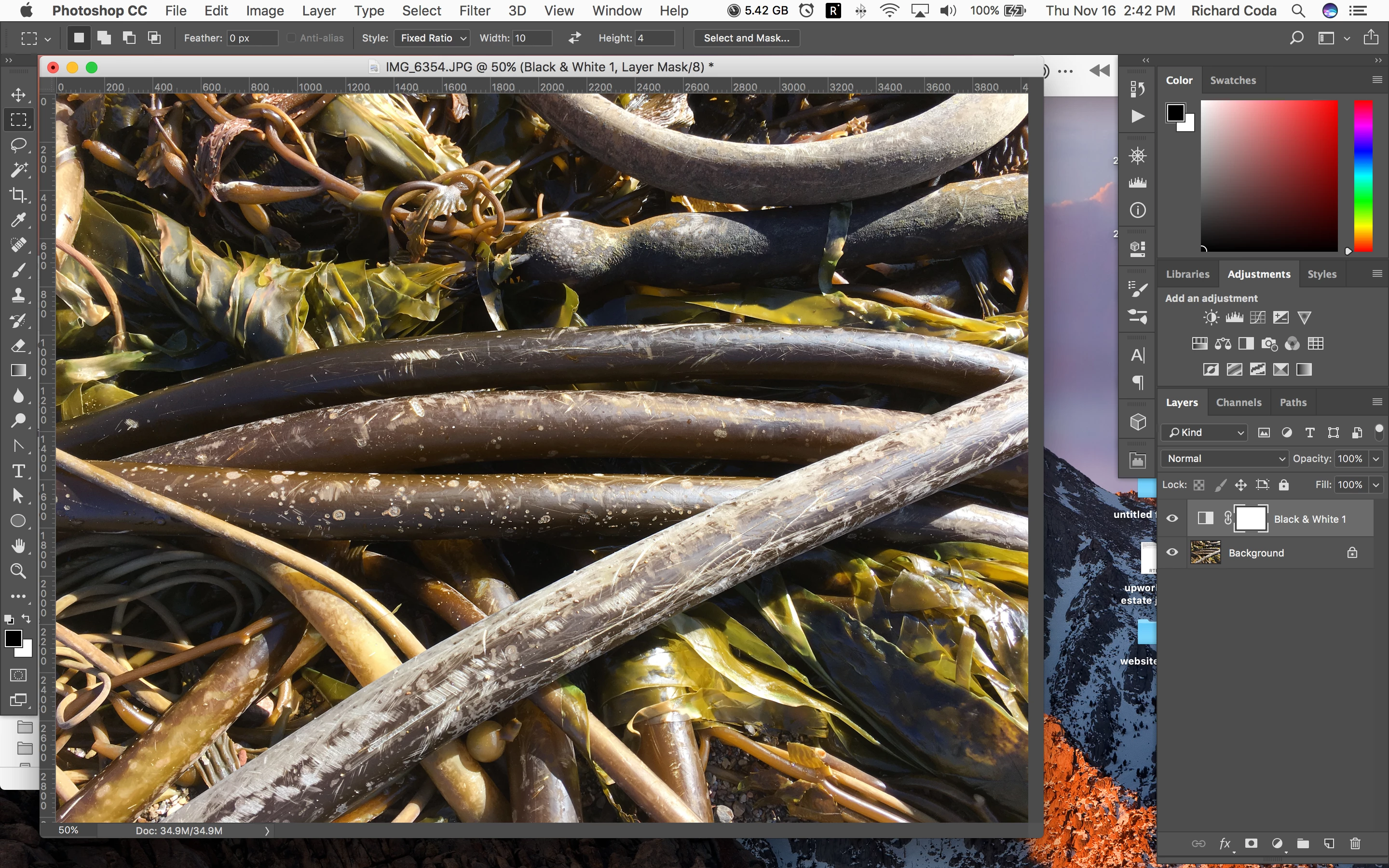
If I make an adjustment layer, let's say convert to B&W for arguments' sake, the adjustment doesn't preview until I resize the window or something. Happens with ALL adjustment layer types. See attached screenshot. Why is the image still color when a BW adjustment layer has been applied?
This topic has been closed for replies.

2 replies

Jesper Storm Bache
Adobe Employee
Adobe Employee
November 17, 2017

I don't see this problem on my Mac Book + retina. I am using 10.13.1, but it should not make a difference.

Do you have any 3rd party plug-ins installed - if so can you reproduce this without the plug-ins? (hold down shift when you launch Photoshop).

Jesper

rcoda1Author
Inspiring
November 17, 2017

no plugins... I have no need for Photoshop plugins.

gener7
Community Expert
Community Expert
November 17, 2017

In Photoshop, you can uncheck "Use Graphics Processor" under Photoshop > Preferences > Performance to see if it is a graphics card issue.

Also if your MBP happens to have dual graphics cards, you can make sure it is selecting the high performance card.

Set graphics performance on MacBook Pro - Apple Support

I'd also check with Apple Support to be sure there are no issues with  your model. I own two mid 2012 MBP running MacOS 10.12 and 10.13 and I do no see this problem using CC 2017 or 2018.

Gene

postrophix
Participating Frequently
November 16, 2017

Hi

Seem your Background layer is lock. Un-lock it (double clic on it)

Pierre

rcoda1Author
Inspiring
November 16, 2017

No... I am not a novice. What would that have to do with anything? I just tried what you recommended... irrelevant. Same thing.

postrophix
Participating Frequently
November 17, 2017

Hi

I'm not a novice either, (recently lost my 5 green bars as I kinda change my profile)

And your right it should work, no problem on my side as Jesper said. I guess on some PS setup, this won't work.

Pierre