Participant
December 7, 2016
Answered

Photoshop 2017 layer selection quirk

  • December 7, 2016
  • 6 replies
  • 16103 views

I recently upgraded to the 2017 version of Photoshop through Creative cloud, and have the weirdest layer selection issue. I select a layer, go to move it, and it immediately reselects a different layer and moves it instead. It does this in multiple files, multiple layers. I get to the point where I can't move a layer, and have to restart the program.

I've been using Photoshop for 15 years, never had this happen. Is this a bug, or a new "feature" that makes me want to throw my computer out the window?

Thanks

    This topic has been closed for replies.
    Correct answer Trevor.Dennis

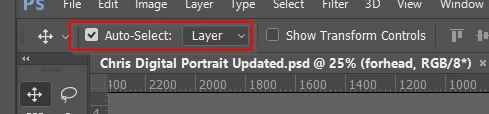
    It sounds like you have Auto Select checked.  That is a totally annoying feature and I keep it turned off, and use the Ctrl key to auto select with the Move tool.  Note also that you can chose for it to select layers or groups, and the latter is the default.  Layers works best for me.

    6 replies

    brianb53207096
    Participant
    June 21, 2019

    This worked for me also ALTHOUGH not until I restarted Photoshop after deselecting auto select. THanks.

    Participant
    May 13, 2019

    Oh my goodness. Thank you. I thought I was going crazy.

    shahin3647
    Participant
    May 3, 2018

    Thanks for your help.

    Participant
    February 12, 2018

    Thank you so much! This feature is so annoying and time consuming - all for the tick of a box!

    Participating Frequently
    June 15, 2017

    Thank you! That fixed it. It's been driving me nuts. I had to lock other layers to be able to move the one I need. So unproductive.

    Participant
    December 7, 2016

    Oooh, I figured out what it's doing. It's automatically selecting the layer I'm "touching" with my cursor. The only way to work around it seems to be to right click and grab the layer I'm looking for out of the list, then I can move it. Kind of difficult when you're talking about a file that has dozens of layers. How do I turn this off?

    Trevor.Dennis
    Community Expert
    Trevor.DennisCommunity ExpertCorrect answer
    Community Expert
    December 7, 2016

    It sounds like you have Auto Select checked.  That is a totally annoying feature and I keep it turned off, and use the Ctrl key to auto select with the Move tool.  Note also that you can chose for it to select layers or groups, and the latter is the default.  Layers works best for me.

    Participant
    December 7, 2016

    That was it! I knew it had to be something simple. I have never used this feature, didn't even know it existed - I suppose my settings got reset when I updated to 2017. Thank you!