Zoltark
Participant
August 16, 2018
Answered

Photoshop 2018 shape/path tool bug

  • August 16, 2018
  • 2 replies
  • 1683 views

Hello,

I have a really odd problem with Photoshop 2018. I do a lot of retouch on photos, and I have to use the shape tool --> path tool. The problem is sometimes lets say 10 out 6 times when i select the shape tool and try to draw a path Photoshop flickers then messes off my workspace (ex. the zoom Z button now works as if I was in the liquify window). After this happens i have to close the program and restart it again. It's really annoying and I could not find a fix for this.

Photoshop is up to date, and I have done a full clean install. Also 5 of my colleagues have the same problem.

Did anyone experienced this? I would really appreciate some help.
    This topic has been closed for replies.
    Correct answer gener7

    There is a reported problem with the Pen Tool in CC 2018. If you have updated to 19.1.5 and it is still there, I can only advise to install and run CC 2017 until it is fixed. You can use 2017 for retouching, and you don't have to uninstall 2018.

    Photoshop CC 2018 19.1: The rubber band being shaky | Photoshop Family Customer Community

    Please visit this thread and feel free to ask questions.

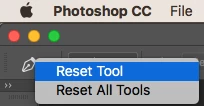
    You  might also  see if a Tool reset clears the problem: Right click on the Tool in the Options bar and choose reset.

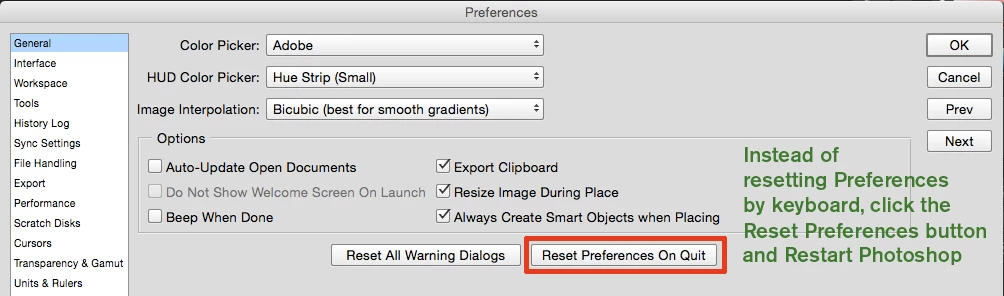
    More drastic is the Preference settings, but might be worth a try. You did say you reinstalled, but keep in mind settings are never replaced in that process. There is a reason for that since in addition to replacing the program files, custom swatches, brushes, actions and presets would be replaced with defaults, costing users hours to rebuild them if they didn't back them up.

    As the disclaimer goes, these are "best ideas" for a fix, but not a guarantee. I hope these ideas help out.

    Gene

    2 replies

    gener7
    Community Expert
    gener7Community ExpertCorrect answer
    Community Expert
    August 16, 2018

    There is a reported problem with the Pen Tool in CC 2018. If you have updated to 19.1.5 and it is still there, I can only advise to install and run CC 2017 until it is fixed. You can use 2017 for retouching, and you don't have to uninstall 2018.

    Photoshop CC 2018 19.1: The rubber band being shaky | Photoshop Family Customer Community

    Please visit this thread and feel free to ask questions.

    You  might also  see if a Tool reset clears the problem: Right click on the Tool in the Options bar and choose reset.

    More drastic is the Preference settings, but might be worth a try. You did say you reinstalled, but keep in mind settings are never replaced in that process. There is a reason for that since in addition to replacing the program files, custom swatches, brushes, actions and presets would be replaced with defaults, costing users hours to rebuild them if they didn't back them up.

    As the disclaimer goes, these are "best ideas" for a fix, but not a guarantee. I hope these ideas help out.

    Gene

    Zoltark
    ZoltarkAuthor
    Participant
    August 16, 2018

    Hello,

    Sadly I can't use an older version cause the script that i work with is not compatible, only with the new version.

    I will try a reset preferences.

    Thank you.

    Sahil.Chawla
    Adobe Employee
    Adobe Employee
    August 16, 2018

    Hi Zoltark,

    We're really sorry to hear about the problem with the Shape and Path tool, could you please let us know which exact version of Photoshop you're working on and which operating system are you using?

    Could you please try resetting the preferences of Photoshop and let us know if it helps with the issue?

    https://helpx.adobe.com/photoshop/using/preferences.html

    Note: back up the custom presets, actions and brushes before resetting the preferences.

    Regards,
    Sahil

    Zoltark
    ZoltarkAuthor
    Participant
    August 16, 2018

    Hello,

    The Photoshop version is CC 2018 (19.1.5). I'm using a Windows 10 OS and a Wacom tablet.

    I did try the reset tool options but nothing changed. Tomorrow I will try to reset the preferences.

    Thank you.