
Participant
July 25, 2021
Answered

Photoshop 2021 Marquee Tools missing

  • July 25, 2021
  • 1 reply
  • 4658 views

Hello, can someone help with why I can only see the retangle marquee tool?  I've tried holding the click and no other tools show up.  I've tried resetting all tools to the default and nothing changes.  You can see from my attached images, there is no menu dropdown beside the rectangle marquee and the only tools that are loaded are rectangle marquee and the crop. I am trying to access the circle marquee tool. Thanks in advance.
    Correct answer jane-e

    @wendybasden wrote:

    There are no other marquee tools available to me except rectangle and crop.  Even when I do a reset, whether I clear them or append them, I only get rectangle and crop.


    Hi Wendy,

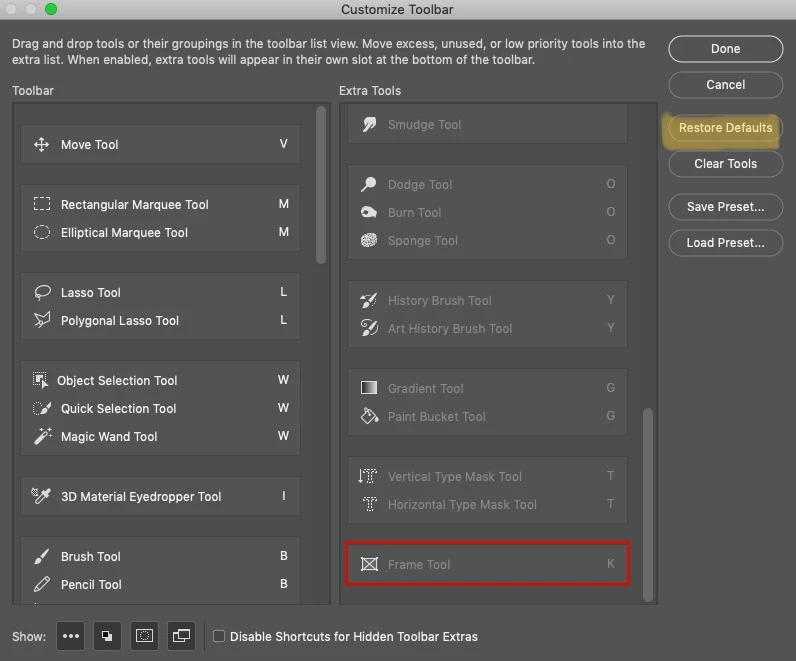
    Your second screenshot shows the presets for the Rectangle Marquee tool. That's not where you want to be. Instead, go to Edit > Toolbars to open the Customize Toolbar dialog and see the hidden tools. In the upper right of this panel, Restore Defaults will reset the toolbar to its defaults.

    https://helpx.adobe.com/photoshop/kb/bringing-back-tools.html 


    ~ Jane


    1 reply

    Nancy OShea
    Community Expert
    Community Expert
    July 25, 2021

    [Moderator moved from Using the Community (forums) to Photoshop.]


    You can customize your Toolbar by pressing the 3 dots icon and select Edit Toolbar.


    Nancy O'Shea— Product User & Community Expert
    Participant
    July 25, 2021

    Thanks for your reply Nancy.  I have tried that as well.  There are no other marquee tools available to me except rectangle and crop.  Even when I do a reset, whether I clear them or append them, I only get rectangle and crop.

    John Waller
    Community Expert
    Community Expert
    July 25, 2021

    Just for the sake of completeness, have you updated to the current version 22.4.3?