minglessis
Inspiring
March 22, 2022
Answered

Photoshop 2022 color themes into swatches?

  • March 22, 2022
  • 2 replies
  • 2450 views

Hello,

Is there a way to save my color themes into swatches?

It seems that with previous color theme panels it was possible but with PS 2022 I can't find the way to save my color themes into my swatches in an efficient way.

Please advise, thanks

This topic has been closed for replies.
Correct answer Sameer K

Hi there,


Thanks for reaching out! We are sorry for the trouble with Libraries in Photoshop. We are here to help!

Could you please share the version of Photoshop and the version of the operating system you are working on?


Currently, Adobe Photoshop will only allow you to use Color themes via the library panel or the swatch history list. Adding Swatches to Library or adding groups of swatches to Color Libraries is possible. Not the other way around that is, adding color themes back into Photoshop's color swatch panels using drag and drop.


You might have a way to do it, and it will take manual effort.

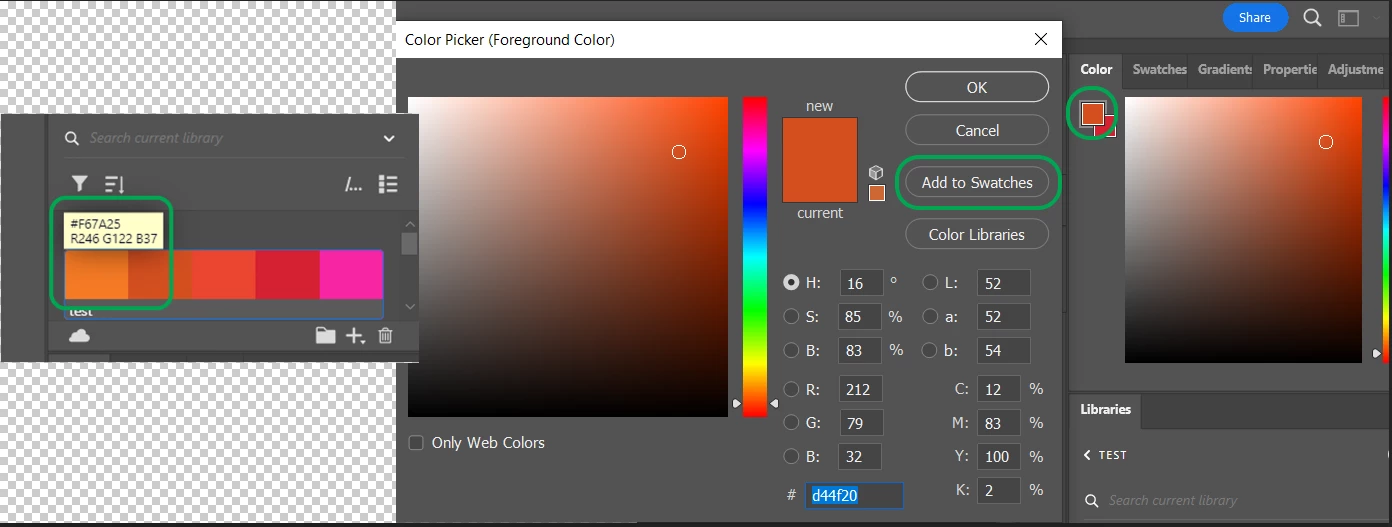
Apply colors by clicking the swatch in a theme or right-clicking and selecting Add to swatches in the menu.
Let us know if this helps,

Thanks,

Sameer K

2 replies

Participant
October 26, 2022

Whats up Bro-Bro,

It looks like the new way to load in swatches is to Window>Swatches, then click the three lines on the top right of the Swatch window. Move down to "import swatches" and then select your desired file for import. 

Sameer K
Community Manager
Sameer KCommunity ManagerCorrect answer
Community Manager
March 22, 2022

Hi there,


Thanks for reaching out! We are sorry for the trouble with Libraries in Photoshop. We are here to help!

Could you please share the version of Photoshop and the version of the operating system you are working on?


Currently, Adobe Photoshop will only allow you to use Color themes via the library panel or the swatch history list. Adding Swatches to Library or adding groups of swatches to Color Libraries is possible. Not the other way around that is, adding color themes back into Photoshop's color swatch panels using drag and drop.


You might have a way to do it, and it will take manual effort.

Apply colors by clicking the swatch in a theme or right-clicking and selecting Add to swatches in the menu.

Let us know if this helps,

Thanks,

Sameer K

minglessis
Inspiring
March 22, 2022

Sameer, thank you for your answer, it is useful.

I'm using PS 2022 and Catalina 10.15.

I understand that by clicking the color from a color theme in the library it's been added to the swatches.

What I don't get is the "add to swatches" in the right-click menu, but that's OK because it's adding the colors by clicking.

Thanks again