Participant
January 12, 2022
Question

Photoshop 2022 Export As Not Working on Clipping Masks Using Artboards
  • January 12, 2022
  • 2 replies
  • 911 views


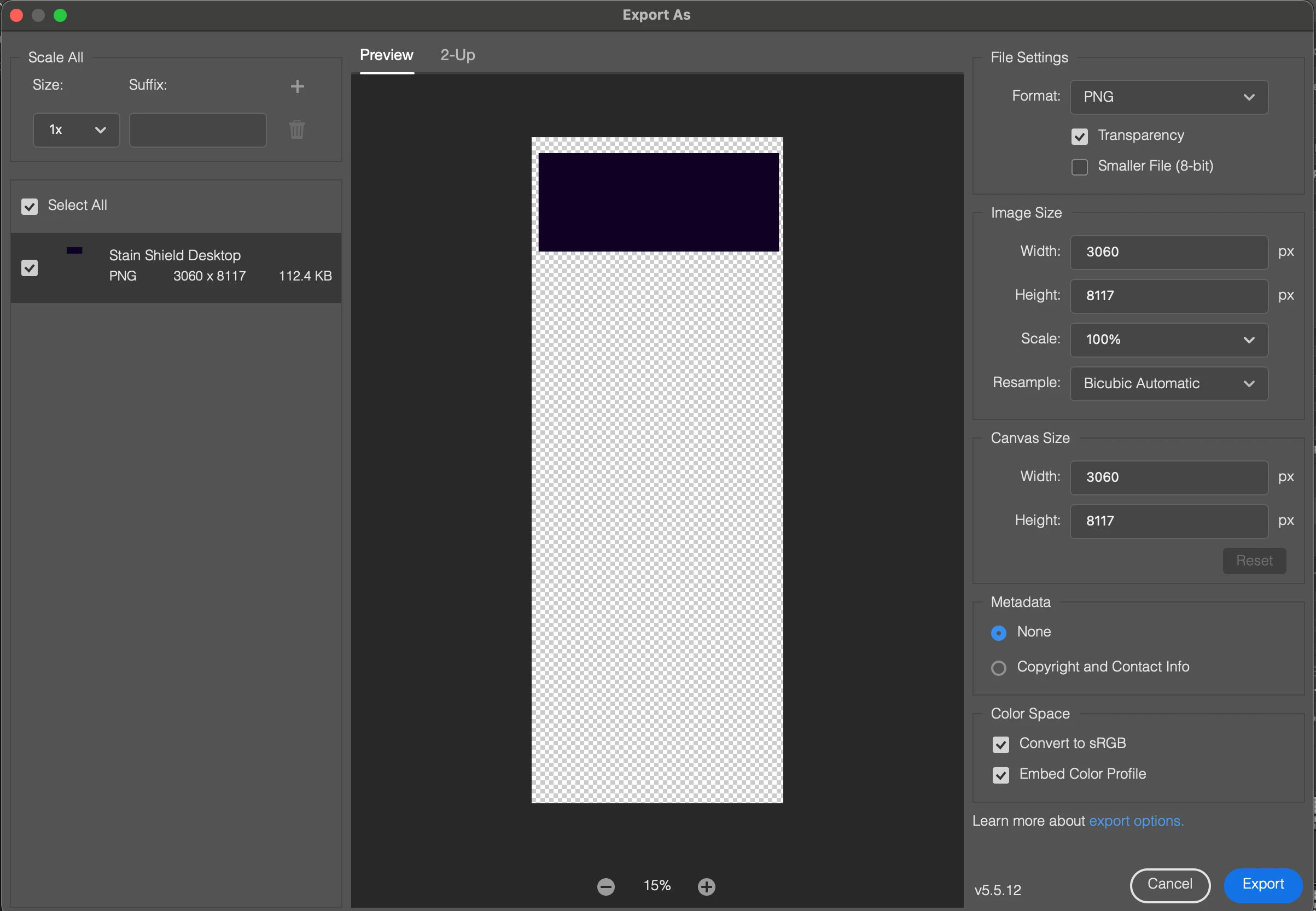
After updating the application from using a 2021 versions, the export as option is no longer working like before. I use clipping masks and when I go to export these clipping masks, the entire page dimensions are automatically added to each element! There is no way in the dialog window box to try and force the original dimensions as the system will crop the page to those dimensions and not how I had my clipping mask. I have over 15 clipping mask elements on my page all sized and having this issue!


Photoshop V 23.1

This topic has been closed for replies.

2 replies

Stephen Marsh
Community Expert
Community Expert
January 12, 2022

Perhaps this is related to the bug fix which removed trimming to a layer mask, which apparently was an unintended feature that many used. Adobe are working on alternatives.

Community Manager
January 12, 2022

Hmm, I haven't been able to reproduce the issue here yet.  Would you please provide a screen capture of the Layers panel or describe the structure in more detail?  Also, just to confirm, it looks like you have launched Export As from the clipping layer itself.  Is that correct?  Lastly, the dimensions you are seeing match that of the Artboard or the entire document?