
Known Participant
October 29, 2021
Answered

Photoshop 2022 Zoom Lag on Mac

  • October 29, 2021
  • 4 replies
  • 6882 views

The zoom (and pan) feature is lagging like hell now. Did not happen with the last version (last release of 2021). Fix this please, I'm reverting back to 2021 until then, thanks.
This topic has been closed for replies.
Correct answer Ged_Traynor

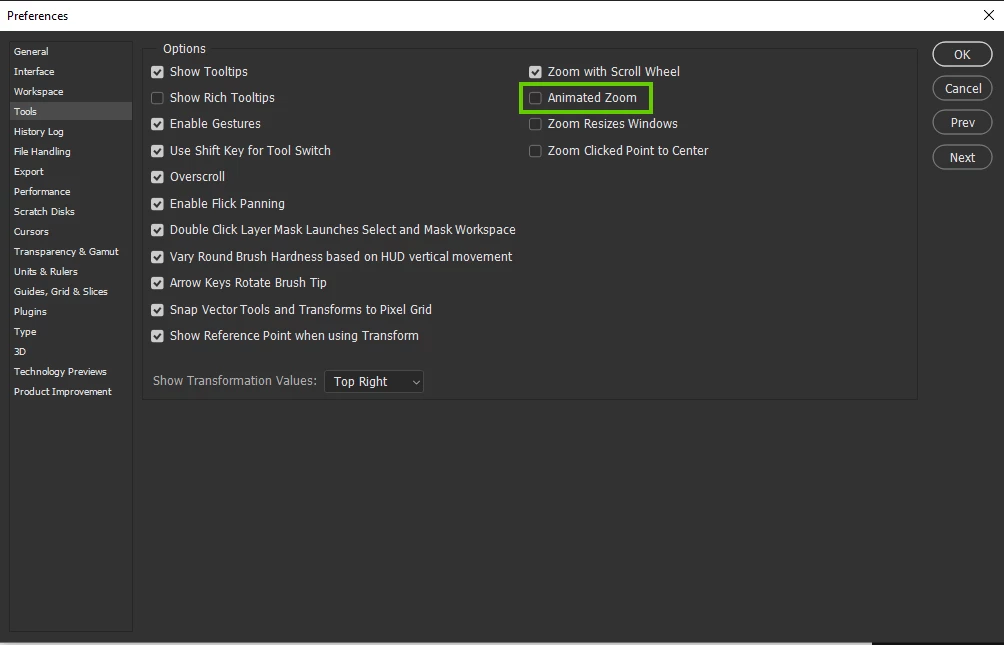
Disable this option in preferences and restart Photoshop to see if it helps

4 replies

Ged_Traynor
Community Expert
Community Expert
November 10, 2021

This issue is reported as been fixed in version 23.0.1

https://helpx.adobe.com/photoshop/kb/fixed-issues.html

Participant
May 18, 2022

Having same problem in latest version too

Known Participant
May 18, 2022

What worked for me was turning off animated zoom I'm preferences.

Inspiring
November 1, 2021

I have the same issue on Windows 10 PC. For me, unchecking "animated zoom" did fix the problem, but I much prefer the animated zoom function, which no longer works as it did before. It's a workaround and hopefully Adobe will see ou comments and address the core issue.


Whispering_EuphoriaB82B
Known Participant
November 2, 2021

-un-checked/checked animated zoom

-un-cheked Use OpenCL (prefernces/performance/advanced settings)

-made sure Pen & Windows Ink is un-checked from windows settings and from wacom tablet settings

-updated GPU drive

-thought holding Alt while zooming might help (since Ps2020 the sliding/panning on adjustment options and transform steps are too big if not usinf Alt)

-increased MB to 80%

All this and only little improvement, please bring back Ps 2019!!!!!!

Whispering_EuphoriaB82B
Known Participant
October 31, 2021

Same issues with Photoshop 2022 on Windows! 

Ged_Traynor
Community Expert
Ged_TraynorCommunity ExpertCorrect answer
Community Expert
October 31, 2021

Disable this option in preferences and restart Photoshop to see if it helps

Participant
October 31, 2021

Thanks! I had the same issue and when I disabled that option zoom works normally

Legend
October 30, 2021

If you go to Preferences > Performance... in 2022, is "Use Graphics Processor" enabled?


If you restore your 2022 preferences using this manual method does it work correctly?

https://helpx.adobe.com/photoshop/using/preferences.html#Manually


If that doesn't solve it, you can quit Photoshop and put the Settings folder back.

Known Participant
November 1, 2021

Just had to disable animated zoom. (Why did I have a feeling that was the case, sigh). Thanks for your reply though.

MiraR
Participant
November 5, 2021

Thank you very much! this solved the problem for me