Participating Frequently
March 17, 2025
Answered

Photoshop 2025 actions have stopped working

  • March 17, 2025
  • 2 replies
  • 632 views

Hello, I am a regular Photoshop user, and over the years I've built up a set of actions that I find helpful to the point where I have a hard time imagining using Photoshop without them. Yesterday I noticed that every single one of my actions stopped working. I don't get an error message or anything, I just click the "play" button and nothing happens. I've Googled around and nothing I see online resembles what can see happening here. Has anyone else noticed this issue with Photoshop lately?


I am using Photoshop CC2025 on a 2018 Macbook with Sonoma 14.7.1.
Correct answer ThioJoe

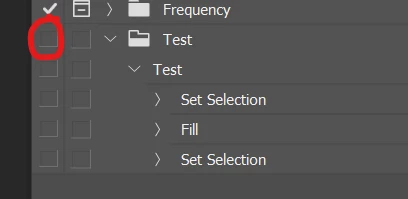
It seems like they might have been disabled somehow, given they don't have checkboxes in the far left column. 

Try clicking here (the left column empty box) next to your actions folder:


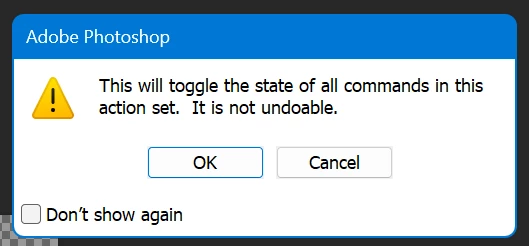
Then hit OK on this message box:


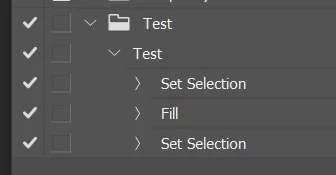
Then they should look like this and work:


2 replies

Participating Frequently
March 18, 2025

That did it thank you! Feeling that sweet mix of relief and embarrassment at the solution being so simple.

ThioJoe
Community Expert
ThioJoeCommunity ExpertCorrect answer
Community Expert
March 17, 2025

It seems like they might have been disabled somehow, given they don't have checkboxes in the far left column. 

Try clicking here (the left column empty box) next to your actions folder:


Then hit OK on this message box:


Then they should look like this and work: