
Photoshop 2025 Missing Printer ICC Profiles
Hi there. Hoping someone may have a fix to this issue. Since installing Adobe Photoshop 2025 (Version 26.1.0), all but two of the printer profiles have disappeared from my printer profile options. I've currently been exporting as a high quality PNG and printing them through illustrator, but this is inconvenient. I've spent hours of googling and even reached out to Adobe tech chat, which annoyingly enough, the person I was talk to ended the chat with no contect after about 30 minutes.
I did find that if I copy my ICC file from the spool/drivers folder and place it in c:\users\username\appdata\roaming\adobe\color\settings, the speceific ICC profile and all the missing usual ones return. BUT THEN, they all disappear from Illustrator and I can't get them back there either. Any help would be greatly appreciated. This has been driving me insane the last couple of days.
I have already uninstalled and reinstalled both Photoshop and Illustrator a couple of times. Didn't work. I also uninstalled and reinstalled my Epson ET-15000 drivers. This fixed it for about a day, then again today, the profiles were missing from Photoshop again. PLEASE HELPPPP!
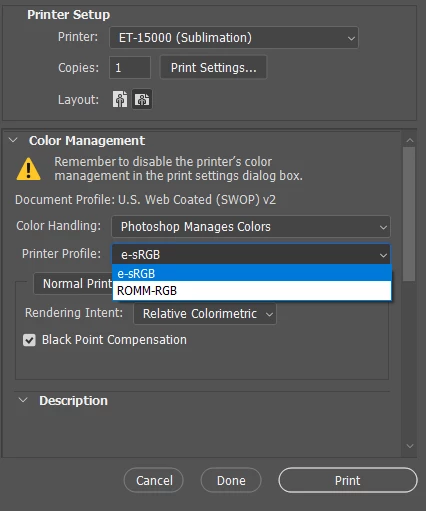
Using Windows 10 Version 22H2 (OS Build 19045.5131)
 AdChoices