
Participating Frequently
November 28, 2024
Answered

Photoshop 2025 Missing Printer ICC Profiles

  • November 28, 2024
  • 5 replies
  • 4912 views

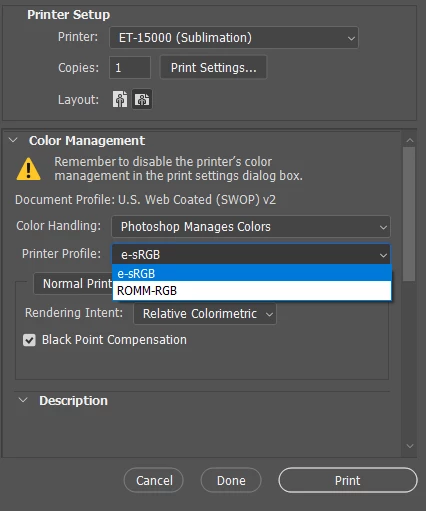
Hi there. Hoping someone may have a fix to this issue. Since installing Adobe Photoshop 2025 (Version 26.1.0), all but two of the printer profiles have disappeared from my printer profile options. I've currently been exporting as a high quality PNG and printing them through illustrator, but this is inconvenient. I've spent hours of googling and even reached out to Adobe tech chat, which annoyingly enough, the person I was talk to ended the chat with no contect after about 30 minutes.


I did find that if I copy my ICC file from the spool/drivers folder and place it in c:\users\username\appdata\roaming\adobe\color\settings, the speceific ICC profile and all the missing usual ones return. BUT THEN, they all disappear from Illustrator and I can't get them back there either. Any help would be greatly appreciated. This has been driving me insane the last couple of days.


I have already uninstalled and reinstalled both Photoshop and Illustrator a couple of times. Didn't work. I also uninstalled and reinstalled my Epson ET-15000 drivers. This fixed it for about a day, then again today, the profiles were missing from Photoshop again. PLEASE HELPPPP!
 

Using Windows 10 Version 22H2 (OS Build 19045.5131)

Correct answer HelloMaylee

Hello, I encountered the exact same issue today (for the second time this year) and I found a workaround that brings back my missing ICC profiles in Photoshop :

  1. Close Photoshop
  2. Go to the installed ICC profiles folder  : C:\Windows\System32\spool\drivers\color (I'm on Windows 11)
  3. Right-click on any ICC profile in that folder.
  4. Select "Install Profile" from the context menu.
  5. Reopen Photoshop - My ICC were visible again in the print dialog !

    Even if the profiles are already installed and visible in Windows or other Adobe apps, this step seems to force Photoshop to reload them properly.

    I hope this will help!

5 replies

HelloMayleeCorrect answer
Participant
May 4, 2025

Hello, I encountered the exact same issue today (for the second time this year) and I found a workaround that brings back my missing ICC profiles in Photoshop :

  1. Close Photoshop
  2. Go to the installed ICC profiles folder  : C:\Windows\System32\spool\drivers\color (I'm on Windows 11)
  3. Right-click on any ICC profile in that folder.
  4. Select "Install Profile" from the context menu.
  5. Reopen Photoshop - My ICC were visible again in the print dialog !

    Even if the profiles are already installed and visible in Windows or other Adobe apps, this step seems to force Photoshop to reload them properly.

    I hope this will help!

Participating Frequently
December 8, 2024

Update for anyone following:


Today I started getting an error that my previous printer information was invalid and may not work with "this version of photoshop" (the latest version). I tried to print, and my ICC profile was still not there. So, I decided to try something simple.


I saved a new copy of the file, gave it a different name, closed the current and reopened. And voila, my ICC profiles for printing have returned. No idea what changed between the previous version of the app and the current one. But whatever I guess. It works now.

Participating Frequently
December 9, 2024

Alas... The ICC profile options have returned to Photoshop, but are once again missing from Illustrator... Still no resolutions.

Participant
December 16, 2024

it was the Windows 24H2 update. Roll back.

Participant
December 7, 2024

Hey, I have the same issue. Any updates?

Participating Frequently
December 7, 2024

Nothing that has worked so far. My ICC profioea mysteriousoy showed back up in photoshop last night. I was aboe to print usunf them. Now this morning theyre gone again. Cant seem to figure out why they come and go as they please. 

Participant
December 5, 2024

I'm having the same problem, hoping for a more direct answer than the article.

NB, colourmanagement
Community Expert
Community Expert
December 19, 2024

@intuitive_Galaxy0D4D To helop you we need to know more - what printer?

What OS? Mac or Windows?


neil barstow - adobe forum volunteer,

colourmanagement consultant & co-author of 'getting colour right'

See my free articles on colour management

Help others by clicking "Correct Answer" if the question is answered.

Found the answer elsewhere? Share it here. "Upvote" is for useful posts


Participating Frequently
December 19, 2024

Im using an Epson ET-15000. Windows version 22H2

Anshul_Saini
Community Manager
Community Manager
November 28, 2024

Hi @Chris23214607tjzh,


Thanks for sharing the details of your issue—this sounds like a frustrating experience, and I’m here to help! Based on your description, I recommend reviewing the suggestions in this Adobe HelpX article: Color management for documents and printing in Photoshop.


This guide covers essential steps, including how to install and manage ICC profiles effectively. It also explains how to ensure your profiles are properly applied during printing and troubleshoot common issues with printer profiles.


Let us know how it goes!


Best,

Anshul Saini

Participating Frequently
December 5, 2024

Hello. I've already tried this and it didn't work. 

Participant
December 5, 2024

Hey, did you try reinstalling your printer drivers?  That seems to have worked for me.